
Chromatics
Chromatics - View and edit live site color palette.
As of May 2026, Chromatics has 52 users and a 5.00/5 rating from 2 reviews in the Workflow & Planning category.
Usersup 10.6 percent+10.6%
52
52
Ratingno change0%
5.00
2 reviews
Reviewsno change0%
2
Version
4.4.10005
Manifest V3
History
2 snapshotsTracking since Apr 24, 2026.
View as table
| Date | Users | Rating | Reviews | Version |
|---|---|---|---|---|
| Apr 24, 2026 | 47 | 5.00 | 2 | 4.4.10005 |
| May 19, 2026 | 49 | 5.00 | 2 | 4.4.10005 |
| Now | 52 | 5.00 | 2 | 4.4.10005 |
Permissions & access
- Permissions
- tabsscripting
- Host access
- http://*/*, https://*/*, <all_urls>
Screenshots



About
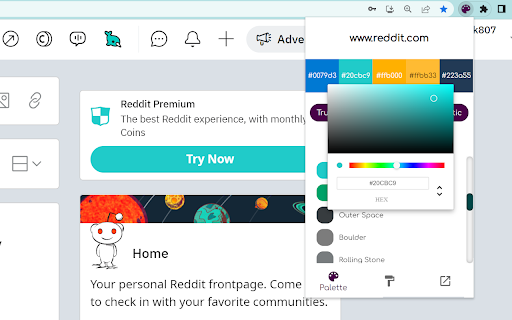
Chromatics is a Chrome extension that allows you to edit and view color palettes on a live site.

- Change the colors of a website
- Apply asthetic color palettes
- See what emotions a website provokes

One of the most common problems designers face is when they don't have access to their client's brand colors. Whether it's because you're working for a startup who hasn't launched yet or you're working with a client who doesn't have an established brand, there are plenty of times when you'd like to be able to reference the colors from your client's website so that you can create something that matches their style.

Chromatics solves this problem by providing users with an interface where they open the extension on any url and view all of the colors used on that page. The user can then choose which ones they want to save for later, which makes it super simple for them to find any color palette they need without having to dig through their entire site looking for it!

Designers: Whether you're working on a new brand or collaborating with clients who don't have any established branding yet, Chromatics will help make your job easier by allowing you access to all of the colors they've chosen while also giving you
Technical
- Version
- 4.4.10005
- Manifest
- V3
- Size
- 536KiB
- Min Chrome
- 88
- Languages
- 1
- Featured
- Yes
Metadata
- ID
- dejidejlhapgiblmgnnkaaoiofiocoed
- Developer ID
- u515ae67c6c30267aa2c4277c1665cf0c
- Developer Email
- [email protected]
- Created
- Dec 13, 2022
- Last Updated (Store)
- Apr 7, 2023
- Last Scraped
- May 19, 2026
- Website
- —
- Support URL
- —
Similar extensions
Alternatives to Chromatics, ranked by description similarity.

Better Color Picker
Easily pick colors from any website.
389
★ 3.9

Color Picker & Eyedropper Tool for Chrome
Instantly pick colors from any webpage with this lightweight Chrome extension. Save HEX and RGB codes easily.
13
Color Picker - Eyedropper Tool
Pick colors from web pages with Eyedropper. Picker, gradient generator, palette. Quickly grab HEX, RGB.
100.0K
★ 4.6

Hex code picker
Use Hex code picker to grab hex color codes from any webpage. Quickly identify colors and copy hex codes for all your design needs!
1.0K
★ 5.0

Color Cosmos
Simplify web design with our Chrome extension: Color Palette & Gradient Generator for effortless color schemes.
16
★ 5.0

ColorScan
Find out the color palette of any website. Click on a color to copy its HEX code.
120

Color Picker Dropper
Color Picker Dropper is an extension that offers a convenient and functional color identifier in the browser window.
1.0K
★ 3.7

HEX Color Picker
Use Hex Color Picker from image to quickly identify and use colors for your projects. Easily pick hex color from any image.
20.0K
★ 4.9
Data sourced from the Chrome Web Store · last verified May 19, 2026.