Tab Master 5000
The swiss army knife of tab, history, bookmark, session, and extension management.
As of May 2026, Tab Master 5000 has 3,000 users and a 3.82/5 rating from 51 reviews in the Functionality & UI category.
Usersno change0%
3.0K
3,000
Ratingno change0%
3.82
51 reviews
Reviewsno change0%
51
Version
2.11.0
Manifest V3
History
1 snapshotsTracking since Apr 24, 2026.
View as table
| Date | Users | Rating | Reviews | Version |
|---|---|---|---|---|
| Apr 24, 2026 | 3.0K | 3.82 | 51 | 2.11.0 |
| Now | 3.0K | 3.82 | 51 | 2.11.0 |
Permissions & access
- Permissions
- tabsstorageunlimitedStorage
- Host access
- http://127.0.0.1/*, *://*/*
Screenshots



About
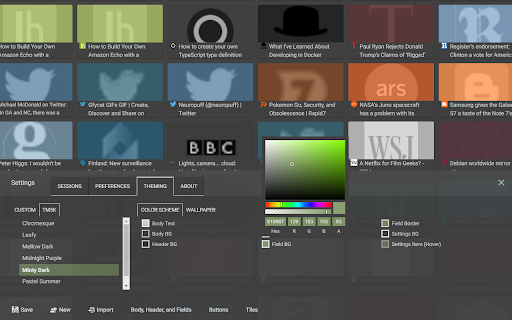
Tab Master 5K replaces your New Tab page with a full-featured tabs, history, bookmarks, apps, extensions, and sessions manager.

--- Features

-- Tabs
- Close, pin, and mute tabs from your New Tab page.
- Re-order tab tiles by dragging and dropping them.
- Close all tabs from a specific website.
- Close duplicate tabs, and optionally make them pulsate.
- Manage tabs through icons, the right click menu, or through a table view.
- Search tabs in the top search bar.
- Option to sort tabs by website or alphabetical order, and apply the order to your Chrome window.
- Option to view tabs across all windows.
- Automatically discard tabs from memory and customize how long they have to be inactive to trigger it.

-- Customization
- Full control of the New Tab's appearance with a flexible theme editor.
- Import any wallpaper as a background.
- Adjust the size of the grid tiles.
- View a screenshot of each tab in the grid.
- Enable screenshots to cover the background of a New Tab page when you hover over a tab tile. You can adjust the strength of the blur and opacity of backgrounds in Preferences.

-- Session Management
- Session manager built in for saving and restoring your current tab sessions.
- Synchronize your saved sessions, and keep them persistently updated with the current Chrome window.
- Tab sessions can be exported and imported.
- View, sort, and filter your session tabs as tiles in the grid view.

-- Chrome Management
- View, sort, and filter your bookmarks, history, apps and extensions as tiles in the grid view. You can change how apps launch, create app shortcuts, enable/disable, or uninstall them.
- Quickly navigate the extension with keyboard shortcuts.
- Undo tab actions by pressing CTRL+Z, or through the context menu while a New Tab page is open.
- Add websites you do not want to view to a comma separated blacklist in Settings -> Preferences. Websites added to the blacklist will have their tabs closed under any circumstance.

Please report any issues on this store page's Support tab.

If you like this extension, or think it could be better, please rate it and leave feedback. You can also fork and pull request this extension on its public Github repository: https://github.com/jaszhix/tab-master-5000-chrome-extension
Technical
- Version
- 2.11.0
- Manifest
- V3
- Size
- 6.08MiB
- Min Chrome
- 88
- Languages
- 3
- Featured
- Yes
Metadata
- ID
- mippmhcfjhliihkkdobllhpdnmmciaim
- Developer ID
- ude3311206d720408cffbf1c2e5d4e768
- Developer Email
- [email protected]
- Created
- Sep 8, 2015
- Last Updated (Store)
- Jun 3, 2024
- Last Scraped
- May 19, 2026
- Website
- —
- Privacy Policy
- http://jaszhix.com/tm5kprivacy.html
Similar extensions
Alternatives to Tab Master 5000, ranked by description similarity.

Re-newtab
A redesigned, productive and pragmatic new tab alternative.
3.0K
★ 4.8

TabMeister
Organize tabs into a smart dashboard. Add notes, reminders, secure passwords, and sync across devices with Flipbook view.
11
★ 5.0

Tab Control
The holy grail of tab managers
431
★ 3.8

Tabworks
Powerful tab manager
2
★ 5.0

Tab Manager in Side Panel
Compatible with built-in and adds more easy-to-use features, lives in side panel
1.0K
★ 4.5

Thready - Vertical Tabs
Vertical tabs, bookmarks, history and readling list in side panel.
1.0K
★ 4.1
Chrome Window Rotator+ (Tab Manager)
View all tabs across windows. Find and access pages instantly. Organize with drag & drop.
108
★ 5.0

New Tab
A premium, highly customizable New Tab extension with a sleek design, shortcut management, and integrated search.
6
★ 5.0
Data sourced from the Chrome Web Store · last verified May 19, 2026.