
Re-newtab
A redesigned, productive and pragmatic new tab alternative.
As of May 2026, Re-newtab has 3,000 users and a 4.75/5 rating from 110 reviews in the Functionality & UI category.
Usersno change0%
3.0K
3,000
Ratingno change0%
4.75
110 reviews
Reviewsup 0.9 percent+0.9%
110
Version
8.0.2
Manifest V3
History
2 snapshotsTracking since Apr 30, 2026.
View as table
| Date | Users | Rating | Reviews | Version |
|---|---|---|---|---|
| Apr 30, 2026 | 3.0K | 4.75 | 109 | 8.0.2 |
| May 29, 2026 | 3.0K | 4.75 | 109 | 8.0.2 |
| Now | 3.0K | 4.75 | 110 | 8.0.2 |
Permissions & access
- Permissions
- topSitesmanagementsessionshistorydownloadsdownloads.opentabsbookmarksfaviconstorageunlimitedStoragesearchidentity
- Host access
- None declared
Screenshots


About
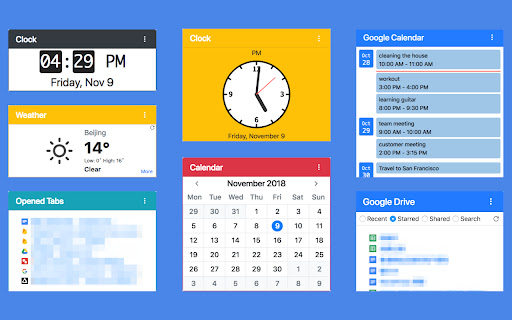
Overview: This extension provides 19 desktop widgets, plus bookmarks manager, history manager, extensions manager, downloaded files manager and quick search function in your new tab page (so chrome will show you these permissions when you install it).

The core idea of this extension is to help user quickly find web pages that you want to open. The home panel shows links, information and functions by different widgets. Of course, you can customize these widgets. Sometimes if you just want to see a wallpaper on new tab,  there is a wallpaper mode that hide all elements on the page and only show the wallpaper and a toggle button.

Version 8.0.0 (March 2023) Updates:
• Remove weather widget.
• Remove Chrome Apps related functions.
• Upgrade to Chrome Manifest V3.

0. Quick Search
You can use keyboard shortcuts to search for bookmarks, history, opened tabs and downloaded files, similar to Alfred.

1. Home Panel
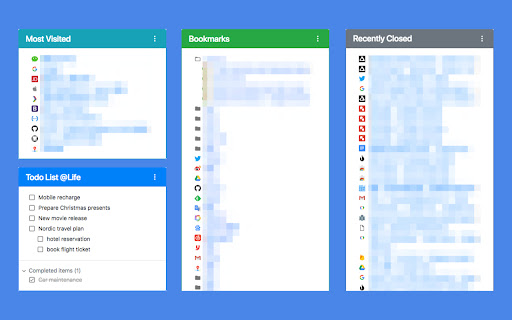
Home panel contains many versatile widgets(cards), like clock, calendar, recently closed tabs. You can add/remove widgets, drag and drop widget to a new position, change widget's title and color.

Main widgets:
• Most Visited: show default newtab most visited pages.
• Bookmarks Bar: show Bookmarks.
• Todo List: a simple but powerful todo(task) list.
• Opened Tabs: a simple tabs manager, which shows all current opened tabs. You can jump to or close a tab by click, and more functions in context menu.
• Recently Closed: recently closed tabs.
• Analog clock and digital clock: highly customizable clocks.
• Calendar: A month view calendar.
• Calculator: A super calculator powered by math.js.
• Google Drive widget: quick access recent, starred, shared drive files or search files.
• Google Calendar widget: list your Google Calendar events.
• Translate: a Google Translate widget.
• Notepad: a simple notepad.
• Search Engine: search via your browser's default search provider.
• YouTube Subscriptions: list video updates for all your subscriptions.
• Google Sites: top google services.
• Office: ms office web apps.
• Chrome Misc: chrome internal pages.

2. Bookmarks Manager
Bookmarks are an important concept, because they are your own collections and what you need. This extension provides a more productive bookmarks manager.

Similar to Mac Finder in columns view, you can manage and navigate bookmarks by mouse or keyboard shortcuts, for example:
• Navigate all bookmarks using mouse or arrow keys.
• Open a bookmark by double click or enter key.
• Open all bookmarks in a folder by context menu.
• Drag and Drop a bookmark to a new location.
• Create, edit or delete bookmark or folder by context menu.
• Select multi bookmarks to move, delete or open.
• Copy/cut/paste bookmarks(except folders) by shortcuts.
• Sort bookmarks by name
• Support many keyboard shortcuts.

3. History Manager
Search or clear browsing history by date range.

4. Downloads Manager
Show your downloaded files. You can open downloaded files or open their folders, and clear download history.

5. Devices
Show synced open tabs on other devices.

6. Extensions Manager
Manage all extensions and apps. You can enable/disable/remove the extensions and open their options.

7. Settings
• User login, logout.
• Theme settings: Pure colors or Wallpapers or Custom photo.

Issue feedback or feature request: https://goo.gl/forms/YOOG4TTkaY2lIbBv2
Contact author: [email protected]
Technical
- Version
- 8.0.2
- Manifest
- V3
- Size
- 1.43MiB
- Min Chrome
- 104
- Languages
- 2
- Featured
- Yes
Metadata
- ID
- ccfjmnfklnaofoggkolocloghafpoccc
- Developer ID
- ub9d0093c83f93801cb34eac94c7e5701
- Developer Email
- [email protected]
- Created
- Apr 12, 2018
- Last Updated (Store)
- May 6, 2024
- Last Scraped
- May 29, 2026
- Website
- guokai.dev
- Support URL
- —
- Privacy Policy
- https://guokai.dev/privacy/
Similar extensions
Alternatives to Re-newtab, ranked by description similarity.

Home - New Tab Page | ChatGPT search with GPT-4o AI answers
A homepage you will fall in love with! Notifications, badges, recent tabs, quick notes, calendar and more. AI search ChatGPT GPT-4o.
50.0K
★ 4.4

New Tab Widgets
New Tab Widgets
148
★ 1.0

Chrome Home - Beautiful New Tab
Beautiful new tab page with customizable widgets and NASA space backgrounds
24
★ 5.0

Baya Extension
Personal dashboard that replaces your new tab page with customizable widgets and bookmarks
2

Thready - Vertical Tabs
Vertical tabs, bookmarks, history and readling list in side panel.
1.0K
★ 4.1
Tab Master 5000
The swiss army knife of tab, history, bookmark, session, and extension management.
3.0K
★ 3.8
New Tab Studio: Countdown & widgets
New tab widgets: Countdown timer, Exam, Uni, Todo List, Habit tracker, Notes, Dashboard, Photos, Deadline
40.0K
★ 4.8

VTab - Daily View Tab
VTab - Beautiful & Personalized New Tab Experience
19
★ 5.0
Data sourced from the Chrome Web Store · last verified May 29, 2026.