
Tab Manager in Side Panel
Compatible with built-in and adds more easy-to-use features, lives in side panel
As of May 2026, Tab Manager in Side Panel has 1,000 users and a 4.55/5 rating from 22 reviews in the Functionality & UI category.
Usersno change0%
1.0K
1,000
Ratingno change0%
4.55
22 reviews
Reviewsno change0%
22
Version
1.4.5
Manifest V3
History
1 snapshotsTracking since Apr 21, 2026.
View as table
| Date | Users | Rating | Reviews | Version |
|---|---|---|---|---|
| Apr 21, 2026 | 1.0K | 4.55 | 22 | 1.4.5 |
| Now | 1.0K | 4.55 | 22 | 1.4.5 |
Permissions & access
- Permissions
- sidePaneltabstabGroupsfaviconstoragehistory
- Host access
- None declared
Screenshots

About
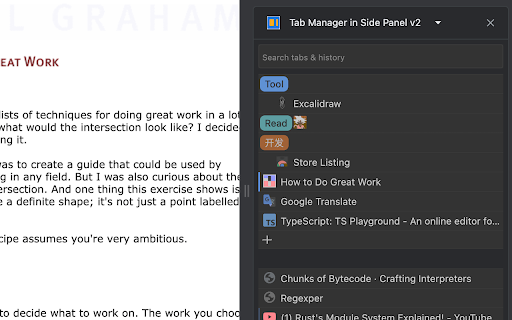
This extension provides some easy and intuitive ways to manage all your tabs across all your windows in side panel. In particular, a simplified tree style tab feature can facilitate the management and deletion of many temporarily opened tabs.

✨ Help you easier to find the target tab ✨
1. Support searching opened tabs and history.
2. Support show 7 most recent tabs.

✨ Help you easier to create and close tabs ✨
1. Create a new adjacent child tab for any tab with one click.
2. Support tabGroup and display non-tabGroup tabs with auto group(one level tree), and you can close all tabs belong same tree  by "Alt + click" close icon of the parent tab.

✨ Help you easier to navigate through tabs ✨
1. Navigate to any tab across all your windows with one click, even when tab group which tab belongs to has been collapsed.
2. Collapse or expand all tab groups in same window with one click.
3. Collapse or expand any tab group with one click.
4. Press "Tab" and "Shift+Tab" to navigate and "Enter" to switch.

✨ Help you easier to organize tab and tab group ✨
1. Drag some tab or tab group and drop into a new postion

✨✨ Bonus tips:
1. You can go to chrome://extensions/shortcuts and set your shortcut for any chrome extension.
2. You can go to chrome://settings/appearance and adjust side panel's some appearance, such as left or right postion, font size and page zoom.

Tab Manager In Side Panel is designed to help you save time, reduce clutter, and improve your productivity when working with multiple tabs across multiple windows, such as easily managing and deleting many temporary  opened tabs. It is lightweight, fast, easy to use and compatible with built-in features. If you are looking for a simple tab manager in side panel, give this extension a try!

Here is recent change log:
v1.4.5
  Feature: improve search function
v1.4.4:
  Feature: add simple view transition animation
v1.4.3:
  Feature: support close tab in recent tabs
v1.4.0:
  Feature: support drag and drop to organize tab and tab group
v1.3.13:
  Feature: stick tab group name when scrolling tabs
v1.3.9:
  Feature: support show 7 most recent tabs
v1.3.5:
  Feature: indent tab by one click
v1.3.2:
  Feature: simple dark mode
v1.2.4:
  Feature: create a new adjacent tab from one tab with one click
Technical
- Version
- 1.4.5
- Manifest
- V3
- Size
- 119KiB
- Min Chrome
- 114
- Languages
- 1
- Featured
- Yes
Metadata
- ID
- dhdfjphlghgaokjflinlfcacdafpmiom
- Developer ID
- u4ff516b66874577669ba1009c445dd97
- Developer Email
- [email protected]
- Created
- Jun 18, 2023
- Last Updated (Store)
- Jun 16, 2025
- Last Scraped
- May 31, 2026
- Website
- —
- Support URL
- —
Similar extensions
Alternatives to Tab Manager in Side Panel, ranked by description similarity.

Thready - Vertical Tabs
Vertical tabs, bookmarks, history and readling list in side panel.
1.0K
★ 4.1

Tab Control
The holy grail of tab managers
431
★ 3.8

Tabistant
Tab assistant. 🤵🐾 Vertical tabs, tab previews, suspend inactive tabs, archive tabs for reading later, with custom themes.
2
★ 2.0

vivid tabs
A simple and user-friendly tab management tool.
9

Tabs in Vertical
Displays all open tabs in a vertical sidebar for better readability
96
★ 5.0

Smart Sessions - Tab Manager
Save & restore your browser sessions. Auto saving, multiple sessions and more.
6.0K
★ 4.1
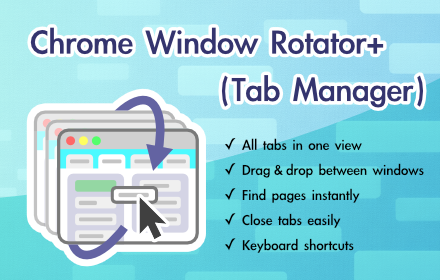
Chrome Window Rotator+ (Tab Manager)
View all tabs across windows. Find and access pages instantly. Organize with drag & drop.
108
★ 5.0

Vertical Tabs - Tab Manager
Best vertical tabs extension. Sidebar, Vertical Tabs, Tab Manager, Tab groups
1.0K
★ 4.5
Data sourced from the Chrome Web Store · last verified May 31, 2026.