cssPicker - copy css from website
copy html and css from any website
As of June 2026, cssPicker - copy css from website has 5,000 users and a 2.75/5 rating from 12 reviews in the Developer Tools category.
Usersno change0%
5.0K
5,000
Ratingno change0%
2.75
12 reviews
Reviewsno change0%
12
Version
1.2.6
Manifest V3
Permissions & access
- Permissions
- scriptingactiveTabstoragetabs
- Host access
- None declared
Screenshots


About
CSSPicker 🎨  - copy css from website & chat to code

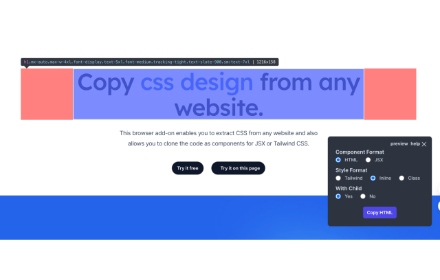
- Support Convert html to React or Tailwind CSS component.
- Support Screenshot to code
How to Use?

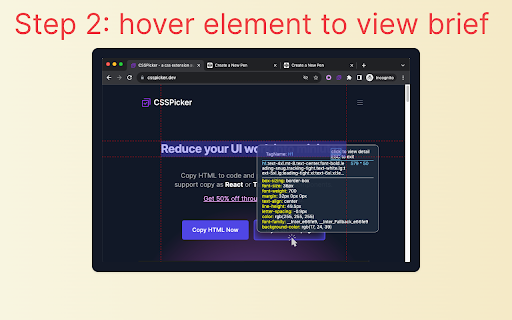
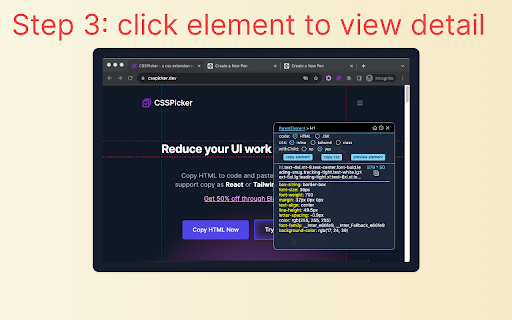
    1.🌟 Click the extension icon.
    2.🚀 click element and copy the HTML/JSX/Tailwind code.
    3. click Screenshot to Code use AI generate code from element

Recent Update
- version 1.2.3: add ai chat and fix react + css code
- version 1.2.3: Optimize the algorithm for obtaining css
- version 1.2.2: adjust ui
- version 1.2.1: add default option
- version 1.2.0: AI powered Screenshot To Code
- version 1.1.5: support remember user options
- version 1.1.4: fix jsx converter, enable jsx converter for free.
- version 1.1.3: add media query option.
- version 1.1.2: copy css style, media query and pseudo class with all css option.
- version 1.1.1: copy as tailwind with media query and pseudo class.
- version 1.1.0: support media query and pseudo class with smartStyle option.

Key Features:
  [*] support convert element imaget to code by AI
  [1] copy HTML elements with CSS styles from website, even inside iframe!
  [2] output the minimal amount of CSS code with media and pseudo class ,  exactly what you want!
  [3] copy element as Tailwind css component
  [4] copy element as React component
  [5] copy element css selector without open devtools
  [6] convert html to React


Introduction:

Effortlessly copy element with CSS styles on any webpage.
Inspect and convert CSS codes without opening dev tools.
Speed up web development and enhance efficiency.

Problems Solved:
This browser extension addresses the following issues:
    - Frontend developers seeking quick access to style codes.
    - Indie hackers looking to easily build pages from free templates.
    - Developers grappling with writing CSS codes.

Who Should Use:

    Frontend developers.
    Indie hackers and entrepreneurs.
    Anyone working with CSS codes.

FAQs:

    ❓ What does this extension do?
        It allows you to instantly copy HTML and CSS for any element on a webpage.

    ❓ Does it work on all sites?
        Yes, it works on any webpage built with any framework, such as React, Vue, WordPress, etc. Just click to copy! 🌐
   ❓ Is cssPicker free?
        yes, we have free plan, which allows you to copy single element without children, this will cover basic usecase, if you want to copy element with children, try our paid plan!
Technical
- Version
- 1.2.6
- Manifest
- V3
- Size
- 931KiB
- Min Chrome
- 88
- Languages
- 1
- Featured
- No
Metadata
- ID
- laooinkgdapbcbjchpmihliljfnakkdh
- Developer ID
- u3dc9c389bfe76df9d3c65e6c5a030b49
- Developer Email
- [email protected]
- Created
- Sep 19, 2023
- Last Updated (Store)
- May 26, 2025
- Last Scraped
- Jun 1, 2026
- Website
- csspicker.dev
- Support URL
- —
- Privacy Policy
- —
Similar extensions
Alternatives to cssPicker - copy css from website, ranked by description similarity.
CopyCss - Copy css scan from any website.
Copy css scan from any website.
1.0K
★ 4.0

CopyUI - HTML, CSS & Tailwind Inspector
Stop coding from scratch. Copy any element of any website and export it to Tailwind CSS, JSX or clean CSS in one click.
185
★ 5.0

CSS Copy Tool
Instantly copy CSS from any element. Lightweight alternative to CSS Scan.
13

CSS Extractor Pro - Extract Clean CSS Code & Color Palettes
Extract clean CSS code from any webpage element & generate complete color palettes. Essential developer tool.
908
★ 3.0

SnipCSS
Extract the CSS/HTML for any element on any page, only take the styles you want
20.0K
★ 3.9

UI Snatcher
Capture any UI element and generate a clean React component with Tailwind CSS classes.
6

CSS Seeker
Extract any CSS / Tailwind in one click
68
★ 5.0

HTML/CSS Section Copier
Extracts selected section and provides raw HTML and CSS.
162
Data sourced from the Chrome Web Store · last verified Jun 1, 2026.