
Cyrillic Killer
Blurs all Cyrillic characters on web pages with site exception management
As of June 2026, Cyrillic Killer has 2 users in the Productivity category.
Usersno change0%
2
2
Ratingno change0%
—
— reviews
Reviewsno change0%
—
Version
1.0.0
Manifest V3
History
5 snapshotsTracking since Apr 3, 2026.
View as table
| Date | Users | Rating | Reviews | Version |
|---|---|---|---|---|
| Apr 3, 2026 | — | — | — | 1.0.0 |
| Apr 17, 2026 | 2 | — | — | 1.0.0 |
| Apr 27, 2026 | — | — | — | 1.0.0 |
| May 14, 2026 | 2 | — | — | 1.0.0 |
| May 23, 2026 | 1 | — | — | 1.0.0 |
| Now | 2 | — | — | 1.0.0 |
Permissions & access
- Permissions
- storageactiveTab
- Host access
- <all_urls>
Screenshots
About
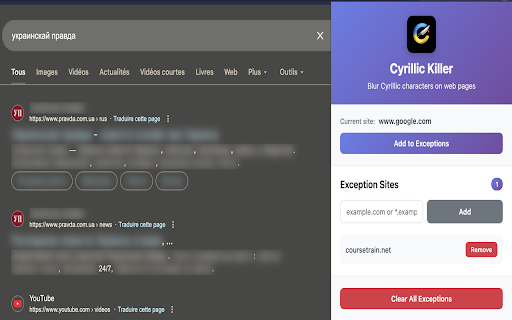
🚫 Cyrillic Killer is a browser extension designed to help users stay focused by automatically blurring all Cyrillic characters on web pages. It is ideal for language learning 📘, reducing distractions 🧠, or filtering specific types of content. The extension works seamlessly in the background and allows users to manage site-based exceptions.

✨ Key Features

🔤 Automatic Cyrillic Detection
The extension detects and blurs all Cyrillic characters (Unicode range U+0400–U+04FF) on any website. It works with both static and dynamic content, including modern web applications built with frameworks such as React and Vue, and also supports Shadow DOM for full coverage.

🌐 Smart Site Exception Management
Users can easily add websites to an exception list to disable blurring on selected domains. Wildcard domain patterns (for example, *.example.com) are supported. A one-click toggle allows adding or removing the current site, and all preferences are stored persistently across browser sessions.

🎨 Modern and Intuitive Interface
The extension provides a clean and modern popup interface for managing site exceptions. It includes real-time site detection and clear visual feedback about whether the current site is excluded or affected.

⚡ High Performance
Cyrillic Killer is optimized to minimize performance impact. It uses debouncing to prevent slowdowns, intelligently avoids interfering with text input fields, and manages memory efficiently to keep page load times fast.

🔒 Privacy and Security
All data is stored locally in the user’s browser. The extension does not use external servers, does not collect personal data, and does not include tracking or analytics.

🛠️ How It Works

The extension scans web pages in real time to detect Cyrillic characters, wraps the detected text with CSS-based blur effects, respects user-defined site exceptions, and automatically adapts to dynamic content changes on the page.

🎯 Use Cases

📖 Language learning by focusing on non-Cyrillic content
🧠 Improving productivity by reducing visual distractions
🎛️ Custom content filtering based on personal preferences
♿ Accessibility adjustments for better content visibility

📦 Installation and Usage

Install the extension from the Chrome Web Store

Click the extension icon to open the popup

Manage site exceptions if needed

Enjoy a more focused browsing experience ✨

⚙️ Technical Details

• Manifest version: 3
• Permissions: storage, activeTab
• Compatibility: Chrome, Edge, and other Chromium-based browsers
• Performance: optimized for low resource usage
Technical
- Version
- 1.0.0
- Manifest
- V3
- Size
- 657KiB
- Min Chrome
- 88
- Languages
- 1
- Featured
- No
Metadata
- ID
- immnleonpnabiehcmnpfiealmppbipfk
- Developer ID
- u9acfd668dd78b9ce0e955fd3480984c9
- Developer Email
- [email protected]
- Created
- Jan 4, 2026
- Last Updated (Store)
- Jan 4, 2026
- Last Scraped
- Jun 10, 2026
- Website
- —
Similar extensions
Alternatives to Cyrillic Killer, ranked by description similarity.

Blurify
Easily blur sensitive content, personal information, and distracting elements while browsing the web
12

Focus Reading
Return to the essence of reading, make attention more valuable
19
★ 1.0

GrayScale Overlay
Adds a grayscale overlay to any webpage
88
★ 5.0

Blur. The Image and Video blur extension
A browser extension that blurs all images on a page, for when you want to be discreet or don't want to look at certain images.
30.0K
★ 4.6

HylyTool
Chrome Extension for highlighting web documents
5
★ 5.0

Privacy
Blur any content on any website to protect your privacy. Click or drag to blur elements manually.
2

Blurry - Blur images & videos on web
Blur images & videos on web pages. Customize based on domains and links. Have safe browsing journey!
22

Privacy Blur – Blur Sensitive Content on Any Website
Blur sensitive information in real-time during screen sharing and recording. Drag & drop to reposition blurs!
20
★ 5.0
Data sourced from the Chrome Web Store · last verified Jun 10, 2026.