
Blurify
Easily blur sensitive content, personal information, and distracting elements while browsing the web
As of May 2026, Blurify has 12 users in the Productivity category.
Usersup 33.3 percent+33.3%
12
12
Ratingno change0%
—
— reviews
Reviewsno change0%
—
Version
2.0.0
Manifest V3
History
4 snapshotsTracking since Apr 1, 2026.
View as table
| Date | Users | Rating | Reviews | Version |
|---|---|---|---|---|
| Apr 1, 2026 | 9 | — | — | 2.0.0 |
| Apr 20, 2026 | 10 | — | — | 2.0.0 |
| May 5, 2026 | 12 | — | — | 2.0.0 |
| May 17, 2026 | 11 | — | — | 2.0.0 |
| Now | 12 | — | — | 2.0.0 |
Permissions & access
- Permissions
- activeTabstoragescriptingnotifications
- Host access
- None declared
Screenshots


About
🎯 Blurify - Your Ultimate Privacy & Focus Companion

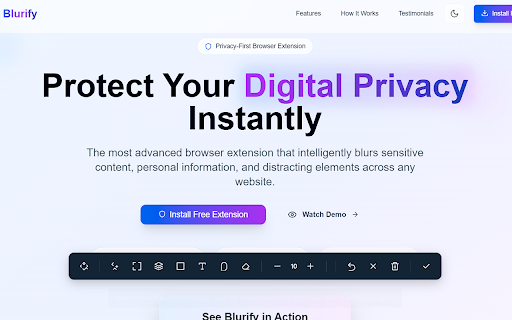
Transform any webpage into a privacy-safe, distraction-free environment with Blurify! Whether you're presenting, screen sharing, or simply want to focus on what matters most, Blurify gives you complete control over what's visible on your screen.

✨ What's New in v2.0.0:
• Completely redesigned welcome experience with interactive setup wizard
• Modern gradient interface with smooth animations
• Real-time settings preview and customization
• Enhanced keyboard shortcuts and accessibility features
• Professional onboarding flow with progress tracking

🔒 Privacy Protection Made Simple:
• Smart Blur Tool - Instantly hide passwords, personal information, financial data, and sensitive content
• Precision Targeting- Click or drag to blur specific elements, text, or entire sections
• Adjustable Intensity- Fine-tune blur levels from subtle to completely hidden
• Persistent Effects - Keep your privacy settings even after page refreshes

🎯 Enhanced Focus & Productivity:
• Highlight Tool - Emphasize important content with customizable colors
• Smart Eraser - Remove any blur or highlight effects with precision
• Distraction Removal - Hide ads, sidebars, and irrelevant content
• Reading Mode - Create a clean, focused reading environment

⚡ Lightning-Fast & User-Friendly:
• One-Click Activation - Toggle toolbar instantly with Ctrl+Shift+S
• Keyboard Shortcuts - Alt+B (Blur), Alt+H (Highlight), Alt+E (Erase)
• Drag & Drop Interface - Move toolbar anywhere on the page
• Right-Click Context Menu - Quick access to all tools
• Auto-Save Settings - Your preferences are remembered across sessions

🎨 Modern Design & Experience:
• Intuitive Interface - Clean, professional design that doesn't get in your way
• Responsive Layout - Works perfectly on all screen sizes
• Smooth Animations - Polished interactions and visual feedback
• Dark/Light Compatibility - Adapts to any website theme
• Accessibility First - Built with screen readers and keyboard navigation in mind

🚀 Perfect For:
• Remote Work - Safe screen sharing during video calls and presentations
• Content Creation - Clean screenshots and recordings without sensitive data
• Research & Study - Highlight key information and remove distractions
• Privacy Protection - Browse safely in public spaces or shared computers
• Professional Presentations - Clean, focused slides and demos
• Educational Content - Create distraction-free learning materials

🛡️ Privacy & Security:
• 100% Local Processing - No data ever leaves your browser
• No Tracking - We don't collect any personal information
• Offline Capable - Works without internet connection
• Open Source Friendly - Transparent development process
• Chrome Manifest V3 - Latest security standards compliance

⚙️ Advanced Features:
• Customizable Settings - Adjust blur intensity, highlight colors, and behavior
• Undo/Redo Support - Easily reverse any changes
• Bulk Operations - Apply effects to multiple elements at once
• Export/Import - Share your configurations across devices
• Developer Tools - Advanced options for power users

🎓 Easy to Learn:
• Interactive Tutorial - Step-by-step guidance for new users
• Helpful Tips - Contextual hints and best practices
• Keyboard Shortcut Guide - Master all features quickly
• Video Tutorials - Visual learning resources
• Community Support - Active user community and documentation

📱 Cross-Platform Compatibility:
• Works on all websites (except Chrome system pages)
• Compatible with Chrome, Edge, and other Chromium browsers
• Responsive design for desktop, laptop, and tablet screens
• Optimized performance on all devices

🔄 Regular Updates:
We're constantly improving Blurify based on user feedback. Expect regular updates with new features, performance improvements, and bug fixes.

Download Blurify today and take control of your digital privacy and focus!

Perfect for professionals, students, content creators, and anyone who values privacy and productivity.
Technical
- Version
- 2.0.0
- Manifest
- V3
- Size
- 110KiB
- Min Chrome
- 88
- Languages
- 1
- Featured
- No
Metadata
- ID
- mgkfhdmabijiekjhafidpafdejgpldlb
- Developer ID
- u725b340d63cfc2c287285b9cd72b6ba7
- Developer Email
- [email protected]
- Created
- May 18, 2025
- Last Updated (Store)
- May 25, 2025
- Last Scraped
- May 30, 2026
- Website
- blurify.click
- Support URL
- —
- Privacy Policy
- https://www.blurify.click/privacy-policy
Similar extensions
Alternatives to Blurify, ranked by description similarity.

BlurIt - Instant Privacy Blur
Capture any screen and instantly blur sensitive information with pro-grade tools.
7

Mask & Blur Pro
Protects sensitive information by masking text and blurring content on webpages. Perfect for screenshots and screen sharing.
2.0K
★ 5.0

ScreenBlur: Hide Sensitive Data & Blur Text on Page
Privacy tool for content creators - blur sensitive information before screen sharing or recording
61
★ 1.0

Blurly: One-Click Element Blurring for Screen Sharing
The easiest way to blur web content. Protect your sensitive data for screen recordings and calls
8

Privacy Blur – Blur Sensitive Content on Any Website
Blur sensitive information in real-time during screen sharing and recording. Drag & drop to reposition blurs!
20
★ 5.0

Focus Blur
Provides privacy by blurring everything on your screen except the selected area.
72
★ 5.0

MyBlurWeb
Blur sensitive content on any website. Blur specific text, draw blur zones, auto-detect emails/numbers, and more.
4

Privacy
Blur any content on any website to protect your privacy. Click or drag to blur elements manually.
2
Data sourced from the Chrome Web Store · last verified May 30, 2026.