
WME Toolbox
Adds many features to the Waze editor
As of June 2026, WME Toolbox has 8,000 users and a 4.59/5 rating from 234 reviews in the Developer Tools category.
Usersno change0%
8.0K
8,000
Ratingup 0.2 percent+0.2%
4.59
234 reviews
Reviewsdown 0.4 percent−0.4%
234
Version
1.10.6
Manifest V3
90-day change · In the last 90 days this extension 4 version updates.
History
8 snapshotsTracking since Apr 5, 2026.
View as table
| Date | Users | Rating | Reviews | Version |
|---|---|---|---|---|
| Apr 5, 2026 | 8.0K | 4.58 | 235 | 1.9.46 |
| Apr 16, 2026 | 8.0K | 4.58 | 235 | 1.10.3 |
| Apr 27, 2026 | 9.0K | 4.58 | 235 | 1.10.4 |
| May 11, 2026 | 8.0K | 4.58 | 235 | 1.10.5 |
| May 14, 2026 | 8.0K | 4.59 | 234 | 1.10.5 |
| May 23, 2026 | 9.0K | 4.59 | 234 | 1.10.5 |
| Jun 6, 2026 | 8.0K | 4.59 | 234 | 1.10.5 |
| Jun 22, 2026 | 9.0K | 4.59 | 234 | 1.10.5 |
| Now | 8.0K | 4.59 | 234 | 1.10.6 |
Changelog
- Jun 22, 2026description
IMPORTANT NOTE:
If you previously used Tampermonkey to disable CSP so Toolbox can work, that is no longer required. Please change the Tampermonkey setting back to ensure browser security.

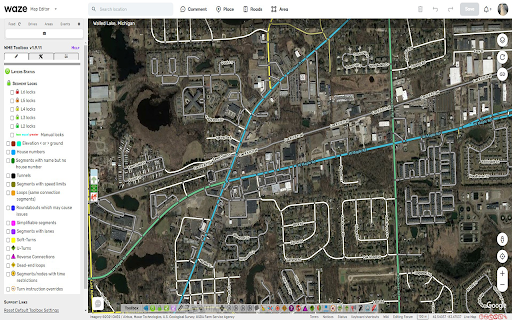
- Layers menu with following features:
	- Highlight of level-locked segments
	- Highlight of manual locks (greater, equal, less than automatic lock)
	- Highlight segments with positive or negative elevation
	- Highlight of segments with house numbers
	- Highlight of named streets without any house number
	- Highlight of segments/nodes with time restrictions
	- Highlight of loops
	- Highlight of roundabouts which may cause issues
	- Highlight unconfirmed turns
	- Highlight of U-Turns
	- Highlight of reverse connections
	- Highlight of Dead-end loops
	- Highlight of soft turns
	- Highlight of TTS override instructions
        - Highlight of simple segments (which have unneeded geometry nodes)

- Toolbar with following features:
	- Function to hide the left sidebar
	- Configuration panel for the plugin options
	- Quick access to keyboard shortcuts editor
	- Select segments panel to enable multi-selection based on filters
	- Properties editor panel to modify several segments at a time
	- Copy segment attributes
	- Clear road geometry
	- Cut segment in two
	- Select all roundabout segments
	- Redo a roundabout
	- Convert a roundabout to a standard road
	- Draw landmark inside a roundabout (to give it a name)
	- Select segments in place or map comment area
	- Suppress unneeded junctions on screen
	- Suppress unneeded geometry nodes on screen
	- Delete expired restrictions (past ending date) on screen
	- Auto fix loops
	- Autofix unconfirmed turns
	- Auto remove toll attribute on non freeway/ramp segments
	- Auto fix reverse connections, dead-end and unterminated roads
	- Auto fix u-turns

- And more:
	- Popups to help new editors on basic editing
	- Option to hide user greetings on the left sidebar
	- Option to force fullscreen
	- New shortcuts for Toolbox features
	- Enable shortcuts on numpad
	- Pan the map from screen size

Access to individual features depends on user rank and country of editing
IMPORTANT NOTE: If you previously used Tampermonkey to disable CSP so Toolbox can work, that is no longer required. Please change the Tampermonkey setting back to ensure browser security. - Layers menu with following features: - Highlight of level-locked segments - Highlight segments with positive or negative elevation - Highlight of segments with house numbers - Highlight of named streets without any house number - Highlight of segments/nodes with time restrictions - Highlight of loops - Highlight of roundabouts which may cause issues - Highlight unconfirmed turns - Highlight of U-Turns - Highlight of reverse connections - Highlight of Dead-end loops - Highlight of soft turns - Highlight of TTS override instructions - Highlight of simple segments (which have unneeded geometry nodes) - Toolbar with following features: - Function to hide the left sidebar - Configuration panel for the plugin options - Quick access to keyboard shortcuts editor - Select segments panel to enable multi-selection based on filters - Properties editor panel to modify several segments at a time - Copy segment attributes - Clear road geometry - Cut segment in two - Select all roundabout segments - Redo a roundabout - Convert a roundabout to a standard road - Draw landmark inside a roundabout (to give it a name) - Select segments in place or map comment area - Suppress unneeded junctions on screen - Suppress unneeded geometry nodes on screen - Delete expired restrictions (past ending date) on screen - Auto fix loops - Autofix unconfirmed turns - Auto remove toll attribute on non freeway/ramp segments - Auto fix reverse connections, dead-end and unterminated roads - Auto fix u-turns - And more: - Popups to help new editors on basic editing - Option to hide user greetings on the left sidebar - Option to force fullscreen - New shortcuts for Toolbox features - Enable shortcuts on numpad - Pan the map from screen size Access to individual features depends on user rank and country of editing
Permissions & access
- Permissions
- None declared
- Host access
- https://spreadsheets.google.com/, https://docs.google.com/
Screenshots
About
IMPORTANT NOTE:
If you previously used Tampermonkey to disable CSP so Toolbox can work, that is no longer required. Please change the Tampermonkey setting back to ensure browser security.

- Layers menu with following features:
	- Highlight of level-locked segments
	- Highlight segments with positive or negative elevation
	- Highlight of segments with house numbers
	- Highlight of named streets without any house number
	- Highlight of segments/nodes with time restrictions
	- Highlight of loops
	- Highlight of roundabouts which may cause issues
	- Highlight unconfirmed turns
	- Highlight of U-Turns
	- Highlight of reverse connections
	- Highlight of Dead-end loops
	- Highlight of soft turns
	- Highlight of TTS override instructions
        - Highlight of simple segments (which have unneeded geometry nodes)

- Toolbar with following features:
	- Function to hide the left sidebar
	- Configuration panel for the plugin options
	- Quick access to keyboard shortcuts editor
	- Select segments panel to enable multi-selection based on filters
	- Properties editor panel to modify several segments at a time
	- Copy segment attributes
	- Clear road geometry
	- Cut segment in two
	- Select all roundabout segments
	- Redo a roundabout
	- Convert a roundabout to a standard road
	- Draw landmark inside a roundabout (to give it a name)
	- Select segments in place or map comment area
	- Suppress unneeded junctions on screen
	- Suppress unneeded geometry nodes on screen
	- Delete expired restrictions (past ending date) on screen
	- Auto fix loops
	- Autofix unconfirmed turns
	- Auto remove toll attribute on non freeway/ramp segments
	- Auto fix reverse connections, dead-end and unterminated roads
	- Auto fix u-turns

- And more:
	- Popups to help new editors on basic editing
	- Option to hide user greetings on the left sidebar
	- Option to force fullscreen
	- New shortcuts for Toolbox features
	- Enable shortcuts on numpad
	- Pan the map from screen size

Access to individual features depends on user rank and country of editingTechnical
- Version
- 1.10.6
- Manifest
- V3
- Size
- 1.0MiB
- Min Chrome
- 88
- Languages
- 1
- Featured
- Yes
Metadata
- ID
- ihebciailciabdiknfomleeccodkdejn
- Developer ID
- uf587d59a2be1e3c5513af6cad8f09766
- Developer Email
- [email protected]
- Created
- May 24, 2013
- Last Updated (Store)
- Jun 14, 2026
- Last Scraped
- Jun 22, 2026
- Website
- —
- Privacy Policy
- —
Similar extensions
Alternatives to WME Toolbox, ranked by description similarity.

GTools: Developer Swiss Army Knife
20 developer tools in your toolbar. JSON, JWT, Regex, Diff, QR, and more. 100% local, zero network requests.
6
★ 5.0

UiToolbar
Select any element on your webpage and send it to Cursor, Claude Code, or any coding agent for AI-assisted editing.
20
★ 3.0

BF2042 Portal Extensions
Adds additional functionality to the BF2042 Portal Rules Editor.
447
★ 5.0

SharePoint Admin Shortcuts
Quick access to common SharePoint admin pages and centers
126

Bubble Editor Powerup from Codeless Love
Enhances the Bubble Editor with toggleable features (not affiliated with Bubble).
296
★ 5.0

Web Tools
Find page GUIDs, detect broken links, pick colors, bulk-open links, and convert text — all in one extension.
56
★ 5.0

Toolboard – Web Productivity Toolkit
82-in-1 Chrome extension with AI tools, converters, inspectors, previewers, and capture utilities for faster web workflows
78
★ 4.9

Web Paint
Draw shapes, lines, and add text to live web pages and take screenshot.
84
★ 5.0
Data sourced from the Chrome Web Store · last verified Jun 22, 2026.