
Quick Text Extraction
This innovative Google Chrome extension empowers users with the ability to extract and interact with text from any webpage,…
As of May 2026, Quick Text Extraction has 3,000 users and a 2.53/5 rating from 15 reviews in the Workflow & Planning category.
Usersno change0%
3.0K
3,000
Ratingno change0%
2.53
15 reviews
Reviewsno change0%
15
Version
1.0
Manifest V3
History
1 snapshotsTracking since Apr 28, 2026.
View as table
| Date | Users | Rating | Reviews | Version |
|---|---|---|---|---|
| Apr 28, 2026 | 3.0K | 2.53 | 15 | 1.0 |
| Now | 3.0K | 2.53 | 15 | 1.0 |
Permissions & access
- Permissions
- scriptingactiveTab
- Host access
- <all_urls>
Screenshots
About
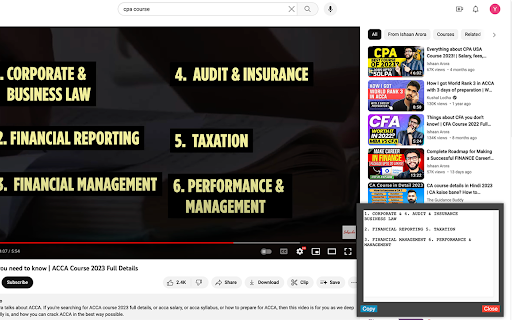
This innovative Google Chrome extension empowers users with the ability to extract and interact with text from any webpage, enhancing their browsing and research capabilities.

Key features and reasons to install:

1. Text Extraction from Webpages: Harnessing the power of Optical Character Recognition (OCR), the extension allows users to recognize and extract text from any part of a webpage. This can be especially useful for academic research, data collection, or when dealing with non-editable web text.

2. User-Friendly Selection Tool: Users can easily specify the area of text extraction using intuitive vertical and horizontal lines that can be drawn directly on the webpage. This precise selection tool ensures users extract exactly what they need.

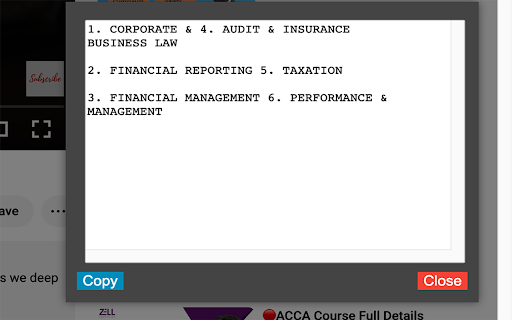
3. Convenient Text Display and Interaction: Extracted text is displayed in a floating box that can be moved and resized according to user preferences. This makes it simple to reference the extracted text while continuing to browse.

4. Clipboard Copy Functionality: With just one click, users can copy the extracted text from the floating box to the clipboard, making it effortless to paste and use the text in other applications or documents.

5. Broad Compatibility: The extension is compatible with all URLs, making it a versatile tool for text extraction across various websites and platforms.

6. Continuous Improvement: The extension is under active development with regular updates aimed at improving user experience and performance. Future updates are planned to move OCR processing to the background for even faster and smoother performance.

By installing this extension, users can enhance their browsing experience, streamline their research process, and interact with web content in a more dynamic and efficient way.
Technical
- Version
- 1.0
- Manifest
- V3
- Size
- 236KiB
- Min Chrome
- 88
- Languages
- 1
- Featured
- Yes
Metadata
- ID
- ifdoagofcglampmghhkbngifighmnopj
- Developer ID
- u52efd75ce6f2cecb02ae5b0c765e8902
- Developer Email
- [email protected]
- Created
- Aug 3, 2023
- Last Updated (Store)
- Aug 3, 2023
- Last Scraped
- May 25, 2026
- Website
- —
- Support URL
- —
- Privacy Policy
- —
Similar extensions
Alternatives to Quick Text Extraction, ranked by description similarity.

Image to Text (OCR)
A Fast and simple document scanner app with high quality text output.
100.0K
★ 2.3

Clip AI - Copy text from vidoes and pdfs | Created by Svalync
Clip AI helps you copy text from image, vidoes, pdfs and more
6.0K
★ 3.0

Web Content Copier
Copy headings and paragraphs from the current webpage.
6.0K
★ 4.5

Photo to Text
Use Photo to Text converter - online ocr: Easily extract text from image with this powerful image text extractor
2.0K
★ 5.0
Image to Text for ChatGPT
Add OCR Image to Text to ChatGPT
6.0K
★ 4.2

SELECTED TEXT
Select web text for abstracts or references.
23
★ 5.0

Activate Enable Right Click & Copy
Allow Right Click, Enable Copy and Paste in Every Site. Simple Allow Copy, Activate Enable Right Click, Copy Text Easily.
50.0K
★ 4.3

Click and Scrape
A simple tool to click and scrape data from web pages to JSON or CSV in seconds, no coding required
45
Data sourced from the Chrome Web Store · last verified May 25, 2026.