
Search Site WE
Search within the current subdomain or within the entire domain.
As of May 2026, Search Site WE has 2,000 users and a 5.00/5 rating from 4 reviews in the Productivity category.
Usersup 100.0 percent+100.0%
2.0K
2,000
Ratingno change0%
5.00
4 reviews
Reviewsno change0%
4
Version
31.1
Manifest V3
90-day change · In the last 90 days this extension gained 1.0K users.
History
2 snapshotsTracking since Apr 24, 2026.
View as table
| Date | Users | Rating | Reviews | Version |
|---|---|---|---|---|
| Apr 24, 2026 | 1.0K | 5.00 | 4 | 31.1 |
| May 21, 2026 | 1.0K | 5.00 | 4 | 31.1 |
| Now | 2.0K | 5.00 | 4 | 31.1 |
Permissions & access
- Permissions
- tabswebNavigationcontextMenusnotificationsstorage
- Host access
- None declared
Screenshots


About
CHANGES

Version 31.1

• Alt+K keyboard shortcut now works again.
• Minor bug fixes.

OVERVIEW

Search Site WE provides facilities to search within the current subdomain or within the entire domain, using a selected search engine.

TOOLBAR BUTTON AND POPUP PANEL

After installation, there will be a new green 'magnifying-glass' button on the main toolbar.

To search within a site, first click on the toolbar button to show the popup panel, then type the search terms into the text box, and then click on either of the search buttons.

Normally, the text box is filled with the text from the previous search. However, if text in the page is selected before opening the popup panel, the text box will be filled with the selected text.

CONTEXT MENU ITEMS

To search within a site, first select some text within the web page, then right-click on the selected text and choose the 'Search Site WE' menu item, and then click on either of the search sub-menu items.

SEARCH DEFAULTS

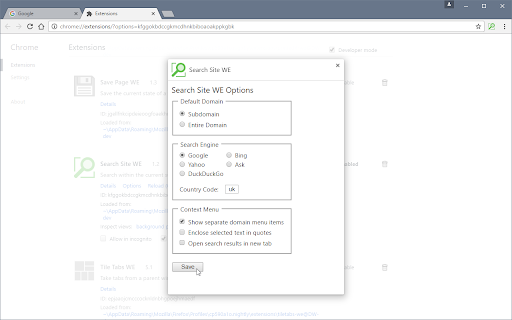
In the Options page, there are options to specify the default search settings.

KEYBOARD SHORTCUTS

To open the toolbar button popup panel, press Alt+K.

SUPPORT

Please e-mail:  [email protected]

LICENSE

Distributed under the GNU General Public License version 2.
See LICENCE.txt file and http://www.gnu.org/licenses/
Technical
- Version
- 31.1
- Manifest
- V3
- Size
- 68.55KiB
- Min Chrome
- 88
- Languages
- 1
- Featured
- Yes
Metadata
- ID
- hjleocmfcmdknclahmmfclopknmdkhkp
- Developer ID
- ua5322ee4078535123b27bd21409dca85
- Developer Email
- [email protected]
- Created
- Nov 16, 2016
- Last Updated (Store)
- Oct 13, 2022
- Last Scraped
- May 21, 2026
- Website
- —
- Support URL
- —
- Privacy Policy
- —
Similar extensions
Alternatives to Search Site WE, ranked by description similarity.

Navigate Up WE
Navigate up one or more URL levels.
1.0K
★ 3.4

Search On Site
The extension allows you to search on a specific site.
114
★ 3.7

Selection Search
Search for the selected text in search engines
40.0K
★ 4.7

Mark My Search
Highlight searched keywords. Find matches instantly.
3.0K
★ 4.4

Save Page WE
Save a complete web page (as curently displayed) as a single HTML file that can be opened in any browser.
100.0K
★ 4.5

Trufflepiggy - Quick Search
The all-in-one search tool: select and search. Find on multiple websites at once. Easy anonymous setup. Cross-browser sync.
2.0K
★ 4.3

Context Menu Search
Use the right-click menu to search for selected text in different search engines
100.0K
★ 4.5

Print Edit WE
Edit web pages prior to printing. Delete, hide and format elements. Edit text. Remove adverts and sidebars.
100.0K
★ 4.4
Data sourced from the Chrome Web Store · last verified May 21, 2026.