
Navigate Up WE
Navigate up one or more URL levels.
As of May 2026, Navigate Up WE has 1,000 users and a 3.40/5 rating from 10 reviews in the Productivity category.
Usersno change0%
1.0K
1,000
Ratingno change0%
3.40
10 reviews
Reviewsno change0%
10
Version
31.2
Manifest V3
History
1 snapshotsTracking since Apr 30, 2026.
View as table
| Date | Users | Rating | Reviews | Version |
|---|---|---|---|---|
| Apr 30, 2026 | 1.0K | 3.40 | 10 | 31.2 |
| Now | 1.0K | 3.40 | 10 | 31.2 |
Permissions & access
- Permissions
- activeTabtabswebNavigationcontextMenusscriptingnotificationsstorage
- Host access
- None declared
Screenshots


About
CHANGES

Version 31.2

• Minor bug fix.

OVERVIEW

Navigate Up WE provides a simple facility to navigate up one or more levels of the URL path.

Navigate Up WE is an alternative no-restart version of the well established Navigate Up add-on.

Navigate Up WE is implemented using the new WebExtensions API and is available for both Firefox and Chrome with identical functions and user interfaces.

OPTIONS PAGE

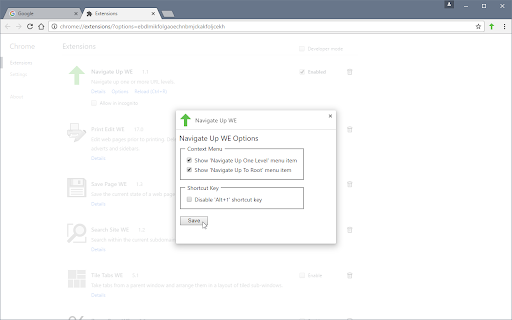
The Navigate Up WE Options page can be accessed as follows:

• Firefox - On the menu bar select Tools > Add-ons (or press Ctrl+Shift+A), select the Extensions tab, and then click on the Options button.

• Chrome - Right-click on the toolbar button, and then select Options.

TOOLBAR BUTTON

After installation of Navigate Up WE, there will be a new green 'up-arrow' button on the main toolbar.

If Navigate Up WE cannot be used with the current page, the toolbar button will be disabled (greyed-out).

To navigate up, just click on the Navigate Up WE icon.

There is an option to set the button action as:

• Navigate Up One Level
• Navigate Up to Root

There is an option to double-click on the button to Navigate Up To Root.

CONTEXT MENU & BUTTON MENU

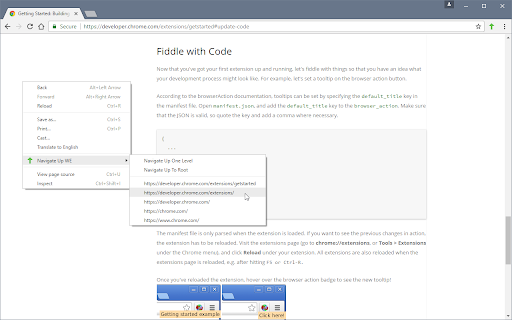
To navigate up to a specific level, right-click on the page contents to open the context menu, select the Navigate Up WE sub-menu, and then select one of the menu items.

Alternatively, right-click on the Navigate Up WE toolbar button to open the button menu, and then select one of the menu items.

The menus are divided into two sections:

• The first contains two menu items for quick access - Navigate Up One Level and Navigate Up To Root.

• The second contains menu items for each higher level URL, plus one or two menu items for related high level URLs.

There is an option to show/hide the Navigate Up WE submenu item on the context menu.

There are options to show/hide the Navigate Up One Level and Navigate Up To Root menu items.

There is an option to open higher-level URLs (shown in menus) in new background/foreground tabs.

KEYBOARD SHORTCUTS

To navigate up, press Alt+U.

SUPPORT

Please e-mail:  [email protected]

LICENSE

Distributed under the GNU General Public License version 2.
See LICENCE.txt file and http://www.gnu.org/licenses/
Technical
- Version
- 31.2
- Manifest
- V3
- Size
- 60.68KiB
- Min Chrome
- 88
- Languages
- 1
- Featured
- Yes
Metadata
- ID
- enpignbamdhfjfipfefolmfbjhpkabpm
- Developer ID
- ua5322ee4078535123b27bd21409dca85
- Developer Email
- [email protected]
- Created
- Nov 16, 2016
- Last Updated (Store)
- Nov 1, 2022
- Last Scraped
- May 29, 2026
- Website
- —
- Support URL
- —
- Privacy Policy
- —
Similar extensions
Alternatives to Navigate Up WE, ranked by description similarity.

Save Page WE
Save a complete web page (as curently displayed) as a single HTML file that can be opened in any browser.
100.0K
★ 4.5

StepUp
Navigate up any URL, subdomain or folder hierarchy — copy or open any level in a new tab, and strip trackers from links.
8

Search Site WE
Search within the current subdomain or within the entire domain.
2.0K
★ 5.0

Print Edit WE
Edit web pages prior to printing. Delete, hide and format elements. Edit text. Remove adverts and sidebars.
100.0K
★ 4.4

The Up One Level Button for browser
The extension is simply for navigating from the current web page to its parent directory.
298
★ 5.0

URL Redirector
Right-click links to open them on a target site by remapping URL paths.
2

Efficiency Split Screen
Split screen to improve search efficiency. Click search link in one window and open it in another.
236
★ 3.7

Scroll to Top - All Elements
Adds scroll-to-top buttons for all scrollable elements on any webpage. Smooth scrolling with intelligent button positioning.
14
Data sourced from the Chrome Web Store · last verified May 29, 2026.