
Mark My Search
Highlight searched keywords. Find matches instantly.
As of June 2026, Mark My Search has 3,000 users and a 4.37/5 rating from 19 reviews in the Productivity category.
Usersno change0%
3.0K
3,000
Ratingup 0.9 percent+0.9%
4.37
19 reviews
Reviewsup 5.6 percent+5.6%
19
Version
1.15.1
Manifest V3
90-day change · In the last 90 days this extension 1 version update.
History
2 snapshotsTracking since Apr 20, 2026.
View as table
| Date | Users | Rating | Reviews | Version |
|---|---|---|---|---|
| Apr 20, 2026 | 3.0K | 4.33 | 18 | 1.15.0 |
| Jun 6, 2026 | 3.0K | 4.33 | 18 | 1.15.0 |
| Now | 3.0K | 4.37 | 19 | 1.15.1 |
Permissions & access
- Permissions
- tabsscriptingstoragesearchcontextMenus
- Host access
- *://*/*
Screenshots


About
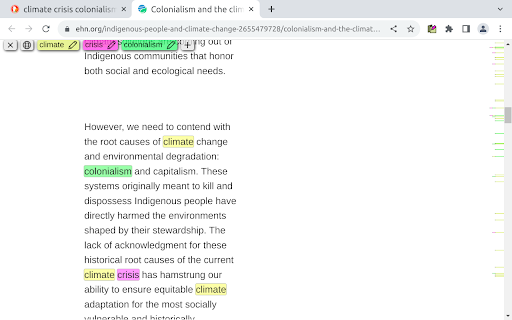
Mark My Search is a complete word finder for anything you search online. Powerful highlighting and advanced features combine with a friendly, intuitive interface to provide effortless text finding without the compromise. Vibrant highlight colors look great on any page, complemented by scroll markers for locating matches and a keyword edit bar which stays until you're done. Shortcuts are available for every action while varied options let you personalise to your taste.

Search for anything, on any search engine - DuckDuckGo, Google, Bing, even Reddit - and Mark My Search will pick out the words you're looking for, in that page and through any links you follow. Highlighting happens without having to press a button! Activate on any page using Alt+M or the context menu.

Mark My Search is Free and Open Source on GitHub(1). See the Roadmap(2) for planned improvements!

1. https://github.com/searchmarkers/mark-my-search
2. https://github.com/searchmarkers/mark-my-search/discussions/108

⎻⎻⎻⎻ Features & Productivity ⎻⎻⎻⎻

Main Features:
•	Enter keywords to find in the page
•	Create and automate keyword lists in the popup
•	Search query highlighting on any search engine
•	Compact toolbar to view and edit the query
•	Popup and settings menu for configuration
•	Rapid scrolling to matches
•	Keyword scrollbar markers
•	Completely operable by mouse or keyboard
•	Specific websites can be filtered

Matching Options:
•	Case sensitivity
•	Whole words only
•	Word stemming (match all word forms)
•	Diacritics sensitivity (match accents)
•	Regular expression

Current Limitations:
•	Sites may reorder text containing highlights; a workaround is available in settings
•	Word stemming can result in unexpected matches

⎻⎻⎻⎻ Accessibility ⎻⎻⎻⎻

To turn off visibility for automatic highlighting, simply open the options page at chrome://extensions > Mark My Search [Details] > [Extension options] and disable both visibility settings. The highlights will be hidden, while the toolbar and scroll markers remain visible, ready to be shown at a moment's notice. This does not apply to manually activated highlighting.

To turn off automatic highlighting completely, click the extension's icon to open the popup, and disable "Detect search engines".

You may wish to press the top-right puzzle piece (Extensions) and 'pin' the Mark My Search icon, so that you can easily click it to open the popup.

To assign more shortcuts, visit chrome://extensions/shortcuts
Technical
- Version
- 1.15.1
- Manifest
- V3
- Size
- 121KiB
- Min Chrome
- 88
- Languages
- 1
- Featured
- Yes
Metadata
- ID
- lijbnhoniejpjjgemoifpjklobhakinb
- Developer ID
- uc9632ebd895fa9be2fdbdad03ee517a3
- Developer Email
- [email protected]
- Created
- May 17, 2022
- Last Updated (Store)
- May 15, 2026
- Last Scraped
- Jun 23, 2026
- Privacy Policy
- https://markmysearch.ator.systems/privacy-policy/
Similar extensions
Alternatives to Mark My Search, ranked by description similarity.

MultiMark - Multi-Color Web Highlighter
Search, find, and highlight text with unlimited colors. Advanced filtering and productivity features.
14

Quick Find for Google Chrome™
Port of Firefox Quick Find features + awesome new ones. Search results in one location. Navigate to links in just a few keystrokes.
4.0K
★ 4.1

Better Finder
Multi-keyword search and highlight with individual colors, match case, and whole word options
61
★ 5.0

Mark My Words
Smart, modern text highlighting with customizable styles.
59
★ 5.0

MarkMyWords
Highlight and search text on any page with multiple colors and terms.
1

Super Find Bar
Advanced in-page search with multi-term highlighting, fuzzy search, smart scrolling, and dynamic content detection
49
★ 5.0

Bookmarks Quick Search
Search bookmarks quickly and easily, with a search popup, which can be opened by a click on the extension logo (or by cmd+E/ctrl+W).
20.0K
★ 4.6

Multi Web find,Highlight,Export
One-click full-word matching and fuzzy search, multi-keyword searches with individual highlights, Export search results
73
★ 1.5
Data sourced from the Chrome Web Store · last verified Jun 23, 2026.