mSecure
Companion browser extension for mSecure that provides auto-login features in your web browser.
As of June 2026, mSecure has 3,000 users and a 2.10/5 rating from 20 reviews in the Workflow & Planning category.
Usersno change0%
3.0K
3,000
Ratingno change0%
2.10
20 reviews
Reviewsno change0%
20
Version
1.0.0
Manifest V3
Permissions & access
- Permissions
- nativeMessagingtabsactiveTabwebNavigationscripting
- Host access
- <all_urls>
Screenshots

About
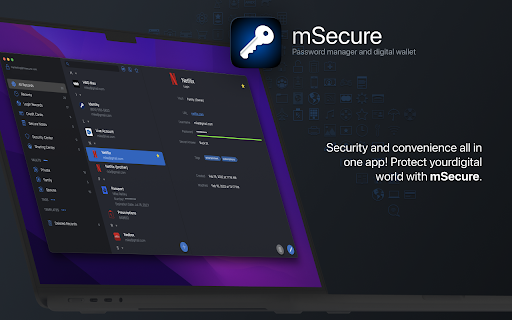
Your secure browser companion for mSecure, providing automated help for account management online!


The mSecure Browser Extension extends mSecure's functionality into your web browser.* Instead of simply storing online account credentials, you can now access them without having to leave your web browser. All features run locally on your computer, through a secured connection, so your information is never transferred to the mSecure Extension through an online source. The source of your information is the mSecure app itself.

* For the initial release of mSecure 6, mSecure's Browser Extension will only be available for Mac. Windows support is coming soon.


AUTO-FILL FOR ACCOUNT SIGN IN
Signing in to an existing online account is incredibly simple, as mSecure can now provide the Browser Extension with the proper credentials automatically. Instead of switching to the mSecure app to copy and paste your username and password, those items are now injected into forms automatically.

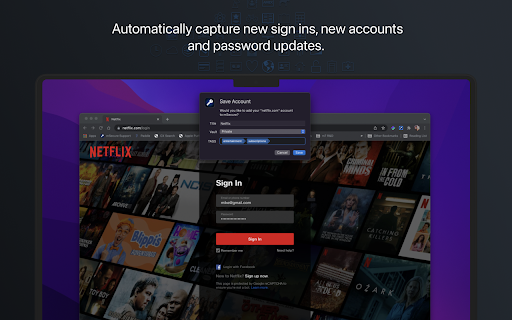
AUTO-CAPTURE FOR ACCOUNT SIGN IN
When signing in to an online account that has not yet been saved to your mSecure app, the Browser Extension will take the username and password you entered and send it to mSecure so a Login can be created automatically. This simplifies online account systems as your Login data is saved as you browse the web.

ACCOUNT CREATION AND ACCOUNT UPDATES
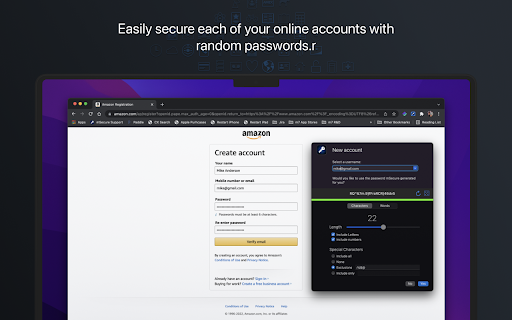
The mSecure Extension goes beyond just help with signing in to your existing accounts. When signing up for a new account, choose from a list of the most popular usernames in your existing Login records. When choosing your username, mSecure also provides a randomly generated password for making sure your new account is safe and secure.

The process is similar for account updates. mSecure provides a randomly generated password so you don't have to worry if the password is strong enough. Simply accept the password mSecure generates, or tailor it to meet your needs in the password generator settings, and after the data is injected into the Sign Up or Update form, the new credentials are automatically saved in mSecure for easy access at a later time.


Experience the security and simplicity only mSecure can provide. Simply download the mSecure app, create your account, and then download the Browser Extension here in the store. Your online account management will never be the same!
Technical
- Version
- 1.0.0
- Manifest
- V3
- Size
- 193KiB
- Min Chrome
- 88
- Languages
- 1
- Featured
- No
Metadata
- ID
- hihnblnamcfdfdjamdhhcgnpmkhmecjm
- Developer ID
- u51d4e0d6d827c483cca11b697647c925
- Developer Email
- [email protected]
- Created
- Mar 17, 2022
- Last Updated (Store)
- Mar 17, 2022
- Last Scraped
- Jun 1, 2026
- Website
- https://www.msecure.com/
- Support URL
- https://support.msecure.com
- Privacy Policy
- https://www.msecure.com/privacy-statement/
Similar extensions
Alternatives to mSecure, ranked by description similarity.

Authenticator App
Secure two-factor authentication app for iPhone, iPad, iPod, Apple Watch and Mac.
20.0K
★ 2.5

SecureKey
Easily create complex and secure passwords and copy it to the clipboard with one click.
12

OnBlick Form Buddy
Automatically logs into a website and fills a form
2

EasyPass – Secure Passwords in One Click
Create secure passwords instantly – simple, smart, and safe with EasyPass.
3

AutoMaton (Account Manager)
An extension to make life a little easier logging into Salesforce Account Manager using 2FA (TOTP only - Generator APP).
192
★ 5.0

SMSafe - Simple Access Management
Securely manage and share your assets and accounts
3
★ 5.0
Passwarden by KeepSolid – Password Manager
Passwarden is your best assistant to store and secure your passwords & any other sensitive information right in Chrome.
1.0K
★ 4.0

ID Assist Password Manager App
A secure password manager for all of your devices.
53
Data sourced from the Chrome Web Store · last verified Jun 1, 2026.