
SecureKey
Easily create complex and secure passwords and copy it to the clipboard with one click.
As of May 2026, SecureKey has 12 users in the Workflow & Planning category.
Usersup 300.0 percent+300.0%
12
12
Ratingno change0%
—
— reviews
Reviewsno change0%
—
Version
1.0.0
Manifest V3
History
2 snapshotsTracking since Apr 25, 2026.
View as table
| Date | Users | Rating | Reviews | Version |
|---|---|---|---|---|
| Apr 25, 2026 | 3 | — | — | 1.0.0 |
| May 22, 2026 | 6 | — | — | 1.0.0 |
| Now | 12 | — | — | 1.0.0 |
Permissions & access
- Permissions
- storage
- Host access
- None declared
Screenshots
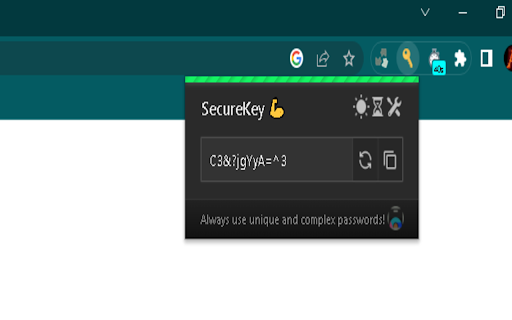
About
SecureKey is a robust and user-friendly Password Manager extension designed to keep your online accounts and sensitive information safe. With SecureKey, you can generate strong, unique passwords, securely store them, and autofill login forms with ease. Say goodbye to password-related stress and enhance your digital security effortlessly.

Key Features:

Password Generation: Create strong and randomized passwords that are virtually impossible to crack.
Secure Storage: Safely store your passwords in an encrypted vault, protected by a master password or biometric authentication.
Autofill Convenience: Instantly fill login forms with your saved credentials, eliminating the need to remember or type passwords manually.
Multi-Device Sync: Synchronize your passwords across multiple devices, ensuring access to your accounts wherever you go.
Password Strength Analysis: Get insights into the strength and security level of your passwords, allowing you to identify and update weak ones.
Secure Notes: Safeguard additional sensitive information, such as credit card details or secure notes, within the password manager.
Browser Compatibility: Seamlessly integrate with popular browsers, providing a smooth and consistent experience across platforms.
SecureKey simplifies your digital life by offering a reliable and secure solution to manage your passwords. Take control of your online security and enjoy peace of mind knowing that your sensitive information is protected by SecureKey.
Technical
- Version
- 1.0.0
- Manifest
- V3
- Size
- 35.11KiB
- Min Chrome
- 88
- Languages
- 1
- Featured
- No
Metadata
- ID
- pfpnccbbocfgkcfdlijjinjinpkecpjd
- Developer ID
- ub6fa37530fa6e39eb7620e8b665ace98
- Developer Email
- [email protected]
- Created
- Jun 12, 2023
- Last Updated (Store)
- Jun 12, 2023
- Last Scraped
- May 22, 2026
- Website
- https://adi-ti.web.app/
- Support URL
- —
- Privacy Policy
- —
Similar extensions
Alternatives to SecureKey, ranked by description similarity.

KeyCrypt
Encrypt Password based on your key
1
★ 5.0

KeyGuard - Password Manager
Experience seamless password management with KeyGuard – save, autofill, and secure your credentials effortlessly.
2.0K
★ 4.9

Safepass: password generator - unique, random, and strong
SafePass – a unique, strength-driven password generator ensures your passwords are robust and random, offering security for free.
1.0K
★ 4.3

Pass Protect
Secure your digital life with Pass Protect, the ultimate password manager.
15

EasyPass – Secure Passwords in One Click
Create secure passwords instantly – simple, smart, and safe with EasyPass.
3
TweakPass: Free Password Manager
Manage your passwords on a single click
718
★ 4.7

Password Generator
Generate strong passwords with one click!
—

Password Generator
this extension will generate random password
—
Data sourced from the Chrome Web Store · last verified May 22, 2026.