
Authenticator App
Secure two-factor authentication app for iPhone, iPad, iPod, Apple Watch and Mac.
As of June 2026, Authenticator App has 20,000 users and a 2.48/5 rating from 23 reviews in the Workflow & Planning category.
Usersno change0%
20.0K
20,000
Ratingno change0%
2.48
23 reviews
Reviewsno change0%
23
Version
1.2.4
Manifest V3
90-day change · In the last 90 days this extension 1 version update.
History
1 snapshotsTracking since Apr 26, 2026.
View as table
| Date | Users | Rating | Reviews | Version |
|---|---|---|---|---|
| Apr 26, 2026 | 20.0K | 2.48 | 23 | 1.2.3 |
| Now | 20.0K | 2.48 | 23 | 1.2.4 |
Changelog
- Apr 26, 2026description
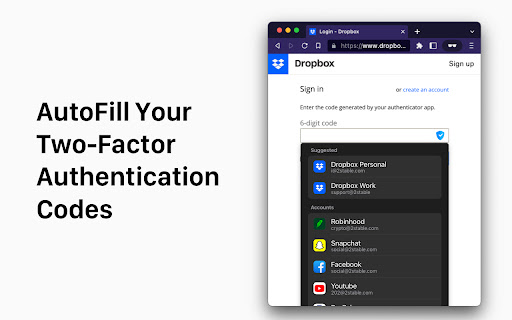
Now you can securely autofill your 2FA codes with Authenticator App by 2Stable Browser Extension. With the new Authenticator App browser extension, you are 1 click away from login in to your accounts. Fast and secure!

To pair your Authenticator App with Authenticator App Browser Extension just follow these steps:

1. Download Authenticator App on your desktop device.
2. Download Authenticator App Browser Extension.
3. Open Authenticator App on your Mac and go to the settings in the top left corner.
4. Find "Browser Extension" and follow the instructions from the screen.

Why you need to use Authenticator App by 2Stable?

Features:

Secure & Private
All data stored in Authenticator is always encrypted, even when it's stored in iCloud to ensure that you are the only one who can access your data.


- Encrypted Backup:
In Authenticator, you can always make a secure encrypted backup, in case you lose your device or switch to a new one.


- Synchronization Across all Devices:
With Authenticator all your accounts will automatically synchronize across all Apple devices, even on your Apple Watch


- Widget:
Access your 2FA codes even faster, directly from your Home Screen with the Authenticator widget.


- Unlock with Apple Watch or Touch ID:
Unlock Authenticator with Apple Watch or Touch ID for faster access.


- Show in the Menu Bar:
Keep Authenticator in your Menu Bar.


- Offline:
Authenticator generates secure codes even offline, this will allow you to authenticate securely even when your device is in airplane mode.


- Multi Import
You can import your accounts easily and securely from Google Authenticator, Password Managers and Files.


- Native Experience
Native experience on all Apple devices. Data Sync, Gestures, Widgets, Dark Mode and more!


- And many, many other features!
We constantly improve our app, don't hesitate to contact us at [email protected] to request a missing feature or an improvement.
Now you can securely autofill your 2FA codes with Authenticator App by 2Stable Browser Extension. With the new Authenticator App browser extension, you are 1 click away from login in to your accounts. Fast and secure!

To pair your Authenticator App with Authenticator App Browser Extension just follow these steps:

1. Download Authenticator App on your desktop device.
2. Download Authenticator App Browser Extension.
3. Open Authenticator App on your Mac and go to the settings in the top left corner.
4. Find "Browser Extension" and follow the instructions from the screen.

Why you need to use Authenticator App by 2Stable?

Features:

- Secure & Private Encryption
Your data is always encrypted, even in iCloud. Only you have access to your two-factor authentication data.

- Encrypted Backup
Create an encrypted backup of your codes to ensure seamless recovery in case you lose or upgrade your device.

- Automatic Synchronization Across Apple Devices
Enjoy real-time synchronization of your accounts across all your Apple devices, including iPhone, iPad, Mac and Apple Watch.

- Groups
Organize your accounts into groups for a cleaner setup. Share your groups with others and control access with flexible permissions.

- Quick Access with Widget
Access your 2FA codes instantly from the Home Screen with the Authenticator Widget, providing faster authentication.

- Offline Two-Factor Authentication
Generate secure codes even when your device is offline or in airplane mode. Your accounts remain protected no matter your connection status.

- Multi Import
Easily import accounts and 2FA codes from other authenticators like Google Authenticator, password managers, and files.

- Native Apple Experience
Enjoy a seamless experience on all Apple devices, with features like dark mode, intuitive gestures, and automatic data sync.

- All Popular Accounts
Authenticator App supports major platforms like Microsoft, Google, Facebook, Amazon, Instagram, Coinbase, Roblox, and thousands more. It’s the perfect solution whether you’re looking for an Authenticator App for Microsoft, an Authenticator App for Facebook, or an Authentication App for Instagram.

- We’re Here to Help
We constantly improve our app, don't hesitate to contact us at [email protected] to request a missing feature or an improvement.
- Apr 26, 2026short_description
Secure and fast two-factor authentication app
Secure two-factor authentication app for iPhone, iPad, iPod, Apple Watch and Mac.
Permissions & access
- Permissions
- storagetabscontextMenus
- Host access
- None declared
Screenshots


About
Now you can securely autofill your 2FA codes with Authenticator App by 2Stable Browser Extension. With the new Authenticator App browser extension, you are 1 click away from login in to your accounts. Fast and secure!

To pair your Authenticator App with Authenticator App Browser Extension just follow these steps:

1. Download Authenticator App on your desktop device.
2. Download Authenticator App Browser Extension.
3. Open Authenticator App on your Mac and go to the settings in the top left corner.
4. Find "Browser Extension" and follow the instructions from the screen.

Why you need to use Authenticator App by 2Stable?

Features:

- Secure & Private Encryption
Your data is always encrypted, even in iCloud. Only you have access to your two-factor authentication data.

- Encrypted Backup
Create an encrypted backup of your codes to ensure seamless recovery in case you lose or upgrade your device.

- Automatic Synchronization Across Apple Devices
Enjoy real-time synchronization of your accounts across all your Apple devices, including iPhone, iPad, Mac and Apple Watch.

- Groups
Organize your accounts into groups for a cleaner setup. Share your groups with others and control access with flexible permissions.

- Quick Access with Widget
Access your 2FA codes instantly from the Home Screen with the Authenticator Widget, providing faster authentication.

- Offline Two-Factor Authentication
Generate secure codes even when your device is offline or in airplane mode. Your accounts remain protected no matter your connection status.

- Multi Import
Easily import accounts and 2FA codes from other authenticators like Google Authenticator, password managers, and files.

- Native Apple Experience
Enjoy a seamless experience on all Apple devices, with features like dark mode, intuitive gestures, and automatic data sync.

- All Popular Accounts
Authenticator App supports major platforms like Microsoft, Google, Facebook, Amazon, Instagram, Coinbase, Roblox, and thousands more. It’s the perfect solution whether you’re looking for an Authenticator App for Microsoft, an Authenticator App for Facebook, or an Authentication App for Instagram.

- We’re Here to Help
We constantly improve our app, don't hesitate to contact us at [email protected] to request a missing feature or an improvement.
Technical
- Version
- 1.2.4
- Manifest
- V3
- Size
- 1.33MiB
- Min Chrome
- 88
- Languages
- 1
- Featured
- No
Metadata
- ID
- pnbabdldpneocemigmicebglmmfcjccm
- Developer ID
- u733d18c706abbb11c2ba1645b5c25ee2
- Developer Email
- [email protected]
- Created
- Nov 15, 2022
- Last Updated (Store)
- Apr 24, 2026
- Last Scraped
- Jun 15, 2026
- Website
- 2stable.com
- Support URL
- https://authenticator.2stable.com/
- Privacy Policy
- https://authenticator.2stable.com/privacy-policy/
Similar extensions
Alternatives to Authenticator App, ranked by description similarity.

2! Authenticator
The private, offline 2FA Authenticator. Import accounts from mobile apps and generate TOTP codes securely
10.0K
★ 3.9
mSecure
Companion browser extension for mSecure that provides auto-login features in your web browser.
3.0K
★ 2.1

MFAuth - 2FA Authenticator
Get 2FA OTP instantly from your MFAuth Cloud account. Works with MFAuth Authenticator app.
261
TOTP Authenticator
Get 2FA OTP instantly from your mobile. Works with TOTP Authenticator mobile app.
20.0K
★ 2.1

Flowtext
Copies 2FA codes from webmail clients to your clipboard.
12

2FA Authenticator
Esta extensión proporciona códigos de autenticación 2FA en el navegador.
4.0K
★ 3.5

Open Two-Factor Authenticator
An open-source two-factor Time-based One-Time Password (TOTP) authenticator with SHA-256 secure storage
10.0K
★ 3.0

True Key™ by McAfee
Go ahead - forget your passwords. With the True Key app, you are the password.
600.0K
★ 4.7
Data sourced from the Chrome Web Store · last verified Jun 15, 2026.