
Link Previewer
Quickly preview the content of a link by just hovering it.
As of June 2026, Link Previewer has 1,000 users and a 4.00/5 rating from 28 reviews in the Workflow & Planning category.
Usersno change0%
1.0K
1,000
Ratingno change0%
4.00
28 reviews
Reviewsno change0%
28
Version
2.8
Manifest V3
History
2 snapshotsTracking since Apr 1, 2026.
View as table
| Date | Users | Rating | Reviews | Version |
|---|---|---|---|---|
| Apr 1, 2026 | 1.0K | 4.00 | 28 | 2.8 |
| May 3, 2026 | 2.0K | 4.00 | 28 | 2.8 |
| Now | 1.0K | 4.00 | 28 | 2.8 |
Permissions & access
- Permissions
- storage
- Host access
- None declared
Screenshots

About
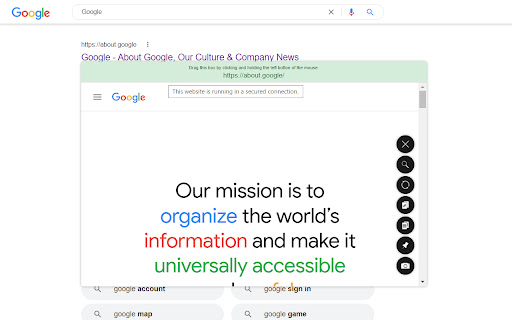
This extension will help you preview the content of a link by just hovering it. This will save you more time on browsing some sites when looking for something in the web.

New Version: 2.8
- Fixed the issue where the link previewer box gets obscured or appears outside the browser window when the link being previewed is located on the bottom or corner side of the browser.
- Added new size option for the link previewer box: "Responsive Size". The size will automatically adjust based on browser's current size.
- Added an option to save or not to save the previewed links to browser history.
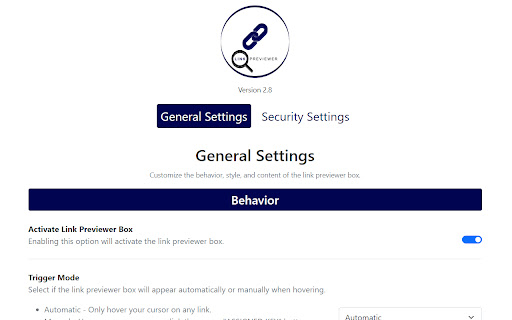
- Improved the "Trigger Mode" feature. You can now assign a key button to trigger the link previewer box when using the "Manual" option. If not set, then the "SHIFT" button will be the default button.

Previous Version: 2.7
- Added "Autosave" feature in settings. All changes will now automatically be saved without the need of the "Save" button.
- Added "Instant" and "0.25 seconds" options in buffer time. You can now preview the link much quicker.
- Added "Trigger Mode" feature. You can now select if the link previewer box will appear by hover or pressing a key.
- Added "Pin on Preview" feature. The link previewer box will automatically pinned when previewing.
- Added "Disable Scroll on Preview" feature. You have the option to temporarily disable the browser scrolling feature when the link previewer box appears.
- Added "Screenshot on Preview" feature. The link previewer box will automatically screenshot it's content when previewing.
- Added "Blocklist" feature. You can now disable the extension on specific websites.
- Added "Search Link" feature. You can now easily switch website to preview by just typing it's URL.
- Added "Shortcut Key" for closing the link previewer box. Just Press "ESC" button to close the link previewer box.
- Minor improvements in link previewer box UI.
- Minor fixes and improvements.

Features:
> Automatic or Manual (Pressing a Key, Customizable) Opening of Preview Window
> Website Security Detection (HTTPS/HTTP Connection Detection)
> Draggable Preview Window (No Limit Dragging)
> Resizable Preview Window (Flexible Sizes)
> Pinnable Preview Window (Automatic or Manual Pinning)
> Optionally Disable Browser Scroll While Previewing
> Easy-to-Close Preview Window (Default Hover Out, Press 'ESC' key, or Click 'Close' button)
> Preview Window Buffer Time (From 'Instant' up to '5' seconds delay)
> Easy-to-Activate/Deactivate (Easy Toggling)
> Mobile/Desktop/Large Desktop/Extra Large Desktop/Flexible Sizes
> Simple/Flat/Modern Styles
> Show/Hide Website URL
> Website Searching
> Website Content/URL Copier
> Website Content Refresher
> Website Content Screenshot (Automatic or Manual Screenshot)
> Website Blocklisting (Disable the Extension on Certain Websites)
> Control Common Website Security Settings

More features to be implemented and improved to provide you with better functionality.
Technical
- Version
- 2.8
- Manifest
- V3
- Size
- 1.92MiB
- Min Chrome
- 88
- Languages
- 1
- Featured
- Yes
Metadata
- ID
- hhnejjlimgamhpolpjnjdkdcoclldhli
- Developer ID
- u2d05934cc9e21284f7dc7c487a320b92
- Developer Email
- [email protected]
- Created
- Aug 6, 2021
- Last Updated (Store)
- May 18, 2022
- Last Scraped
- Jun 1, 2026
- Website
- —
- Support URL
- —
- Privacy Policy
- —
Similar extensions
Alternatives to Link Previewer, ranked by description similarity.

Preview Link
Preview links without leaving the page—live previews, fewer tabs, and hover or key-triggered opening.
25
★ 3.7
Link Peek
Show a modern link summary on hover with modifier key support
114
★ 4.0

Copy Text Easily
Extension that lets you view and reuse clipboard history with drag and drop, and copy text with one click
30.0K
★ 3.9

Open Selected Links
Opens multiple links in the selected content in the current or new window or a tab group.
6.0K
★ 4.0

Transclude Me
Make web more context rich by enabling in-place context-specific previews for links
7

WebLook
Peek inside any link instantly without leaving your page. Hold Shift and hover to preview links with a clean, adaptive UI.
14

Link Grabber
Use Link Grabber to find, extract, copy, filter, organize & export links from any webpage or multiple pages at once.
20.0K
★ 4.5

Link Tab Checker
Checks if a link opens in a new tab.
39
★ 5.0
Data sourced from the Chrome Web Store · last verified Jun 1, 2026.