
Transclude Me
Make web more context rich by enabling in-place context-specific previews for links
As of May 2026, Transclude Me has 7 users in the Workflow & Planning category.
Usersdown 12.5 percent−12.5%
7
7
Ratingno change0%
—
— reviews
Reviewsno change0%
—
Version
1.2.1
Manifest V3
History
2 snapshotsTracking since Apr 25, 2026.
View as table
| Date | Users | Rating | Reviews | Version |
|---|---|---|---|---|
| Apr 25, 2026 | 8 | — | — | 1.2.1 |
| May 22, 2026 | 9 | — | — | 1.2.1 |
| Now | 7 | — | — | 1.2.1 |
Permissions & access
- Permissions
- storagecontextMenushistory
- Host access
- <all_urls>
Screenshots


About
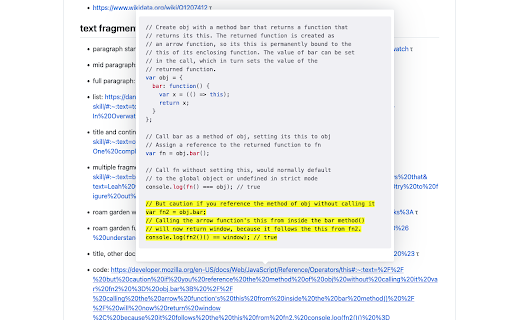
This extension enables live preview for:
- Fragment links (https://web.dev/text-fragments/)
- General preview for a set of allowlisted websites

For the same links it allows you to view them in a Sliding Panel mode.

Links in preview mode can be saved to Instapaper

Usage:
After installing the extension - supported links should get a `τ` indicator suffix to signify that this link has a preview.

To see the preview for a link, hover over the link with the `Alt` key pressed.
Click on the link with `Shift+Alt` keys pressed to open the link in the sliding pane view.

---
The extension also allows you to copy any page element's HTML to easily share a context rich representation of it. This part of extension is still work in progress though.
Technical
- Version
- 1.2.1
- Manifest
- V3
- Size
- 379KiB
- Min Chrome
- 88
- Languages
- 1
- Featured
- Yes
Metadata
- ID
- peekobjabbjacffbhjmlkadjlkniofje
- Developer ID
- ua5936255bb22e1e110894d377a745430
- Developer Email
- [email protected]
- Created
- May 11, 2022
- Last Updated (Store)
- Nov 24, 2022
- Last Scraped
- May 22, 2026
- Website
- —
- Privacy Policy
- —
Similar extensions
Alternatives to Transclude Me, ranked by description similarity.

Link Previewer
Quickly preview the content of a link by just hovering it.
1.0K
★ 4.0

Preview Link
Preview links without leaving the page—live previews, fewer tabs, and hover or key-triggered opening.
25
★ 3.7

Link to Text Fragment
Browser extension that allows for linking to arbitrary text on a page.
90.0K
★ 3.7

Dev.to Markdown Preview
Preview Live while you are writing at Dev.to Editor.
11

Copy Text Easily
Extension that lets you view and reuse clipboard history with drag and drop, and copy text with one click
30.0K
★ 3.9

Preview Links for Gmail™
Automatically generate complete web URL link previews, sample content and screenshots while drafting your email.
7

Sumit
A simple way to preview webpages.
19
★ 5.0

Linklet
A lightweight extension that helps save tabs as bookmarks.
Linklet is here to keep your workflow in order. It is user friendly,…
18
★ 5.0
Data sourced from the Chrome Web Store · last verified May 22, 2026.