Restored — previously removed on May 19, 2026 and now available again.

Link Grabber
Use Link Grabber to find, extract, copy, filter, organize & export links from any webpage or multiple pages at once.
As of June 2026, Link Grabber has 20,000 users and a 4.52/5 rating from 189 reviews in the Workflow & Planning category.
Usersno change0%
20.0K
20,000
Ratingdown 0.4 percent−0.4%
4.52
189 reviews
Reviewsup 5.0 percent+5.0%
189
Version
1.9.5.5
Manifest V3
90-day change · In the last 90 days this extension 4 version updates.
History
11 snapshotsTracking since Apr 1, 2026.
View as table
| Date | Users | Rating | Reviews | Version |
|---|---|---|---|---|
| Apr 1, 2026 | 20.0K | 4.54 | 180 | 1.9.5.0 |
| Apr 5, 2026 | 20.0K | 4.55 | 182 | 1.9.5.0 |
| Apr 8, 2026 | 20.0K | 4.55 | 182 | 1.9.5.1 |
| Apr 16, 2026 | 20.0K | 4.53 | 183 | 1.9.5.1 |
| Apr 23, 2026 | 20.0K | 4.54 | 185 | 1.9.5.1 |
| Apr 29, 2026 | 20.0K | 4.54 | 186 | 1.9.5.1 |
| May 2, 2026 | 20.0K | 4.54 | 187 | 1.9.5.1 |
| May 11, 2026 | 20.0K | 4.54 | 187 | 1.9.5.2 |
| May 15, 2026 | 20.0K | 4.52 | 188 | 1.9.5.4 |
| May 17, 2026 | 20.0K | 4.52 | 188 | 1.9.5.5 |
| Jun 17, 2026 | 20.0K | 4.52 | 189 | 1.9.5.5 |
| Now | 20.0K | 4.52 | 189 | 1.9.5.5 |
Changelog
- May 11, 2026description
🚀 Introducing Link Grabber: Your Ultimate Link Finder and URL Extractor
Are you tired of manually searching for hyperlinks on web pages? Do you need a reliable link finder to extract urls from text on websites? Look no further! 🔍 Our Google Chrome extension here to revolutionize the way you find and extract urls.

💻 Link Grabber is a powerful link extractor and url finder that allows you to quickly and easily extract urls from web pages. With its user-friendly interface and advanced features, Link Grabber is the perfect tool for anyone looking to streamline their link extraction process.

✅ Key Features:
1️⃣ Finder & Selection: Select an area on the webpage and see highlighted hyper-links inside (or one-click to find all urls on the page) 📊
2️⃣ Extractor: Extract found urls to Excel, CSV, Clipboard, Bookmarks, and other options. ⏱️
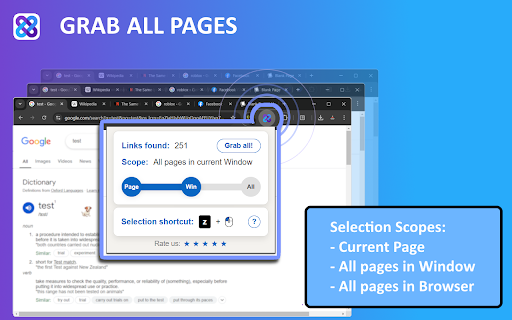
3️⃣ Multi-Page Grabber: Extract links from multiple webpages simultaneously. Simply click app icon and grab links from multiple pages by changing the selection Scope.💥
4️⃣ Link Crawler: From a few seed URLs, automatically crawl only what matters—map structure, audit pages, and extract links with depth and scope control. 🕸️
5️⃣ Hover Copy mate: Hover mouse over the link on any page and press Ctrl+C combination to quickly copy links one by one
6️⃣ Organizer: Grab urls from text > review and filter right inside the Grabber extension 📊
7️⃣ Grab Links from Text: Select any text on a webpage, right-click and choose "Grab Links from Selection" to instantly extract all URLs from plain text, emails, xml, sitemaps or mixed content. Works with URLs with or without protocols! 🔗

🔍 How does it work?
1️⃣ Install and activate: Install the link grabber extension (and reload the webpage if already open).
2️⃣ Select links: Press the mouse + key combination (default is 'Ctrl' + Left mouse button) to select the area on the webpage where you want to extract urls. Click Find All to find all urls on the page.
3️⃣ Process: Decide what to do with your extracted urls using quick action buttons shown right on the page: open, copy, download to CSV, save to bookmarks, review before processing, or find all urls.

📋 Link Selection - Choose how you want to select:
➤ Find urls in selection
➤ Find All links on the page
➤ Find All links in all open pages
➤ Copy link on mouse hover
➤ Copy links of open tabs
➤ Extract URLs from text (right-click on selected text)

🔍 Processing - Decide what to do with your extracted data:
➤ Open links in new tab, in new window, in incognito tab
➤ Copy to Clipboard
➤ Add to Bookmarks
➤ Export to CSV/Text file
➤ Review and filter selected links in browser

⚙️ Customization Options:
🔹 Choose how to activate the link selection box: Mouse Button, Keyboard Key
🔹 Filter: Exclude/Include urls with specific words
🔹 Change deafult Copy\Open\Export action: Chose default Copy\Open\Export popup button behavior.
🔹 Open Delay: Set a custom delay in seconds to have pages open step by step with this delay. Useful for users with poor internet connections.
🔹 Block Repeating: Remove duplicates
🔹 Reverse Order: Reverse the order of your extracted links
🔹 Open Tabs at the End: Open new tabs at the end of your browser
🔹 Do Not Focus on New Window: Keep your focus on the current window
🔹 Website Blocklist: Block grabber from running on specific websites
🔹 Controls Size: Choose the size of the control buttons that appear when selecting links.
🔹 Hover Copy links: Enable copying links by hovering over them and pressing Ctrl+C/Command+C
🔹 Keep links highlight: Keep links highlighted after mouse selection on page - allows to see links location and manually unselect specific links.

⏰ Benefits:
• Time-saving: Extract urls in seconds, saving you hours of manual searching.
• Easy to use: Our user-friendly interface makes it easy to extract links, even for beginners.
• The only url extractor you will use: Link Grabber is a pro tool to help you extract URLs quickly and efficiently.

💼 Use Cases:
▸ SEO professionals: Use our link extractor and web link extractor extension to collect backlinks on competitor websites or find broken anchors on your own site.
▸ Marketing teams: Extract urls from social media platforms or online directories to track brand mentions.
▸ Researchers: Use the grabber to extract hrefs from academic papers or online resources.

🤓 Usage examples:
▸ Extract links from text
▸ Find all links on a website
▸ Find external links in an Excel webpage
▸ Find all hyperlinks on the page filtered by a specific word
▸ Find broken urls (might be used as a URL checker using the include URL filter)

⁉️ FAQ
❓ How to open links in Incognito Mode?
🔹 First of all - you need to give our app permission to work in incognito mode.Here is how you can do that:
→ Go to app management page (Right click on app icon > Manage extension)
→ Scroll down and enable 'Allow in Incognito' setting.
→ Once done - you will see 'Incognito' option in the Open button menu.

❓ How can I change the size of popup buttons??
🔹 Go to app options and change 'Controls Size' setting

❓ How to copy URL`s of open browser tabs
🔹 Select tabs you want to copy urls from (hold Shift to select range of tabs).Then right click on the extension icon and choose 'Copy selected tabs' button.

💡 Why Choose Link Grabber?
▸ Easy to use: Our extension is designed to be simple and intuitive, making it easy to extract hyperlinks quickly and efficiently.
▸ Regular updates: We continuously update the grabber extension to ensure it remains fast, reliable, and accurate.
▸ Excellent support: Our support team is always available to help with any questions or issues.

🚀 Try Link Grabber Today!
Install our Google Chrome extension now and experience the power of fast and accurate hyperlink extraction. You'll never have to manually search for links again!

📨 Share your option, let us know what you would like to see in this app - Contact Us at [email protected]

Change Log:
 - 1.9.x - Added Link Crawler allowing to automate link grabbing with auto-navigation btw links.
 - 1.9.3.x - Added ability to extract URLs from raw text using text selection
 - 1.9.4.x - Added support of saving links to Chrome Reading List (optional)
 - 1.9.5.x - Added link folders support & Shadow DOM url extraction
🚀 Introducing Link Grabber: a practical browser tool for collecting and processing page references. Use it to gather results from selections, full pages, or raw text, then review and process everything in one place.

💻 Link Grabber focuses on speed and control: select, review, filter, and run actions without leaving the current tab.

✅ Key Features:
1️⃣ Finder & Selection: Select an area on the page and highlight detected items (or run Find All for the full page). 📊
2️⃣ Export & Actions: Send results to CSV/Text, clipboard, bookmarks, Reading List, and more. ⏱️
3️⃣ Multi-Page Mode: Run collection across multiple open pages by changing selection scope. 💥
4️⃣ Crawler: Start from seed pages and crawl with depth/scope limits for audits and structure mapping. 🕸️
5️⃣ Hover Copy: Hover over a hyperlink and press Ctrl+C to copy quickly.
6️⃣ Organizer: Review, filter, and group results in folders directly inside the app. 📊
7️⃣ Grab from Raw Text: Extract valid references from selected text, emails, XML, sitemaps, and mixed content. 🔗

🔍 How does it work (basic path)?
1️⃣ Install and activate: Install the extension (reload the page if it was already open).
2️⃣ Select: Use your mouse + key combo (default: Ctrl + Left Click) or run collection from the extension menu.
3️⃣ Process: Open, copy, export, bookmark, or review results before action.

⚙️ Customization Options:
🔹 Choose how to activate the link selection box: Mouse Button, Keyboard Key
🔹 Filter: Exclude/Include items with specific words
🔹 Change default Copy/Open/Export action: Choose default popup action behavior.
🔹 Open Delay: Set a custom delay in seconds to have pages open step by step with this delay. Useful for users with poor internet connections.
🔹 Block Repeating: Remove duplicates
🔹 Reverse Order: Reverse result order
🔹 Open Tabs at the End: Open new tabs at the end of your browser
🔹 Do Not Focus on New Window: Keep your focus on the current window
🔹 Website Blocklist: Block the extension on specific websites
🔹 Controls Size: Choose the size of control buttons shown during selection.
🔹 Hover Copy: Enable copy-on-hover with Ctrl+C/Command+C
🔹 Keep highlight: Keep highlighted items after selection for manual cleanup.
🔹 ... and many others

⁉️ FAQ
❓ How to open results in Incognito Mode?
🔹 You need to allow this extension in incognito mode:
→ Go to app management page (Right click on app icon > Manage extension)
→ Scroll down and enable 'Allow in Incognito' setting.
→ Once done - you will see 'Incognito' option in the Open button menu.

❓ How can I change the size of popup buttons??
🔹 Go to app options and change 'Controls Size' setting

❓ How to copy URLs from open browser tabs?
🔹 Select the tabs (hold Shift for a range), then right-click the extension icon and choose "Copy selected tabs".

❓ Is everything completely free?
🔹 We offer a free plan with full feature access during the trial period (up to 1,000 collected items). Some features remain free forever, including Hover Copy, No-Popup Mode, Copy Tab URLs, and Link Detection. Paid plans remove limits. Current plans, limits, and pricing are listed at link-grabber.com.

🚀 Try Link Grabber Today!
Install the extension and speed up page audits, research, and daily collection workflows.

📨 Share your feedback and feature requests at [email protected]
- May 11, 2026short_description
Use Link Grabber to find, extract, copy, filter or export links from any webpage. Powerful URL extractor and link scanner.
Use Link Grabber to find, extract, copy, filter, organize & export links from any webpage or multiple pages at once.
Permissions & access
- Permissions
- bookmarksstoragetabscontextMenusscripting
- Host access
- <all_urls>
Screenshots



About
🚀 Introducing Link Grabber: a practical browser tool for collecting and processing page references. Use it to gather results from selections, full pages, or raw text, then review and process everything in one place.

💻 Link Grabber focuses on speed and control: select, review, filter, and run actions without leaving the current tab.

✅ Key Features:
1️⃣ Finder & Selection: Select an area on the page and highlight detected items (or run Find All for the full page). 📊
2️⃣ Export & Actions: Send results to CSV/Text, clipboard, bookmarks, Reading List, and more. ⏱️
3️⃣ Multi-Page Mode: Run collection across multiple open pages by changing selection scope. 💥
4️⃣ Crawler: Start from seed pages and crawl with depth/scope limits for audits and structure mapping. 🕸️
5️⃣ Hover Copy: Hover over a hyperlink and press Ctrl+C to copy quickly.
6️⃣ Organizer: Review, filter, and group results in folders directly inside the app. 📊
7️⃣ Grab from Raw Text: Extract valid references from selected text, emails, XML, sitemaps, and mixed content. 🔗

🔍 How does it work (basic path)?
1️⃣ Install and activate: Install the extension (reload the page if it was already open).
2️⃣ Select: Use your mouse + key combo (default: Ctrl + Left Click) or run collection from the extension menu.
3️⃣ Process: Open, copy, export, bookmark, or review results before action.

⚙️ Customization Options:
🔹 Choose how to activate the link selection box: Mouse Button, Keyboard Key
🔹 Filter: Exclude/Include items with specific words
🔹 Change default Copy/Open/Export action: Choose default popup action behavior.
🔹 Open Delay: Set a custom delay in seconds to have pages open step by step with this delay. Useful for users with poor internet connections.
🔹 Block Repeating: Remove duplicates
🔹 Reverse Order: Reverse result order
🔹 Open Tabs at the End: Open new tabs at the end of your browser
🔹 Do Not Focus on New Window: Keep your focus on the current window
🔹 Website Blocklist: Block the extension on specific websites
🔹 Controls Size: Choose the size of control buttons shown during selection.
🔹 Hover Copy: Enable copy-on-hover with Ctrl+C/Command+C
🔹 Keep highlight: Keep highlighted items after selection for manual cleanup.
🔹 ... and many others

⁉️ FAQ
❓ How to open results in Incognito Mode?
🔹 You need to allow this extension in incognito mode:
→ Go to app management page (Right click on app icon > Manage extension)
→ Scroll down and enable 'Allow in Incognito' setting.
→ Once done - you will see 'Incognito' option in the Open button menu.

❓ How can I change the size of popup buttons??
🔹 Go to app options and change 'Controls Size' setting

❓ How to copy URLs from open browser tabs?
🔹 Select the tabs (hold Shift for a range), then right-click the extension icon and choose "Copy selected tabs".

❓ Is everything completely free?
🔹 We offer a free plan with full feature access during the trial period (up to 1,000 collected items). Some features remain free forever, including Hover Copy, No-Popup Mode, Copy Tab URLs, and Link Detection. Paid plans remove limits. Current plans, limits, and pricing are listed at link-grabber.com.

🚀 Try Link Grabber Today!
Install the extension and speed up page audits, research, and daily collection workflows.

📨 Share your feedback and feature requests at [email protected]
Technical
- Version
- 1.9.5.5
- Manifest
- V3
- Size
- 1.15MiB
- Min Chrome
- 88
- Languages
- 52
- Featured
- No
Metadata
- ID
- jfkaiopedjohkgccocjchpbpekbfnidc
- Developer ID
- u36ef959fceecb38231f2be914a88214b
- Developer Email
- [email protected]
- Created
- May 26, 2024
- Last Updated (Store)
- May 14, 2026
- Last Scraped
- Jun 17, 2026
- Website
- link-grabber.com
- Support URL
- https://link-grabber.com/#rec850313462
- Privacy Policy
- https://link-grabber.com/privacy
Similar extensions
Alternatives to Link Grabber, ranked by description similarity.

Bulk Link Grabber: Copy, Extract & Open Multiple URLs
Grab, copy & open multiple links fast. Extract URLs from tabs or drag-selects. Export to CSV/TXT. The ultimate bulk URL opener tool.
247
★ 5.0

LinkScalper - Advanced Link Grabber
Extracts all links from a webpage and displays them on a new page with options.
981
★ 4.8

Page Link Collect
Page Link Collect is a versatile Chrome extension designed to enhance your web browsing experience by effortlessly collecting all…
367
★ 5.0

Link Extractor and Manager Pro - AIO
Extract, filter, group, and export all links from any webpage. Save to My Links, export CSV/JSON/TXT, import/export bookmarks.
28
★ 5.0

Open Multiple Links
Open Multiple Links – Select or enter a list of URLs and open them all with just one click.
94
★ 5.0

Copy Text Easily
Extension that lets you view and reuse clipboard history with drag and drop, and copy text with one click
30.0K
★ 3.9

Smart Link Opener – Instant Bulk URL Opener
Smart Link Opener Paste links and open them all with one click
59
★ 5.0

Link Organizer - New Tab
A beautiful link organizer for your new tab page
123
★ 4.7
Data sourced from the Chrome Web Store · last verified Jun 17, 2026.