
Open Selected Links
Opens multiple links in the selected content in the current or new window or a tab group.
As of June 2026, Open Selected Links has 6,000 users and a 4.04/5 rating from 28 reviews in the Workflow & Planning category.
Usersdown 14.3 percent−14.3%
6.0K
6,000
Ratingdown 1.7 percent−1.7%
4.04
28 reviews
Reviewsup 3.7 percent+3.7%
28
Version
1.8.5
Manifest V3
90-day change · In the last 90 days this extension lost 1.0K users, 1 version update, changed permissions.
History
7 snapshotsTracking since Apr 17, 2026.
View as table
| Date | Users | Rating | Reviews | Version |
|---|---|---|---|---|
| Apr 17, 2026 | 7.0K | 4.11 | 27 | 1.8.4 |
| May 11, 2026 | 10.0K | 4.11 | 27 | 1.8.4 |
| May 15, 2026 | 8.0K | 4.11 | 27 | 1.8.4 |
| May 19, 2026 | 9.0K | 4.11 | 27 | 1.8.4 |
| May 23, 2026 | 8.0K | 4.11 | 27 | 1.8.4 |
| Jun 11, 2026 | 7.0K | 4.11 | 27 | 1.8.4 |
| Jun 24, 2026 | 7.0K | 4.11 | 27 | 1.8.5 |
| Now | 6.0K | 4.04 | 28 | 1.8.5 |
Changelog
- Jun 11, 2026description
When viewing a page containing a list of links you want to open, such as a list of references in Wikipedia or a paper, it's convenient to be able to open them all at once rather than opening and dragging one at a time.

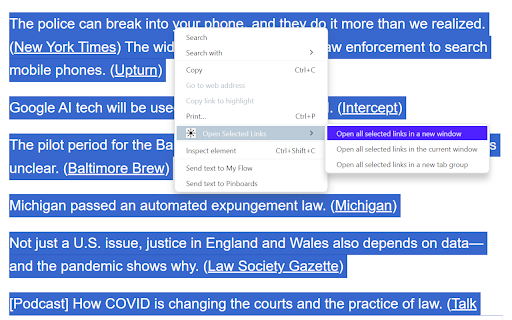
This extension adds context menus item for selections to open all the links contained in them in the current window (optionally in a new tab group) or a new window.

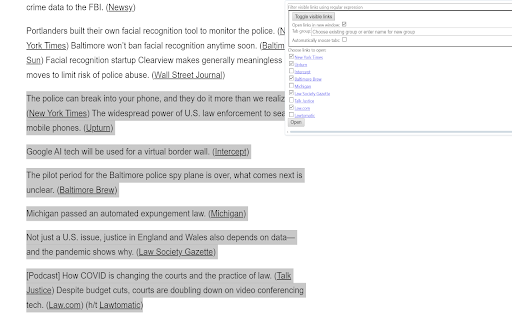
Alternatively, you can bring up the extension's popup menu to choose exactly which links to open (and now, you can also filter the link text with a regular expression!), whether to open them in the current or a new window, and whether to add them to a new or existing tab group. You can also open the tabs "snoozed" to reduce memory footprint prior to reading the tabs.

Finally, you can set up keyboard shortcuts to open selected links with a keystroke.

What's new in Version 1.8.4
* Fix opening links in a new window from the menu or command

What's new in Version 1.8.3
* Fix "automatically snooze tabs" option

What's new in Version 1.8.2
* Add side-by-side mode
* Multiple-display support
* Hamburger icon to hide/show the popup config options
* Filter enhancements
  * Disallow inserting newlines.
  * Don't crash if partially entered regexps are invalid
  * Make the placeholder text come back on deleting all the text
  * Make the filter URLs checkbox actually search both URL and link text
  * Give the filter focus if any keys are pressed
When viewing a page containing a list of links you want to open, such as a list of references in Wikipedia or a paper, it's convenient to be able to open them all at once rather than opening and dragging one at a time.

This extension adds context menus item for selections to open all the links contained in them in the current window (optionally in a new tab group) or a new window.

Alternatively, you can bring up the extension's popup menu to choose exactly which links to open (and now, you can also filter the link text with a regular expression!), whether to open them in the current or a new window, and whether to add them to a new or existing tab group. You can also open the tabs "snoozed" to reduce memory footprint prior to reading the tabs.

Finally, you can set up keyboard shortcuts to open selected links with a keystroke.

What's new in Version 1.8.5
* Add copy links to clipboard (#28)
  * Copy button in popup writes checked URLs (newline-separated) to clipboard
  * Context menu item and keyboard shortcut (`osl_copy`) for copy without opening the popup
* Add incognito/private window option (#29)
  * "Incognito/private" checkbox in popup; greyed out with a note if user hasn't granted the extension incognito access
  * When opened from an incognito window, the popup checkbox is pre-checked so new windows inherit privacy by default; user can uncheck to escape to a regular window
  * Context menu and keyboard commands respect the saved incognito setting when invoked from a normal window, and stay incognito if invoked from an incognito window

What's new in Version 1.8.4
* Fix opening links in a new window from the menu or command

What's new in Version 1.8.3
* Fix "automatically snooze tabs" option

What's new in Version 1.8.2
* Add side-by-side mode
* Multiple-display support
* Hamburger icon to hide/show the popup config options
* Filter enhancements
  * Disallow inserting newlines.
  * Don't crash if partially entered regexps are invalid
  * Make the placeholder text come back on deleting all the text
  * Make the filter URLs checkbox actually search both URL and link text
  * Give the filter focus if any keys are pressed
- Jun 11, 2026permissions
activeTab, contextMenus, system.display, scripting, storage, tabGroups
activeTab, clipboardWrite, contextMenus, system.display, scripting, storage, tabGroups
Permissions & access
- Permissions
- activeTabclipboardWritecontextMenussystem.displayscriptingstoragetabGroups
- Host access
- None declared
Screenshots

About
When viewing a page containing a list of links you want to open, such as a list of references in Wikipedia or a paper, it's convenient to be able to open them all at once rather than opening and dragging one at a time.

This extension adds context menus item for selections to open all the links contained in them in the current window (optionally in a new tab group) or a new window.

Alternatively, you can bring up the extension's popup menu to choose exactly which links to open (and now, you can also filter the link text with a regular expression!), whether to open them in the current or a new window, and whether to add them to a new or existing tab group. You can also open the tabs "snoozed" to reduce memory footprint prior to reading the tabs.

Finally, you can set up keyboard shortcuts to open selected links with a keystroke.

What's new in Version 1.8.5
* Add copy links to clipboard (#28)
  * Copy button in popup writes checked URLs (newline-separated) to clipboard
  * Context menu item and keyboard shortcut (`osl_copy`) for copy without opening the popup
* Add incognito/private window option (#29)
  * "Incognito/private" checkbox in popup; greyed out with a note if user hasn't granted the extension incognito access
  * When opened from an incognito window, the popup checkbox is pre-checked so new windows inherit privacy by default; user can uncheck to escape to a regular window
  * Context menu and keyboard commands respect the saved incognito setting when invoked from a normal window, and stay incognito if invoked from an incognito window

What's new in Version 1.8.4
* Fix opening links in a new window from the menu or command

What's new in Version 1.8.3
* Fix "automatically snooze tabs" option

What's new in Version 1.8.2
* Add side-by-side mode
* Multiple-display support
* Hamburger icon to hide/show the popup config options
* Filter enhancements
  * Disallow inserting newlines.
  * Don't crash if partially entered regexps are invalid
  * Make the placeholder text come back on deleting all the text
  * Make the filter URLs checkbox actually search both URL and link text
  * Give the filter focus if any keys are pressed
Technical
- Version
- 1.8.5
- Manifest
- V3
- Size
- 60.74KiB
- Min Chrome
- 88
- Languages
- 1
- Featured
- Yes
Metadata
- ID
- hcihcignkpajeehfnomlncinacagapdf
- Developer ID
- ube87419d33682ed02588eb08d3130d07
- Developer Email
- [email protected]
- Created
- Nov 3, 2020
- Last Updated (Store)
- Jun 7, 2026
- Last Scraped
- Jun 24, 2026
- Website
- —
- Privacy Policy
- —
Similar extensions
Alternatives to Open Selected Links, ranked by description similarity.

Tab Group
Allow you manage and save your chrome tabs.
10.0K
★ 4.0

Bulk URL Opener
Browser addon to open multiple urls with one click. With many more tools to help you manage urls.
90.0K
★ 4.5

Tabhunter
Wade through all your tabs fast
455
★ 5.0

Link Previewer
Quickly preview the content of a link by just hovering it.
1.0K
★ 4.0

Open Selected Links Beta
Opens multiple links in the selected content in the current or new window or a tab group. BETA TESTING RELEASE
4

Bulk URL Opener Pro
Open multiple URLs at once with advanced features: save lists, import/export, delay settings, and more
11
★ 5.0

Open Multiple Links - Full Featured
Quickly open links! Remove duplicates, randomize order, export/import text files, bookmark lists. Boost your browsing efficiency!
40
★ 3.0

Open Multiple Links
Select text with links and open them all in new tabs
6.0K
★ 3.1
Data sourced from the Chrome Web Store · last verified Jun 24, 2026.