
Message Templates
Custom templates for messages, Gmail, Facebook.
As of June 2026, Message Templates has 909 users and a 4.13/5 rating from 8 reviews in the Workflow & Planning category.
Usersdown 2.0 percent−2.0%
909
909
Ratingno change0%
4.13
8 reviews
Reviewsno change0%
8
Version
1.2.4
Manifest V3
History
7 snapshotsTracking since Apr 1, 2026.
View as table
| Date | Users | Rating | Reviews | Version |
|---|---|---|---|---|
| Apr 1, 2026 | 928 | 4.13 | 8 | 1.2.4 |
| Apr 18, 2026 | 933 | 4.13 | 8 | 1.2.4 |
| Apr 28, 2026 | 918 | 4.13 | 8 | 1.2.4 |
| May 8, 2026 | 906 | 4.13 | 8 | 1.2.4 |
| May 16, 2026 | 916 | 4.13 | 8 | 1.2.4 |
| May 25, 2026 | 925 | 4.13 | 8 | 1.2.4 |
| Jun 3, 2026 | 911 | 4.13 | 8 | 1.2.4 |
| Now | 909 | 4.13 | 8 | 1.2.4 |
Permissions & access
- Permissions
- activeTabtabsstoragealarms
- Host access
- *://*/*
Screenshots
About
Write emails faster! Increase your productivity with templates and keyboard shortcuts on your favorite email and social media platforms.

OrganizedMindClub enables you to save time writing emails by creating your own snippets and templates. Try it now and start writing your emails faster!

★ Keyboard shortcut completion You’re always ending your emails with “Please find the document attached to this email.”? With keyboard completion, you can type att+TAB and get the same result!

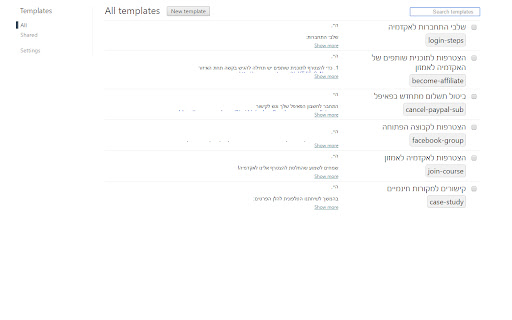
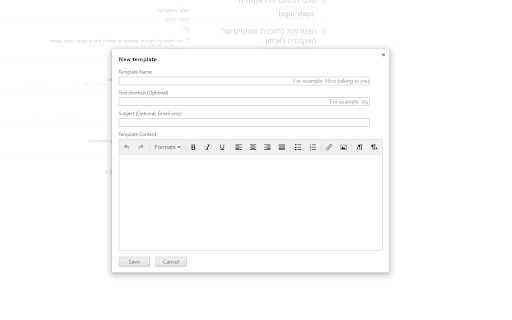
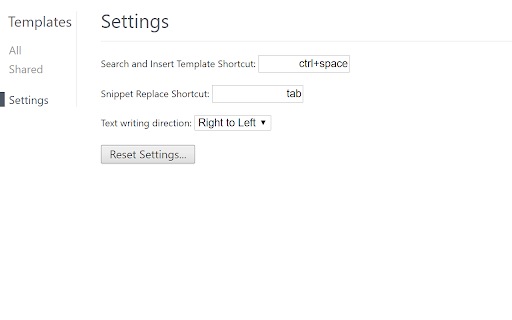
★ Create your own templates You find yourself writing repetitive pieces of text in your emails? Make it a template! OrganizedMindClub enables you to create your own templates and shortcuts. So if you write the same content over and over, you now can use a shortcut for it and answer an email within seconds. (The default Search and Insert Template Shortcut is Ctrl+Space but you can easily change it).

★ Template text writing direction Choose your direction! This extension supports both right to left AND left to right text direction.

★ Share templates with your team (FREE) Communication is collaborative by definition. OrganizedMindClub enables you to share templates with your team so when the template changes, everyone is still on the same page.

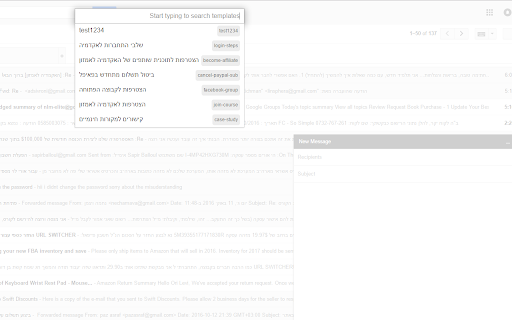
★ Autocomplete dialog You don’t want to remember your shortcuts? Search and insert templates right inside the Compose box.

★ Supports multiple computers Using multiple computers with the same Google account? No problem! Our tool will sync all of your existing templates with all of your computers.

★ Compatibility This extension is designed to work seamlessly with most major web-based email clients and social networks.

Find out more at: http://www.organizedmindclub.com/ Your feedback is welcome at [email protected]

Enjoy!
Technical
- Version
- 1.2.4
- Manifest
- V3
- Size
- 471KiB
- Min Chrome
- 88
- Languages
- 1
- Featured
- No
Metadata
- ID
- gnfkfajglnnkaaiaaeheiinmcmniecni
- Developer ID
- uafcc7a0cee842d89bc4b08be46f3cdd7
- Developer Email
- [email protected]
- Created
- Oct 13, 2016
- Last Updated (Store)
- Dec 6, 2025
- Last Scraped
- Jun 3, 2026
- Support URL
- —
Similar extensions
Alternatives to Message Templates, ranked by description similarity.

Briskine: Email templates for Gmail™
Write emails faster! Increase your productivity with templates and keyboard shortcuts on Gmail™, Outlook, or LinkedIn.
100.0K
★ 4.5

Gmail Assistant
Write emails faster in Gmail with predictive suggestions and your own customizable phrases.
7

TinyJunko: Open AI ChatGPT and email templates for Gmail
Write emails faster! Increase your productivity with templates and Open AI ChatGPT on Gmail.
43
★ 5.0

Emplates
Save and insert email templates in Gmail and Outlook, boosting your productivity and optimizing your workflow.
7
★ 5.0

Templateasy
Create, modify, and use tailor-made templates efficiently, saving time when replying to emails.
5

Quick Paste Templates
Save, organize, and paste reusable text templates with one click
99
★ 5.0

Text Expander & Form Autofill for Google Chrome™
Record and replay form submissions, and use text expansion shortcuts to fill forms faster.
14

LinkedIn Quick Message Templates
Save time with custom message templates for LinkedIn messaging
30
Data sourced from the Chrome Web Store · last verified Jun 3, 2026.