
Gmail Assistant
Write emails faster in Gmail with predictive suggestions and your own customizable phrases.
As of June 2026, Gmail Assistant has 7 users in the Workflow & Planning category.
Usersno change0%
7
7
Ratingno change0%
—
— reviews
Reviewsno change0%
—
Version
1.0.1
History
4 snapshotsTracking since Apr 19, 2026.
View as table
| Date | Users | Rating | Reviews | Version |
|---|---|---|---|---|
| Apr 19, 2026 | 7 | — | — | 1.0.1 |
| May 14, 2026 | 5 | — | — | 1.0.1 |
| May 26, 2026 | 4 | — | — | 1.0.1 |
| Jun 8, 2026 | 5 | — | — | 1.0.1 |
| Now | 7 | — | — | 1.0.1 |
Permissions & access
- Permissions
- None declared
- Host access
- None declared
Screenshots


About
Overview

Simplify Your Email Writing with Our Gmail Extension

If you find yourself spending too much time composing emails, our Chrome extension is here to help. Designed specifically for Gmail users, this tool streamlines the email writing process, making it faster and more efficient.

Key Features:

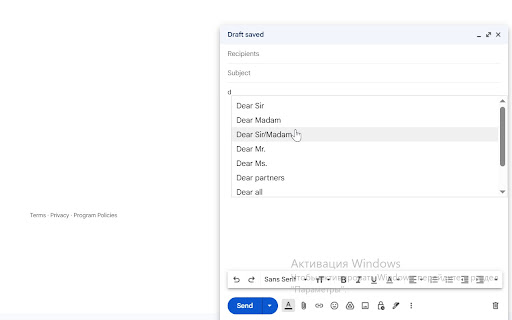
★ Predictive Text Suggestions: Our extension provides a list of commonly used phrases and expressions, allowing you to easily insert them into your emails. This helps reduce the time spent thinking about wording and lets you focus on your message.

★ Personalized Phrase Library: You can create a personal library of your frequently used phrases. This feature ensures that your unique writing style is always accessible, making your communication more consistent.

★ Time-Saving Efficiency: By offering relevant suggestions, our extension minimizes repetitive typing, helping you save time whether you are responding to colleagues, clients, or friends.

★ No AI, Just Smart Suggestions: Unlike other tools, our extension focuses on providing practical, commonly used expressions without the complexities of AI. AI may not fully capture a user’s unique tone or preferred phrasing, leading to suggestions that feel generic or out of context. AI may generate phrases that vary in style, making it hard to maintain a consistent tone throughout an email or document. Additionally, AI-generated phrases can sometimes contain stylistic errors that might detract from the clarity of your message, making our extension a more reliable choice for straightforward and effective writing.

★ User-Friendly Interface: The extension integrates seamlessly with Gmail, making it easy to use without disrupting your workflow.

Why Use Our Extension?

★ Improve Communication: Enhance the clarity of your emails with well-structured phrases that convey your message effectively.
★ Increase Productivity: Spend less time on email composition and more time on other important tasks.
★ Simple and Practical: Our extension focuses on providing useful suggestions without the complexities of AI, ensuring a straightforward user experience.
★ If you’re looking to improve your email writing process, consider trying our Chrome extension. It’s designed to make your Gmail experience more efficient and enjoyable.

Use Our Gmail Extension Everywhere — Write Emails Faster and Smarter
Our extension helps everyone create emails in Gmail faster and easier. This solution is especially valuable for the following groups:

🤝 Customer Support: create shortcuts for common responses, troubleshooting tips, and instructions. Especially useful when handling multiple tickets simultaneously.
💰 Sales Teams: use templates for sales pitches, proposals, and follow-ups to speed up communication with clients.
💼 Recruiters: quickly insert frequently used interview questions, email templates, and job descriptions when managing multiple candidates.
🩺 Healthcare Professionals: doctors, nurses, and veterinarians can save time with templates for common recommendations and messages.
🎓 Teachers: use ready-made comments and feedback to quickly grade and respond to students.
📊 Marketers: create shortcuts for marketing messages, social media posts, and email campaigns to manage multiple accounts efficiently.
🏛️ Lawyers: save frequently used legal terms, clauses, and references for faster drafting of emails and documents.

This extension works directly inside Gmail, giving you instant access to your personalized phrases and templates, with text suggestions available in English and Russian — saving you time and making email writing effortless. Try it today and speed up your email writing!

More information and documentation: <https:// www.gmail-assistant.com>
Privacy policy: <https://www.gmail-assistant.com/PrivacyPolicy.html>
Technical
- Version
- 1.0.1
- Manifest
- —
- Size
- 133KiB
- Min Chrome
- 88
- Languages
- 1
- Featured
- No
Metadata
- ID
- einhmleomgcmnfbfibbcgiinococmgin
- Developer ID
- u2eb9d1e47ef4f29868e2df92315ac640
- Developer Email
- [email protected]
- Created
- Aug 13, 2025
- Last Updated (Store)
- Aug 16, 2025
- Last Scraped
- Jun 8, 2026
- Website
- gmail-assistant.com
- Support URL
- [email protected]
- Privacy Policy
- https://www.gmail-assistant.com/PrivacyPolicy.html
Similar extensions
Alternatives to Gmail Assistant, ranked by description similarity.

Help me write
Help me write email writter for chrome
7.0K
★ 2.4

Mailyr: Write Emails with GPT-5, Claude, and Gemini
ChatGPT Mailyr: Write emails using GPT-5, Claude, and Gemini. Boost productivity with AI-powered email writing.
739
★ 4.5

Improvise GPT
AI-based email and message improvisation using ChatGPT - A powerful and user-friendly solution for written communication.
62
★ 4.8

Emplates
Save and insert email templates in Gmail and Outlook, boosting your productivity and optimizing your workflow.
7
★ 5.0

Letterbot AI
AI email assistant — generate emails, replies, subject lines, summaries, and grammar fixes in 13 languages.
537
★ 5.0
Simplify Gmail
Make Gmail simpler, more capable, and more respectful
30.0K
★ 4.5

Preview Links for Gmail™
Automatically generate complete web URL link previews, sample content and screenshots while drafting your email.
7

AI Email Writer
Quick emails even if you instruct with a different language
3.0K
★ 3.2
Data sourced from the Chrome Web Store · last verified Jun 8, 2026.