
Briskine: Email templates for Gmail™
Write emails faster! Increase your productivity with templates and keyboard shortcuts on Gmail™, Outlook, or LinkedIn.
As of June 2026, Briskine: Email templates for Gmail™ has 100,000 users and a 4.49/5 rating from 614 reviews in the Workflow & Planning category.
Usersno change0%
100.0K
100,000
Ratingno change0%
4.49
614 reviews
Reviewsdown 0.2 percent−0.2%
614
Version
7.16.14
Manifest V3
90-day change · In the last 90 days this extension 5 version updates.
History
14 snapshotsTracking since Apr 1, 2026.
View as table
| Date | Users | Rating | Reviews | Version |
|---|---|---|---|---|
| Apr 1, 2026 | 100.0K | 4.49 | 615 | 7.16.5 |
| Apr 5, 2026 | 100.0K | 4.49 | 616 | 7.16.7 |
| Apr 8, 2026 | 100.0K | 4.49 | 617 | 7.16.7 |
| Apr 16, 2026 | 100.0K | 4.49 | 616 | 7.16.8 |
| Apr 26, 2026 | 100.0K | 4.49 | 617 | 7.16.8 |
| Apr 29, 2026 | 100.0K | 4.49 | 618 | 7.16.8 |
| May 5, 2026 | 100.0K | 4.49 | 617 | 7.16.8 |
| May 8, 2026 | 100.0K | 4.49 | 618 | 7.16.9 |
| May 15, 2026 | 100.0K | 4.49 | 618 | 7.16.10 |
| May 20, 2026 | 100.0K | 4.49 | 618 | 7.16.12 |
| May 31, 2026 | 100.0K | 4.49 | 618 | 7.16.14 |
| Jun 6, 2026 | 100.0K | 4.49 | 619 | 7.16.14 |
| Jun 15, 2026 | 100.0K | 4.49 | 617 | 7.16.14 |
| Jun 22, 2026 | 100.0K | 4.49 | 615 | 7.16.14 |
| Now | 100.0K | 4.49 | 614 | 7.16.14 |
Changelog
- May 5, 2026description
Write emails faster with templates.

Create templates from repetitive pieces of text. Insert them into your emails or messages in seconds using shortcuts, and respond faster to your customers!
➤ Use for: Customer Support, Sales, Personal productivity.
➤ Works great on Gmail™, Outlook.com, LinkedIn, Facebook, and many more sites.

★ Keyboard shortcuts (or snippets)
Do you always end your emails with “Kind regards, Ken”? With keyboard shortcuts, you can type kr, press the TAB key, and get the same result — only faster!

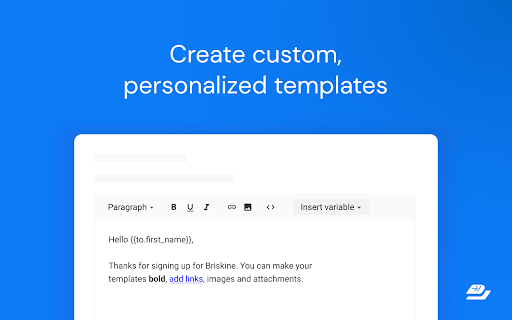
★ Create your own templates
Do you often find yourself typing the same text in your emails? Turn it into a template! Then, use a shortcut to insert it and reply within seconds.
Templates are similar to Gmail™ Canned Responses but are faster, easier to customize, and work on any site.

★ Variables
Do most of your emails start with “Hello firstname”? Press h and then TAB, and Briskine will write “Hello Jennifer” (if you’re writing to Jennifer, of course).

★ Search
Don’t remember your shortcuts? Search and insert templates directly from the compose box.

★ Share templates with your team (Premium)
Make sure everyone has access to your company templates and set a consistent tone for your external emails.

★ Permissions and privacy
Briskine needs broad permissions to work on any site. But you’re always in control — you can block it from running on specific sites (from the blocklist in the Briskine dashboard) or allow it to run only on some sites through Chrome’s extension settings.

Find out more at https://www.briskine.com/
Your feedback is welcome at [email protected]
Write emails faster with templates.

Create templates from repetitive pieces of text. Insert them into your emails or messages in seconds using shortcuts, and respond faster to your customers!
➤ Use for: Customer Support, Sales, Personal productivity.
➤ Works great on Gmail™, Outlook.com, LinkedIn, Facebook, and many more sites.

★ Keyboard shortcuts (or snippets)
Do you always end your emails with “Kind regards, Ken”? With keyboard shortcuts, you can type kr, press the TAB key, and get the same result — only faster!

★ Create your own templates
Do you often find yourself typing the same text in your emails? Turn it into a template! Then, use a shortcut to insert it and reply within seconds.
Templates are similar to Gmail™ Canned Responses but are faster, easier to customize, and work on any site.

★ Variables
Do most of your emails start with “Hello firstname”? Press h and then TAB, and Briskine will write “Hello Jennifer” (if you’re writing to Jennifer, of course).

★ Search
Don’t remember your shortcuts? Search and insert templates directly from the compose box.

★ Share templates with your team (Premium)
Make sure everyone has access to your company templates and set a consistent tone for your external emails.

★ Permissions and privacy
Briskine needs broad permissions to work on any site. But you’re always in control: you can block it from running on specific sites (from the blocklist in the Briskine dashboard) or allow it to run only on some sites through Chrome’s extension settings.

Find out more at https://www.briskine.com/
Your feedback is welcome at [email protected]
Permissions & access
- Permissions
- tabscontextMenusstoragescriptingunlimitedStorage
- Host access
- https://*/*, http://*/*
Screenshots



About
Write emails faster with templates.

Create templates from repetitive pieces of text. Insert them into your emails or messages in seconds using shortcuts, and respond faster to your customers!
➤ Use for: Customer Support, Sales, Personal productivity.
➤ Works great on Gmail™, Outlook.com, LinkedIn, Facebook, and many more sites.

★ Keyboard shortcuts (or snippets)
Do you always end your emails with “Kind regards, Ken”? With keyboard shortcuts, you can type kr, press the TAB key, and get the same result — only faster!

★ Create your own templates
Do you often find yourself typing the same text in your emails? Turn it into a template! Then, use a shortcut to insert it and reply within seconds.
Templates are similar to Gmail™ Canned Responses but are faster, easier to customize, and work on any site.

★ Variables
Do most of your emails start with “Hello firstname”? Press h and then TAB, and Briskine will write “Hello Jennifer” (if you’re writing to Jennifer, of course).

★ Search
Don’t remember your shortcuts? Search and insert templates directly from the compose box.

★ Share templates with your team (Premium)
Make sure everyone has access to your company templates and set a consistent tone for your external emails.

★ Permissions and privacy
Briskine needs broad permissions to work on any site. But you’re always in control: you can block it from running on specific sites (from the blocklist in the Briskine dashboard) or allow it to run only on some sites through Chrome’s extension settings.

Find out more at https://www.briskine.com/
Your feedback is welcome at [email protected]
Technical
- Version
- 7.16.14
- Manifest
- V3
- Size
- 480KiB
- Min Chrome
- 88
- Languages
- 1
- Featured
- Yes
Metadata
- ID
- lmcngpkjkplipamgflhioabnhnopeabf
- Developer ID
- u458d1a9237d818a3c9f9b319de3c8197
- Developer Email
- [email protected]
- Created
- Jun 24, 2014
- Last Updated (Store)
- May 20, 2026
- Last Scraped
- Jun 22, 2026
- Website
- briskine.com
- Support URL
- https://help.briskine.com/
- Privacy Policy
- https://www.briskine.com/privacy/
Similar extensions
Alternatives to Briskine: Email templates for Gmail™, ranked by description similarity.

TinyJunko: Open AI ChatGPT and email templates for Gmail
Write emails faster! Increase your productivity with templates and Open AI ChatGPT on Gmail.
43
★ 5.0

Message Templates
Custom templates for messages, Gmail, Facebook.
909
★ 4.1

Emplates
Save and insert email templates in Gmail and Outlook, boosting your productivity and optimizing your workflow.
7
★ 5.0

Templateasy
Create, modify, and use tailor-made templates efficiently, saving time when replying to emails.
5

Gmail Assistant
Write emails faster in Gmail with predictive suggestions and your own customizable phrases.
7

Text Expander & Form Autofill for Google Chrome™
Record and replay form submissions, and use text expansion shortcuts to fill forms faster.
14
My Canned Responses
Create and manage your canned response templates easily on Gmail, Github, Stackoverflow, Outlook, UpWork and more.
796
★ 5.0

TemplateIn - Templates for the web
Access your templates anywhere on the web.
5
★ 5.0
Data sourced from the Chrome Web Store · last verified Jun 22, 2026.