
Document Scanner
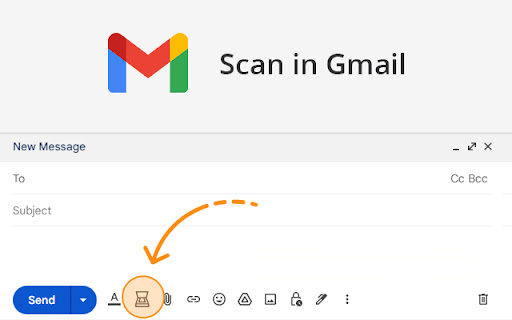
Scan documents on web pages and directly save them as attachments or images in web apps like Gmail, Outlook and Salesforce.
As of June 2026, Document Scanner has 6,000 users and a 4.33/5 rating from 3 reviews in the Workflow & Planning category.
Usersdown 25.0 percent−25.0%
6.0K
6,000
Ratingno change0%
4.33
3 reviews
Reviewsno change0%
3
Version
2.2.601
Manifest V3
90-day change · In the last 90 days this extension lost 2.0K users, 1 version update.
History
4 snapshotsTracking since Jun 2, 2026.
View as table
| Date | Users | Rating | Reviews | Version |
|---|---|---|---|---|
| Jun 2, 2026 | 8.0K | 4.33 | 3 | 2.1.1111 |
| Jun 6, 2026 | 8.0K | 4.33 | 3 | 2.2.601 |
| Jun 10, 2026 | 9.0K | 4.33 | 3 | 2.2.601 |
| Jun 22, 2026 | 8.0K | 4.33 | 3 | 2.2.601 |
| Now | 6.0K | 4.33 | 3 | 2.2.601 |
Permissions & access
- Permissions
- activeTabscriptingstorage
- Host access
- https://*.google.com/, https://*.gmail.com/, https://*.mail.google.com/, https://*.inbox.google.com/, https://*.lightning.force.com/*, https://*.force.com/, https://*.salesforce.com/, https://*.outlook.live.com/, https://*.outlook.office.com/, https://*.outlook.office365.com/
Screenshots


About
The extension enables scanning documents on web pages and directly save them as attachments or images in web apps like Gmail, Outlook and Salesforce.

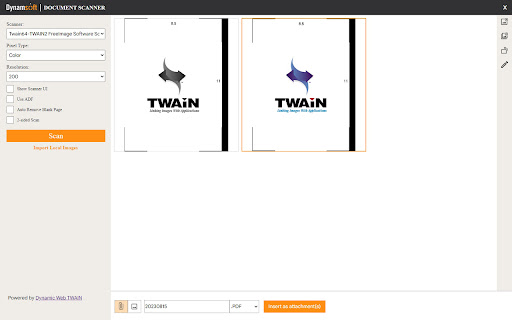
A scanner modal will appear after pressing the scanner icon added by the extension in the toolbar of supported web apps.

1. Is the Document Scanner available for free?

It is free for personal use. If you want to use it for commercial purposes, please contact us at [email protected].

2. On which platforms and browsers does the Document Scanner Extension operate?

Supported Platforms: Windows, macOS, and Linux.
Supported Browsers: Chrome and Edge.
Supported Web Apps: Gmail, Outlook and Salesforce.

3. Which file formats are supported by the extension for saving as attachments?

The extension supports saving attachments in multiple-page PDF and JPG formats.

Dynamic Web TWAIN is used to provide the ability to scan documents via scanners. You can learn about how to use Dynamic Web TWAIN to add document scanning to your web application by reading the docs: https://www.dynamsoft.com/web-twain/docs/introduction/index.html
Technical
- Version
- 2.2.601
- Manifest
- V3
- Size
- 5.1MiB
- Min Chrome
- 88
- Languages
- 1
- Featured
- No
Metadata
- ID
- glelnofehkiolecgdagikdfkfhoafogd
- Developer ID
- uefb61be15addea4e6f1631859a5ea531
- Developer Email
- [email protected]
- Created
- Feb 15, 2023
- Last Updated (Store)
- Jun 1, 2026
- Last Scraped
- Jun 22, 2026
- Website
- dynamsoft.com
- Privacy Policy
- http://www.dynamsoft.com/PrivacyStatement.aspx
Similar extensions
Alternatives to Document Scanner, ranked by description similarity.

Mobile Data Collection - Scan-IT to Office
Field Data Acquisition and Barcode Scanning for Google Chrome
10.0K
★ 3.6

SmartDocs Document Viewer
Optimizes document display and rendering of Documents managed on SmartDocs platform
5

DocuSplit 2.0 Google Chrome Extension
DocuSplit 2.0 Google Chrome Extension
600
★ 5.0

CleanMyPDF - AI PDF Text Extractor
Extract and clean text from PDFs with AI-powered formatting preservation. Premium OCR and export features available.
51

Save Emails as PDF by cloudHQ
Export, convert and save Gmail™ emails as a PDF document
100.0K
★ 4.3

Webpage to DOCX
Convert any web page or local HTML file to DOCX.
5.0K
★ 3.4

Make PDF Look Scanned
No need for printers and scanners anymore - everything you need to do is just a few clicks.
2.0K
★ 4.0

DocsWork Editor for documents DOC & DOCX
Create and edit DOC & DOCX documents with an editor online
30.0K
★ 3.7
Data sourced from the Chrome Web Store · last verified Jun 22, 2026.