
Webpage to DOCX
Convert any web page or local HTML file to DOCX.
As of June 2026, Webpage to DOCX has 5,000 users and a 3.44/5 rating from 16 reviews in the Workflow & Planning category.
Usersup 25.0 percent+25.0%
5.0K
5,000
Ratingno change0%
3.44
16 reviews
Reviewsno change0%
16
Version
1.2.9
Manifest V3
90-day change · In the last 90 days this extension gained 1.0K users, 1 version update.
History
2 snapshotsTracking since Apr 5, 2026.
View as table
| Date | Users | Rating | Reviews | Version |
|---|---|---|---|---|
| Apr 5, 2026 | 4.0K | 3.44 | 16 | 1.2.8 |
| May 23, 2026 | 4.0K | 3.44 | 16 | 1.2.9 |
| Now | 5.0K | 3.44 | 16 | 1.2.9 |
Changelog
- May 14, 2026description
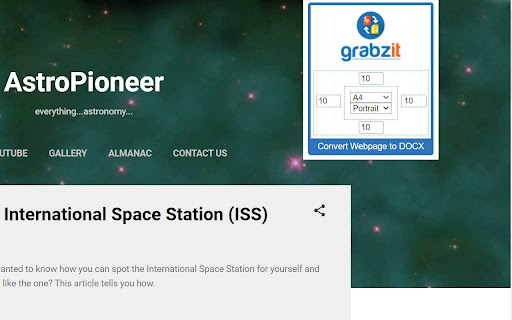
Quickly convert any webpage or local HTML file to a DOCX document, that can be opened in Microsoft Word and other applications. This extension reads the content of the current web page and sends it to GrabzIt's API for conversion before automatically downloading it to your computer.

Once you have installed your extension just follow the instructions in the extension popup to sign up and get converting!

While using GrabzIt is and always will be free forever. After your automatic premium free trial expires you can optionally upgrade to hide cookie notices, increase your monthly allowance, and set headers and footers.

You can even secure your DOCX by setting a password for the document.
Need to edit a webpage or save it for later? Quickly convert any webpage or local HTML file into an editable DOCX document that can be opened in Microsoft Word, Google Docs, and other word processors.

Perfect for:

- Saving articles, recipes, or research for offline reading.
- Extracting website text so you can edit or reformat it.
- Archiving digital receipts and order confirmations.

How It Works: With a single click, this extension securely sends the current web page to GrabzIt's powerful API. Because web pages and Word documents are built differently, the API intelligently extracts the text, images, and core structure (like headings and paragraphs) and converts them into a clean, easy-to-edit format. The DOCX file is then automatically downloaded to your computer. For added security, you can even set a password to protect your downloaded document!

Getting Started & Pricing: Once installed, simply follow the instructions in the extension popup to create your free GrabzIt account and start converting.

- Free Tier: Core webpage-to-DOCX conversions will always be free.
- Premium Features: You'll start with a free trial of our Premium tier. Afterward, you can optionally upgrade to hide cookie banners, increase your monthly conversion allowance, customize your document's headers and footers and more.

Backed by GrabzIt Limited's enterprise-grade infrastructure. Fast, secure, and reliable.
Permissions & access
- Permissions
- activeTabstoragescriptingdownloads
- Host access
- *://grabz.it/*, file:///*
Screenshots


About
Need to edit a webpage or save it for later? Quickly convert any webpage or local HTML file into an editable DOCX document that can be opened in Microsoft Word, Google Docs, and other word processors.

Perfect for:

- Saving articles, recipes, or research for offline reading.
- Extracting website text so you can edit or reformat it.
- Archiving digital receipts and order confirmations.

How It Works: With a single click, this extension securely sends the current web page to GrabzIt's powerful API. Because web pages and Word documents are built differently, the API intelligently extracts the text, images, and core structure (like headings and paragraphs) and converts them into a clean, easy-to-edit format. The DOCX file is then automatically downloaded to your computer. For added security, you can even set a password to protect your downloaded document!

Getting Started & Pricing: Once installed, simply follow the instructions in the extension popup to create your free GrabzIt account and start converting.

- Free Tier: Core webpage-to-DOCX conversions will always be free.
- Premium Features: You'll start with a free trial of our Premium tier. Afterward, you can optionally upgrade to hide cookie banners, increase your monthly conversion allowance, customize your document's headers and footers and more.

Backed by GrabzIt Limited's enterprise-grade infrastructure. Fast, secure, and reliable.
Technical
- Version
- 1.2.9
- Manifest
- V3
- Size
- 250KiB
- Min Chrome
- 88
- Languages
- 1
- Featured
- No
Metadata
- ID
- lgnilmnjhjckgcgbljmemfmblpjmjfjn
- Developer ID
- u124e10a91e2cdaa72102129bede56633
- Developer Email
- [email protected]
- Created
- Jun 23, 2023
- Last Updated (Store)
- May 11, 2026
- Last Scraped
- Jun 21, 2026
- Website
- https://grabz.it/
- Support URL
- https://grabz.it/contact/
- Privacy Policy
- https://grabz.it/legal/privacy-policy/
Similar extensions
Alternatives to Webpage to DOCX, ranked by description similarity.
Webpage to PDF
Convert any web page or local HTML file into a PDF document that resembles as closely as possible what you see in the browser.
437
★ 2.7

Webpage to Video
Converts web pages or local HTML files you are currently looking at into videos. The videos are produced in the mp4 (H264) format.
1.0K
★ 3.3

Docx QuickView
View local Word (.docx) files instantly in your browser.
80
★ 1.0

PDF to HTML
Convert PDF files to HTML documents, just navigate to the PDF file and use GrabzIt.
108

Quick Google Docs Create
Quick Google Docs Create
256
★ 5.0

Word to PDF
Convert Word to PDF for free.
10.0K
★ 4.1
OpenOffice Writer online for Word documents
Create and edit doc and docx documents with OpenOffice Writer online
50.0K
★ 3.2
Convert PDF to Word
Free PDF File Converter - Convert PDF to DOC/DOCS for Free.
5.0K
★ 3.4
Data sourced from the Chrome Web Store · last verified Jun 21, 2026.