
DocuSplit 2.0 Google Chrome Extension
DocuSplit 2.0 Google Chrome Extension
As of May 2026, DocuSplit 2.0 Google Chrome Extension has 600 users and a 5.00/5 rating from 1 reviews in the Workflow & Planning category.
Usersup 2.2 percent+2.2%
600
600
Ratingno change0%
5.00
1 reviews
Reviewsno change0%
1
Version
1.0.6
Manifest V3
History
3 snapshotsTracking since Apr 1, 2026.
View as table
| Date | Users | Rating | Reviews | Version |
|---|---|---|---|---|
| Apr 1, 2026 | 587 | 5.00 | 1 | 1.0.6 |
| Apr 30, 2026 | 590 | 5.00 | 1 | 1.0.6 |
| May 27, 2026 | 608 | 5.00 | 1 | 1.0.6 |
| Now | 600 | 5.00 | 1 | 1.0.6 |
Permissions & access
- Permissions
- None declared
- Host access
- None declared
Screenshots


About
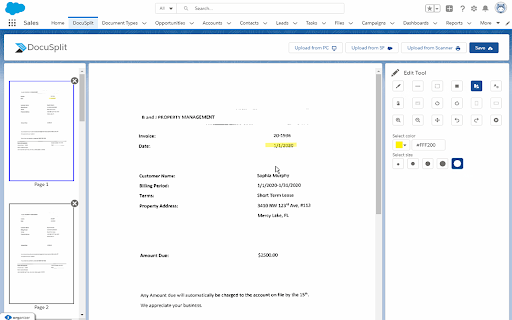
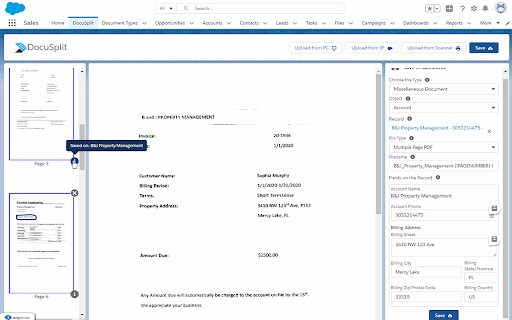
The Docusplit App was developed with the purpose of streamlining and securing document scanning and PDF extraction directly within the Salesforce platform. The App allows users to scan documents or import them from a users PC or Salesforce record, manipulate or annotate each page within the document(s) and save a page or group of pages to a variety of Salesforce records.

The Docusplit App is widely used across a variety of organizations within the Salesforce eco-system. The most common use cases are represented by a need to scan or extract physical or digital documents securely.

Salesforce users who require a high level of security, especially those within the government or medical industry will benefit from Docusplits native functionality. Users can scan physical documents directly into Salesforce, bypassing the requirement to save scanned items to a users local PC. Further, users can manipulate documents by blacking-out or cropping sensitive information while annotating or highlighting other data points within the documents.

Organizations that choose to benefit from the streamlining functions of Docusplit can choose not just from the scanning functions provided, but by its import functions as well. The two import functions, Import from PC and Import from Salesforce are most commonly used by organizations that receive PDF or image (jpg, png, etc) files directly into Salesforce or via email. Those documents can be opened within Salesforce and routed to their corresponding records.

As an example, many organizations, especially loan providers and shipping logistic providers receive due diligence documents and bills/shipping documents from customers and/or vendors via portals. Those documents can be received in Salesforce and channeled within seconds post-review.

The purpose of the Docusplit Chrome Extension is to allow Docusplit users to rasterize PDF's without transmitting the PDF data to external services.
Technical
- Version
- 1.0.6
- Manifest
- V3
- Size
- 2.09MiB
- Min Chrome
- 88
- Languages
- 1
- Featured
- No
Metadata
- ID
- nibfohpdadcpnjodofbjkhhejbkjfdci
- Developer ID
- uc688864f625f8c5c17ef6d98ce6be8bc
- Developer Email
- [email protected]
- Created
- Feb 6, 2021
- Last Updated (Store)
- Sep 13, 2024
- Last Scraped
- May 27, 2026
- Website
- docusplit.com
- Support URL
- https://www.docusplit.com/#contacts
- Privacy Policy
- —
Similar extensions
Alternatives to DocuSplit 2.0 Google Chrome Extension, ranked by description similarity.

RaiseITNow
This tool is used to Capture or record your screen, annotate easily, and save directly to Salesforce Org.
6

Split PDF Document
Use Split PDF Document to extract pages from file. Split or unmerge PDF documents with ease. Separate pages and break up PDF files.
489
★ 5.0

Scan docs from scanners in Salesforce & Gmail
Attach documents from flatbed ADF scanners as PDF in Chrome browser from other web apps too: Dropbox, Office 365, QBO, SAP etc.
795

DocuFast
Documentation capture and management Chrome extension
65
★ 5.0

Mobile Data Collection - Scan-IT to Office
Field Data Acquisition and Barcode Scanning for Google Chrome
10.0K
★ 3.6

Document Scanner
Scan documents on web pages and directly save them as attachments or images in web apps like Gmail, Outlook and Salesforce.
6.0K
★ 4.3

Elements.cloud
This Chrome Extension allows the Elements documentation and analytics to be displayed inside Salesforce and Jira.
3.0K
★ 5.0

DESelect Search in Salesforce Marketing Cloud
Easily search for objects in SFMC: all Content Builder objects, data extensions, query activities, data filters, automations, ...
2.0K
★ 4.8
Data sourced from the Chrome Web Store · last verified May 27, 2026.