
Axure Cloud Extension
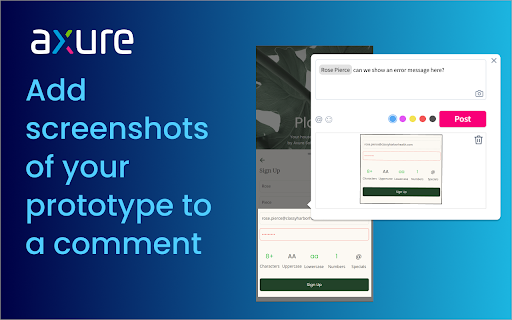
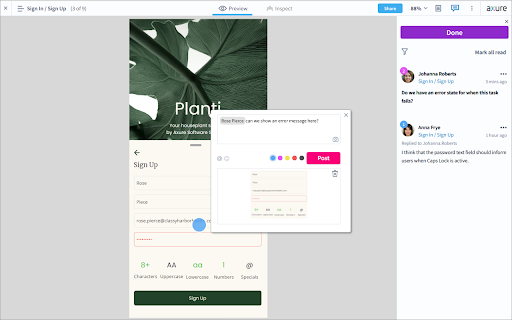
Capture screenshots of your prototype to attach to Axure Cloud comments. When commenting, click the camera icon to add a screenshot.
As of May 2026, Axure Cloud Extension has 10,000 users and a 3.29/5 rating from 17 reviews in the Workflow & Planning category.
Usersno change0%
10.0K
10,000
Ratingdown 0.6 percent−0.6%
3.29
17 reviews
Reviewsup 6.3 percent+6.3%
17
Version
1.2.1
Manifest V3
History
1 snapshotsTracking since Apr 26, 2026.
View as table
| Date | Users | Rating | Reviews | Version |
|---|---|---|---|---|
| Apr 26, 2026 | 10.0K | 3.31 | 16 | 1.2.1 |
| Now | 10.0K | 3.29 | 17 | 1.2.1 |
Permissions & access
- Permissions
- tabs
- Host access
- <all_urls>
Screenshots


About
Easily add context to your Axure Cloud discussions by attaching screenshots of your prototype to a comment. After installing the extension, refresh your browser, and then click the camera icon when adding a comment.

Please note: This is only for use for screenshotting in Axure Cloud and attaching to comments within Axure Cloud discussions and is not a general screenshot tool.
If you have any issues or questions, please email [email protected] To download the latest version of Axure RP or a free 30-day trial, visit axure.com/download.
Technical
- Version
- 1.2.1
- Manifest
- V3
- Size
- 18.74KiB
- Min Chrome
- 88
- Languages
- 1
- Featured
- No
Metadata
- ID
- fiidicpfcmmoobdpadllfjklbdegfjaf
- Developer ID
- u08479a02e5a15a66ec66a77388d0967f
- Developer Email
- [email protected]
- Created
- Dec 10, 2014
- Last Updated (Store)
- Nov 2, 2022
- Last Scraped
- May 23, 2026
- Website
- axure.com
- Privacy Policy
- https://www.axure.com/privacy
Similar extensions
Alternatives to Axure Cloud Extension, ranked by description similarity.

Gorira
A chrome extension to help you screenshot your web pages and create JIRA tickets
219
★ 5.0

Zoho Annotator
The most elegant and efficient annotation tool.
20.0K
★ 4.7

Free Screenshot Capture & Annotation Tool
Useful extension for taking screenshots and adding annotations to them. Visualize, annotate, and share screenshots in a few clicks!
1.0K
★ 5.0

Screen Capture - A Review and Feedback Tool
Extension to aid the process of reviews and audits
88
★ 5.0

ViewAll - Screenshots, Comments, Team & AI Sharing with Ease
Encrypted web feedback tool for teams. Capture screenshots, code, and accessibility data. Share securely and export for AI.
7
★ 5.0

Moqups
Capture screenshots, and create projects with Moqups
10.0K
★ 5.0

Screenshot & Screen Recorder w/ Webcam-Droplr
The Easiest All-In-One Screenshot & Screen Recorder
10.0K
★ 4.0

Listeri
CLICK - COMMENT - SHARE: The Simple Screenshot Tool
10
★ 5.0
Data sourced from the Chrome Web Store · last verified May 23, 2026.