
Auto Picture-in-Picture
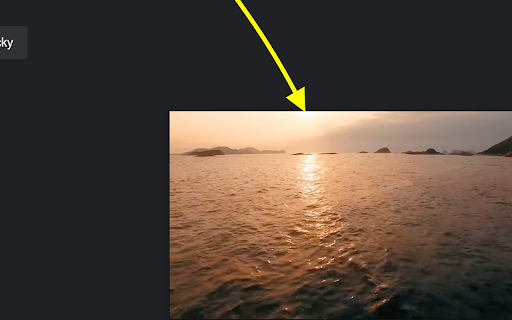
Automatically enters Picture-in-Picture mode when switching tabs or applications.
As of May 2026, Auto Picture-in-Picture has 72 users and a 2.00/5 rating from 8 reviews in the Productivity category.
Usersup 1.4 percent+1.4%
72
72
Ratingno change0%
2.00
8 reviews
Reviewsno change0%
8
Version
1.1
Manifest V3
History
3 snapshotsTracking since Apr 1, 2026.
View as table
| Date | Users | Rating | Reviews | Version |
|---|---|---|---|---|
| Apr 1, 2026 | 71 | 2.00 | 8 | 1.1 |
| Apr 30, 2026 | 77 | 2.00 | 8 | 1.1 |
| May 29, 2026 | 74 | 2.00 | 8 | 1.1 |
| Now | 72 | 2.00 | 8 | 1.1 |
Permissions & access
- Permissions
- storage
- Host access
- <all_urls>
Screenshots

About
Auto Picture in Picture

Auto Picture-in-Picture is a lightweight and intuitive Chrome extension that enhances your video-watching experience by automatically enabling Picture-in-Picture mode whenever you switch tabs or applications. Seamlessly continue watching your favorite videos while multitasking across different tabs or programs without missing a beat.

Key Features:

	•	Automatic Activation: Instantly enters Picture-in-Picture mode when you navigate away from a playing video—no clicks required.
	•	Seamless Integration: Returns the video to its original place when you go back to the tab, providing a smooth transition.
	•	User-Friendly: Simple setup with no complicated configurations—just install and enjoy.
	•	Productivity Boost: Perfect for staying engaged with webinars, tutorials, or entertainment while working on other tasks.

How It Works:

	1.	Install the Extension: Add Auto Picture-in-Picture to your Chrome browser with a single click.
	2.	Play a Video: Visit your favorite video site and start playing a video.
	3.	Switch Tabs or Apps: Navigate to a different tab or application.
	4.	Enjoy PiP Mode: The video will automatically pop out into a small, resizable window that stays on top of other windows.
	5.	Return Anytime: Go back to the original tab to exit Picture-in-Picture mode seamlessly.

Why Choose Auto Picture-in-Picture?

	•	Effortless Multitasking: Keep videos in view while browsing, working, or chatting.
	•	Stay Informed: Perfect for following tutorials or lectures without interrupting your workflow.
	•	Enhance Entertainment: Watch shows or live streams while engaging in other activities.
	•	No Distractions: Avoid the hassle of manually activating Picture-in-Picture mode every time.

Get Started Now!

Experience a new level of convenience and productivity. Install Auto Picture-in-Picture today and transform the way you watch videos on your browser.

Add to Chrome

Support and Feedback:

We value your feedback! If you have any questions or suggestions, please don’t hesitate to contact us through the support page.

Note: Chrome security policies only allow one Auto PiP result per each user interaction. This means when you first play a video and click off the tab it will go to auto picture in picture. If you then go back to the video and click off the tab a second time it will not go into PiP automatically. Either the video will need to be paused and played to register a user interaction or the PiP button on the video player must be used.
Technical
- Version
- 1.1
- Manifest
- V3
- Size
- 23.31KiB
- Min Chrome
- 88
- Languages
- 1
- Featured
- No
Metadata
- ID
- fadphegbibgjfnnponedieonecdijfei
- Developer ID
- u958b283ea7cc43fc2a5897dfd1a7da4c
- Developer Email
- [email protected]
- Created
- Oct 7, 2024
- Last Updated (Store)
- Oct 29, 2024
- Last Scraped
- May 29, 2026
- Website
- —
- Support URL
- —
- Privacy Policy
- https://justincooper96.wixsite.com/syneticai/privacy
Similar extensions
Alternatives to Auto Picture-in-Picture, ranked by description similarity.
PiP (Picture in picture)
Watch videos in a floating window Picture in Picture (PIP) outside the browser window or on top of any other application.
200.0K
★ 4.2

Picture in Picture | PiP | Floating Player for Youtube
Watch video in a floating PiP window. Picture in Picture for YouTube, Netflix & all sites. Always on top.
100.0K
★ 4.9

Automatic Picture-in-Picture (Auto PiP)
Automatic Picture-in-Picture on tab switch, with one-click toolbar PiP, disabled sites, and safer cleanup.
10.0K
★ 5.0

Picture in Picture - Floating Player (PiP)
Watch videos in a floating Picture-in-Picture (PiP) mode. Use a floating player to watch videos while doing something else online.
10.0K
★ 4.6

Picture-in-Picture Anywhere
Show any tab in Picture-in-Picture.
125
★ 5.0

Youtube Pip Picture in Picture & Floating Video Player
Youtube Pip Picture in Picture & Floating Video Player. Open active video in Picture-in-Picture
149

Picture-in-Picture - Mini Video Player
Watch video using Picture-in-Picture
4.0K
★ 4.9

Picture in Picture for Chrome
Use this extension to watch videos on a floating mini player while browsing other tabs.
10
Data sourced from the Chrome Web Store · last verified May 29, 2026.