
Power Automate Actions Handler
Record, copy, and manage Power Automate actions from SharePoint. Capture HTTP requests and duplicate actions between tenants.
As of June 2026, Power Automate Actions Handler has 1,000 users and a 5.00/5 rating from 1 reviews in the Developer Tools category.
Usersno change0%
1.0K
1,000
Ratingno change0%
5.00
1 reviews
Reviewsno change0%
1
Version
1.0.17
Manifest V3
90-day change · In the last 90 days this extension 1 version update.
History
3 snapshotsTracking since Apr 20, 2026.
View as table
| Date | Users | Rating | Reviews | Version |
|---|---|---|---|---|
| Apr 20, 2026 | 1.0K | 5.00 | 1 | 1.0.16 |
| Apr 25, 2026 | 1.0K | 5.00 | 1 | 1.0.16 |
| May 9, 2026 | 1.0K | 5.00 | 1 | 1.0.16 |
| Now | 1.0K | 5.00 | 1 | 1.0.17 |
Changelog
- May 9, 2026description
The Power Automate Actions tool serves as a versatile solution for managing Power Automate actions. It offers the following functionalities:

1. Recording all HTTP requests from SharePoint:

- Capturing requests invoked directly from the SharePoint/ MS Graph Explorer interface.
- Recording requests executed from the browser console.
- Gathering requests executed with SP Editor.

2. Duplicating Actions Between Tenants and Environments:

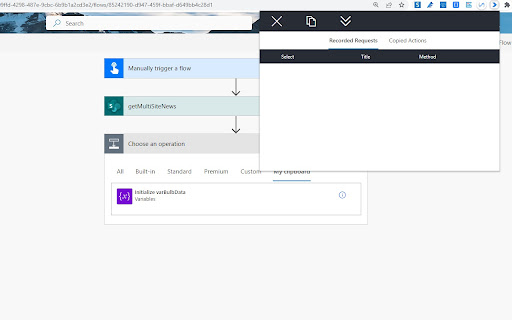
- Easily copy all actions from the "My Clipboard" section and paste them into the desired environment.

3. Copying Actions from Community Blogs:
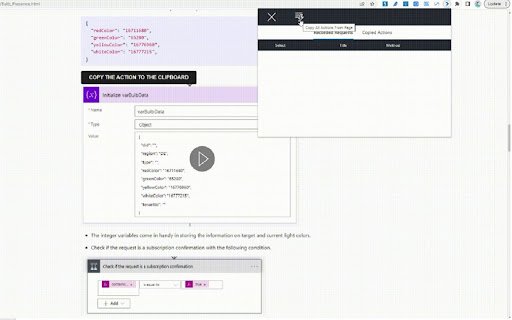
- Copy all actions stored on a page.
- Copy individual actions using the provided copy button.
- Check out our article on bulb presence, "https://michalkornet.com/2023/04/25/Bulb_Presence.html," for a reference.

4. Storing Actions in a More Persistent Way.

5. Extended Paste Feature for the New Power Automate Editor:
- In version 1.0.7, a feature allowing users to paste recorded actions into the new Power Automate editor has been introduced.

The project is open-source, and we encourage you to provide feedback in the issues section of the repository: "https://github.com/mkm17/powerautomate-actions-extension."


Change Log:
1.0.16
- Adds default predefined actions functionality.
- Adds side panel handler

1.0.15
- Adds predefined actions functionality.

1.0.14
- Export and import favorites functionality.

1.0.13
- Added a Settings tab with options to configure the maximum recording time and toggle the visibility of the action search bar.
- Added a setting to manually override page type detection.

1.0.12
- Added search functionality across all tabs to filter actions by title.
- Extended title column width for better readability of action titles.
- Added option to peek into action details via info button.

1.0.11
- Added Favorite Actions feature.

**Fixes**
- Changed action property name in Modern Editor.

1.0.10
- Added recording capability on the SharePoint Admin page.
- Enabled the ability to copy actions within iframes (including the make.powerapps page and directly from Canvas Apps).
**Fixes**
- Rendering record buttons on SharePoint modern pages – additional iframe fix.
- Fix action icons rendering

1.0.7
- Fixed pasting recorded actions into the new Power Automate editor.
- Added a notification banner.

1.0.6
- Added support for HTTP Microsoft Graph actions.
- Enabled recording of actions on Microsoft Graph Explorer and classic SharePoint pages.
- Enhanced persistence of recorded actions.
- Fixed scrolling for actions.

1.0.5
- Fixed an issue with storing new editor Power Automate actions. (DEPRICATED)

1.0.4
- Added support for copying actions from the new Power Automate editor.

1.0.3
- Improved handling of SharePoint requests using the _vti_bin endpoint.
The Power Automate Actions tool serves as a versatile solution for managing Power Automate actions. It offers the following functionalities:

1. Recording all HTTP requests from SharePoint:

- Capturing requests invoked directly from the SharePoint/ MS Graph Explorer interface.
- Recording requests executed from the browser console.
- Gathering requests executed with SP Editor.

2. Duplicating Actions Between Tenants and Environments:

- Easily copy all actions from the "My Clipboard" section and paste them into the desired environment.

3. Copying Actions from Community Blogs:
- Copy all actions stored on a page.
- Copy individual actions using the provided copy button.
- Check out our article on bulb presence, "https://michalkornet.com/2023/04/25/Bulb_Presence.html," for a reference.

4. Storing Actions in a More Persistent Way.

5. Extended Paste Feature for the New Power Automate Editor:
- In version 1.0.7, a feature allowing users to paste recorded actions into the new Power Automate editor has been introduced.

The project is open-source, and we encourage you to provide feedback in the issues section of the repository: "https://github.com/mkm17/powerautomate-actions-extension."


Change Log:
1.0.17
- Improved favorites import to merge with existing favorites, skip duplicates, and refresh favorites via runtime live updates.

1.0.16
- Adds default predefined actions functionality.
- Adds side panel handler

1.0.15
- Adds predefined actions functionality.

1.0.14
- Export and import favorites functionality.

1.0.13
- Added a Settings tab with options to configure the maximum recording time and toggle the visibility of the action search bar.
- Added a setting to manually override page type detection.

1.0.12
- Added search functionality across all tabs to filter actions by title.
- Extended title column width for better readability of action titles.
- Added option to peek into action details via info button.

1.0.11
- Added Favorite Actions feature.

**Fixes**
- Changed action property name in Modern Editor.

1.0.10
- Added recording capability on the SharePoint Admin page.
- Enabled the ability to copy actions within iframes (including the make.powerapps page and directly from Canvas Apps).
**Fixes**
- Rendering record buttons on SharePoint modern pages – additional iframe fix.
- Fix action icons rendering

1.0.7
- Fixed pasting recorded actions into the new Power Automate editor.
- Added a notification banner.

1.0.6
- Added support for HTTP Microsoft Graph actions.
- Enabled recording of actions on Microsoft Graph Explorer and classic SharePoint pages.
- Enhanced persistence of recorded actions.
- Fixed scrolling for actions.

1.0.5
- Fixed an issue with storing new editor Power Automate actions. (DEPRICATED)

1.0.4
- Added support for copying actions from the new Power Automate editor.

1.0.3
- Improved handling of SharePoint requests using the _vti_bin endpoint.
Permissions & access
- Permissions
- activeTabwebRequestbackgroundstorageclipboardReadclipboardWritesidePanel
- Host access
- https://*/*
Screenshots


About
The Power Automate Actions tool serves as a versatile solution for managing Power Automate actions. It offers the following functionalities:

1. Recording all HTTP requests from SharePoint:

- Capturing requests invoked directly from the SharePoint/ MS Graph Explorer interface.
- Recording requests executed from the browser console.
- Gathering requests executed with SP Editor.

2. Duplicating Actions Between Tenants and Environments:

- Easily copy all actions from the "My Clipboard" section and paste them into the desired environment.

3. Copying Actions from Community Blogs:
- Copy all actions stored on a page.
- Copy individual actions using the provided copy button.
- Check out our article on bulb presence, "https://michalkornet.com/2023/04/25/Bulb_Presence.html," for a reference.

4. Storing Actions in a More Persistent Way.

5. Extended Paste Feature for the New Power Automate Editor:
- In version 1.0.7, a feature allowing users to paste recorded actions into the new Power Automate editor has been introduced.

The project is open-source, and we encourage you to provide feedback in the issues section of the repository: "https://github.com/mkm17/powerautomate-actions-extension."


Change Log:
1.0.17
- Improved favorites import to merge with existing favorites, skip duplicates, and refresh favorites via runtime live updates.

1.0.16
- Adds default predefined actions functionality.
- Adds side panel handler

1.0.15
- Adds predefined actions functionality.

1.0.14
- Export and import favorites functionality.

1.0.13
- Added a Settings tab with options to configure the maximum recording time and toggle the visibility of the action search bar.
- Added a setting to manually override page type detection.

1.0.12
- Added search functionality across all tabs to filter actions by title.
- Extended title column width for better readability of action titles.
- Added option to peek into action details via info button.

1.0.11
- Added Favorite Actions feature.

**Fixes**
- Changed action property name in Modern Editor.

1.0.10
- Added recording capability on the SharePoint Admin page.
- Enabled the ability to copy actions within iframes (including the make.powerapps page and directly from Canvas Apps).
**Fixes**
- Rendering record buttons on SharePoint modern pages – additional iframe fix.
- Fix action icons rendering

1.0.7
- Fixed pasting recorded actions into the new Power Automate editor.
- Added a notification banner.

1.0.6
- Added support for HTTP Microsoft Graph actions.
- Enabled recording of actions on Microsoft Graph Explorer and classic SharePoint pages.
- Enhanced persistence of recorded actions.
- Fixed scrolling for actions.

1.0.5
- Fixed an issue with storing new editor Power Automate actions. (DEPRICATED)

1.0.4
- Added support for copying actions from the new Power Automate editor.

1.0.3
- Improved handling of SharePoint requests using the _vti_bin endpoint.
Technical
- Version
- 1.0.17
- Manifest
- V3
- Size
- 836KiB
- Min Chrome
- 88
- Languages
- 1
- Featured
- No
Metadata
- ID
- eoeddkppcaagdeafjfiopeldffkhjodl
- Developer ID
- u70230acac6c881db04df963c2e7e7e47
- Developer Email
- [email protected]
- Created
- May 24, 2023
- Last Updated (Store)
- May 5, 2026
- Last Scraped
- Jun 8, 2026
- Website
- michalkornet.com
- Privacy Policy
- —
Similar extensions
Alternatives to Power Automate Actions Handler, ranked by description similarity.

Power Automate Tools
This extension enables editing a Power Automate flow definition as JSON.
10.0K
★ 4.0

SharePoint Admin Shortcuts
Quick access to common SharePoint admin pages and centers
126

Flow Run Buddy
View run history for Power Automate Cloud Flows directly from the flow designer
121
★ 1.0

Bot Assistant
Automation Anywhere A360 Assistant
1.0K
★ 5.0

Power Automate Utility
Build tools for Power Automate
317
★ 4.0

Toolshed for Power Platform / Dynamics 365
Utility Bot for Power Platform / Dynamics 365 Developers and Admins
992
★ 5.0

Power Automate Classic View Switcher
Switch Power Automate to classic designer automatically or with one click. Perfect for developers who prefer classic flow editor.
92
★ 5.0

MS Teams Video & Transcript Downloader
Download MS Teams meeting videos and transcripts. Multiple formats (JSON, VTT, Grouped). In-browser.
4.0K
★ 4.8
Data sourced from the Chrome Web Store · last verified Jun 8, 2026.