
Toolshed for Power Platform / Dynamics 365
Utility Bot for Power Platform / Dynamics 365 Developers and Admins
As of June 2026, Toolshed for Power Platform / Dynamics 365 has 992 users and a 5.00/5 rating from 17 reviews in the Developer Tools category.
Usersdown 0.8 percent−0.8%
992
992
Ratingno change0%
5.00
17 reviews
Reviewsno change0%
17
Version
1.1.2
Manifest V3
History
6 snapshotsTracking since Apr 19, 2026.
View as table
| Date | Users | Rating | Reviews | Version |
|---|---|---|---|---|
| Apr 19, 2026 | 1.0K | 5.00 | 17 | 1.1.2 |
| Apr 29, 2026 | 1.0K | 5.00 | 17 | 1.1.2 |
| May 8, 2026 | 1.0K | 5.00 | 17 | 1.1.2 |
| May 16, 2026 | 983 | 5.00 | 17 | 1.1.2 |
| May 25, 2026 | 999 | 5.00 | 17 | 1.1.2 |
| Jun 4, 2026 | 990 | 5.00 | 17 | 1.1.2 |
| Now | 992 | 5.00 | 17 | 1.1.2 |
Permissions & access
- Permissions
- activeTab
- Host access
- None declared
Screenshots

About
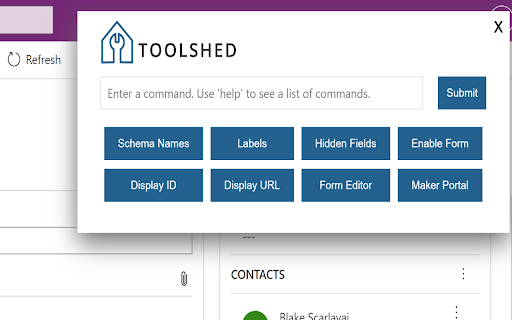
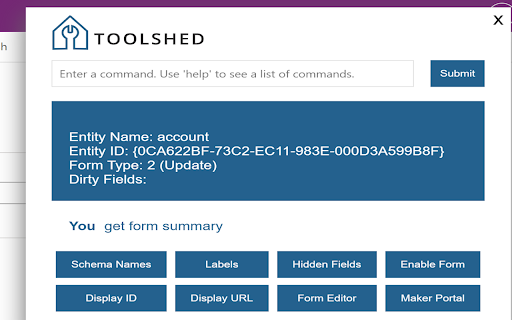
Toolshed for Power Platform / Dynamics 365 is an easy to use and incredibly helpful tool for Power Platform / Dynamics 365 Developers and Admins. Easily execute short commands that return a quick response from the extension. Commands such as showing hidden form fields, enabling fields, showing attribute schema names, the record ID, and entity type code.

Execute basic natural language query to quickly retrieve fields from a specific record.
Example: "Get telephone1 from account where name is Contoso"

Execute an update command to update hidden fields on the current record.
Example: "Update telephone1 to 123456789"

Type "help" to view a full list of commands within the extension.

Full list of commands:
   Create web resource in [solution name] - Open the dialog to create a web resource in the specified solution
   Disable preview url - Disables the preview url for the maker portal navigation commands to use the normal url instead
   Display ID - Displays the current row id
   Display URL - Displays the current row URL
   Enable form - Enables all the form fields
   Enable preview url - Enables the preview url for the maker portal navigation commands (make.preview.powerapps.com)
   Fill form - Populate the form with random data
   Get dirty fields - Display a list of dirty form fields
   Get entity type code - Displays the current entity type code
   Get form summary - Displays the table name, id, type code and dirty fields
   Get form type - Displays the form type
   Get roles - Displays the current user's roles
   Get user info - Displays the current user's domain name, user id, BU ID, BU Name and roles
   Get version - Displays the current application version
   Go to [table] - Navigate to the specified table form
   Open admin center - Opens the admin center
   Open apps - Opens the list of apps in the maker portal
   Open default solution - Opens the default solution in the maker portal
   Open diagnostics page - Opens the diagnostics page for the environment
   Open [table] in default solution - Opens the specified table in the default solution
   Open [table] in solution [solution] - Opens the specified table in the specified solution
   Open flows - Opens the list of flows in the maker portal
   Open form editor - Opens the current form's editor
   Open maker portal - Opens the maker portal
   Open solution [solution] - Opens the specified solution in the maker portal
   Open solutions - Opens the list of solutions in the maker portal
   Open in default solution - Opens the current table in the default solution
   Open in solution [solution] - Opens the current table in the specified solution
   Query [fetchxml] on [table] - Executes the specified fetch xml against the specified table
   Retrieve [column] from [table] where [column] is [value] - Retrieves the specified column from the specified table using the specified condition
   Show hidden fields - Displays the hidden fields on the form
   Show labels - Shows the field display names
   Show schema names - Shows the field schema names
   Total [table] records - Retrieves a count of all the specified table records
   Update [column] to [value] - Updates the specified column with the specified value
   Tell me a joke - Tells a hilarious dad joke

More to come!  Reach out on Twitter @bscarlav or @Root16Tweets for suggestions

By installing and using this Chrome extension, you agree to be bound by the terms and conditions in the following link. If you do not agree with any part of these terms, you must not use the extension - https://root16.com/root16-browser-extension-terms-and-conditions/
Technical
- Version
- 1.1.2
- Manifest
- V3
- Size
- 103KiB
- Min Chrome
- 88
- Languages
- 1
- Featured
- No
Metadata
- ID
- ghiblnflpmebfpgbccbdhipgandmhkei
- Developer ID
- u7ef8303b4a0a3908a562b5778fcfc90a
- Developer Email
- [email protected]
- Created
- Jun 9, 2022
- Last Updated (Store)
- Dec 9, 2025
- Last Scraped
- Jun 4, 2026
- Website
- —
- Support URL
- —
- Privacy Policy
- —
Similar extensions
Alternatives to Toolshed for Power Platform / Dynamics 365, ranked by description similarity.

c! Dynamics 365 Helper
Small and usefull js-functions to manipulate Dynamics 365 [Dyn365] (online).
190
★ 5.0

CRMultitool
Developer tools for Microsoft Dynamics CRM / Powerapps
98
GotDibbs Toolbox for Dynamics 365/Power Apps
Admin tools for Dynamics 365/Power Apps
1.0K
★ 5.0

Dynamics Dev +
Performs quick actions in Dynamics 365
159
★ 5.0

Power Console - Dynamics 365 Developer Toolkit
Dynamics 365 & Power Platform DevTools. Inspect entities, metadata, forms, processes & records with structured output.
651
★ 5.0

D365 Finance & Operations Dev Tools
Dynamics 365 Finance & Operations Developer Tools to open table browser, run class, or open form by their name
1.0K
★ 4.0

Dynamics 365 Flow History
View Power Automate flow runs for Dynamics 365 records. Find record-specific runs instantly.
53
★ 5.0
PrettifyMyWebApi for Microsoft Dataverse
Open any row in the Dataverse Web Api and supercharge the output. Press to impress your coworkers!
2.0K
★ 5.0
Data sourced from the Chrome Web Store · last verified Jun 4, 2026.