
Text to Speech (TTS)
A text to speech tool with natural sounding voices.
As of June 2026, Text to Speech (TTS) has 40,000 users and a 3.20/5 rating from 35 reviews in the Productivity category.
Usersdown 33.3 percent−33.3%
40.0K
40,000
Ratingup 2.6 percent+2.6%
3.20
35 reviews
Reviewsup 6.1 percent+6.1%
35
Version
0.2.9
Manifest V3
90-day change · In the last 90 days this extension lost 20.0K users.
History
3 snapshotsTracking since Apr 18, 2026.
View as table
| Date | Users | Rating | Reviews | Version |
|---|---|---|---|---|
| Apr 18, 2026 | 60.0K | 3.12 | 33 | 0.2.9 |
| May 9, 2026 | 60.0K | 3.12 | 33 | 0.2.9 |
| Jun 4, 2026 | 60.0K | 3.15 | 34 | 0.2.9 |
| Now | 40.0K | 3.20 | 35 | 0.2.9 |
Permissions & access
- Permissions
- storagecontextMenus
- Host access
- None declared
Screenshots

About
Text to Speech (TTS) is a text-to-speech extension with natural-sounding voices by using two different TTS engines.

The 1st engine is the HTML5 native web speech API for speech synthesis. It is active in all modern browsers by default (more info: https://webaudio.github.io/web-speech-api/). The 2nd API is the Kokoro AI engine, which uses a new artificial intelligence method to synthesize text (more info: https://huggingface.co/onnx-community/Kokoro-82M-v1.0-ONNX). Please note that when you choose Kokoro AI, the app needs to download training data (~300MB) for the AI engine. So please be patient while the app is loading.

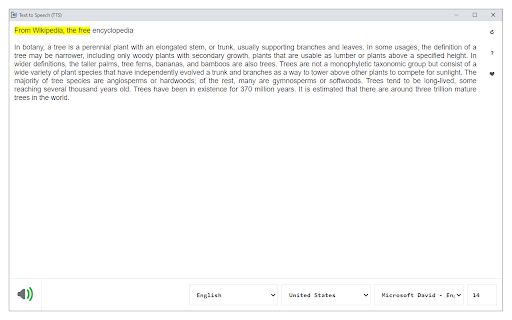
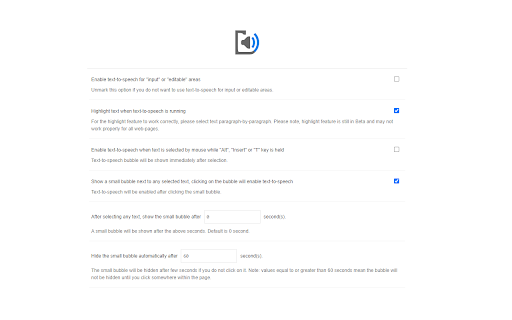
You can use this extension in a standalone interface or within web pages. If you press the toolbar button, the first interface opens up where you can enter the desired text for TTS. On the other hand, within a webpage, once you select a text, a placeholder speaker icon appears. Once you click the speaker icon, the text-to-speech starts. For the highlight feature to work correctly, please select text paragraph by paragraph. Please note that the highlight feature is still in Beta and may not work properly on all websites. There are also a few options related to the in-page text-to-speech, which can be adjusted from the extension settings page.

Note 1: For TTS in webpages, the app only uses the Web Speech API. Kokoro AI engine is only available within the standalone interface.

Note 2: Kokoro AI engine, once loaded, can work fully offline. Moreover, you can save the output TTS audio as a .wav file to your machine. When text-to-speech is completed, please press the audio icon on the right toolbar.

To report Bugs, please visit the addon's homepage (https://mybrowseraddon.com/text-to-speech.html) and fill out the bug report form.
Technical
- Version
- 0.2.9
- Manifest
- V3
- Size
- 5.77MiB
- Min Chrome
- 88
- Languages
- 1
- Featured
- Yes
Metadata
- ID
- cpnomhnclohkhnikegipapofcjihldck
- Developer ID
- u945d559d572e22612b859d592da9a903
- Developer Email
- [email protected]
- Created
- Nov 5, 2018
- Last Updated (Store)
- Oct 20, 2025
- Last Scraped
- Jun 4, 2026
- Website
- —
Similar extensions
Alternatives to Text to Speech (TTS), ranked by description similarity.

Kokoro TTS Sender
Send text from browser to Kokoro-FastAPI for TTS generation
96
★ 5.0

Speech to Text (Voice Recognition)
An easy to use speech synthesis and recognition tool for your browser!
200.0K
★ 3.4

Text to Music (Using AI)
Generate an audio track with text prompt via artificial intelligence.
157

Readerify
Read web pages aloud with advanced TTS.
712
★ 4.7

AudioTTS - Simple Text to Speech Downloader
Save audio from various text-to-speech tools for personal use, with support for platforms like ElevenLabs, Azure, Google, and more.
40.0K
★ 3.6

VoxLocal
High-quality text-to-speech without using external APIs. Keep all data local and private. Built upon Kokoro.js
12

Free TTS
High-quality text-to-speech engine for your browser.
1

Text to Speech AI
An advanced text-to-speech AI that reads PDF, DOCX, and TXT files, website content, and includes a super calculator.
65
★ 4.7
Data sourced from the Chrome Web Store · last verified Jun 4, 2026.