
Speech to Text (Voice Recognition)
An easy to use speech synthesis and recognition tool for your browser!
As of June 2026, Speech to Text (Voice Recognition) has 200,000 users and a 3.38/5 rating from 121 reviews in the Productivity category.
Usersdown 33.3 percent−33.3%
200.0K
200,000
Ratingno change0%
3.38
121 reviews
Reviewsup 0.8 percent+0.8%
121
Version
0.1.7
Manifest V3
90-day change · In the last 90 days this extension lost 100.0K users.
History
2 snapshotsTracking since Apr 18, 2026.
View as table
| Date | Users | Rating | Reviews | Version |
|---|---|---|---|---|
| Apr 18, 2026 | 300.0K | 3.38 | 120 | 0.1.7 |
| Jun 5, 2026 | 300.0K | 3.38 | 121 | 0.1.7 |
| Now | 200.0K | 3.38 | 121 | 0.1.7 |
Permissions & access
- Permissions
- storagecontextMenus
- Host access
- None declared
Screenshots

About
Speech to Text (Voice Recognition) is an extension that helps you convert your speech to text by using two different speech recognition engines.

The 1st engine is the HTML5 native web speech API for audio transcribing. It is active in most modern browsers by default (more info: https://webaudio.github.io/web-speech-api/). The 2nd API is the Whisper AI engine, which uses a new artificial intelligence method to transcribe audio (more info: https://huggingface.co/onnx-community/whisper-base). Please note that when you choose Whisper AI, the app needs to download training data (~280MB) for the AI engine. So please be patient while the app is loading.

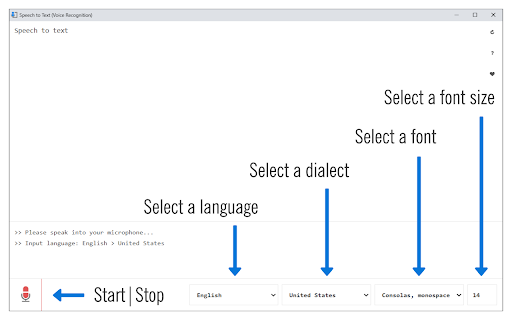
Both engines can recognize a wide variety of languages and related dialects. To work with this extension, simply open the addon's UI and then press on the big microphone icon to start converting your voice to text. Please note that, when the add-on is first started, it asks for microphone permission. Please accept the permission to start working with the add-on. All the captured text is placed in the top text area within the interface. To copy the text, use the (Ctrl + C) keyboard combination. This add-on has no background activities when it is closed.

Note: The Whisper AI engine, once loaded, can work fully offline. Moreover, you can drag and drop an audio file to start transcribing. Please note that this feature is not available for the Web Speech API. If you want to use an audio file for transcribing, please break it into small audio chunks (around a few minutes) as the AI engine runs locally in your browser and is limited in memory and processing power; therefore, it is not capable of handling large audio files.

If you found a bug to report, please fill out the bug report form on the add-on's homepage (https://mybrowseraddon.com/speech-to-text.html).
Technical
- Version
- 0.1.7
- Manifest
- V3
- Size
- 5.29MiB
- Min Chrome
- 88
- Languages
- 1
- Featured
- Yes
Metadata
- ID
- kcgloaobfaiejoiahlhnfaolfcifjjho
- Developer ID
- ud622040a07dfd01f85a8ff1591da667e
- Developer Email
- [email protected]
- Created
- May 21, 2019
- Last Updated (Store)
- Oct 21, 2025
- Last Scraped
- Jun 5, 2026
- Website
- —
- Privacy Policy
- https://mybrowseraddon.com/privacy-policy/keller.html
Similar extensions
Alternatives to Speech to Text (Voice Recognition), ranked by description similarity.

Text to Music (Using AI)
Generate an audio track with text prompt via artificial intelligence.
157

VoiceType AI
Speech-to-text with OpenAI Whisper
18
★ 5.0

Text to Speech (TTS)
A text to speech tool with natural sounding voices.
40.0K
★ 3.2

Speechfire
Provides offline speech-to-text functionality into any focused text field.
76
★ 5.0

WhisperAI.com - The Official Speech to Text
Dictate in any language with the official WhisperAI.com speech-to-text app, powered by OpenAI.
3.0K
★ 5.0

Audio to Text Transcription
Use Audio to Text Transcription to transcribe audio to text from mic, tab, or file — powered by Groq and Whisper AI
2.0K
★ 5.0

Audio to Text Converter
Use AI to transcribe people's voices from audio and video into text.
104

AI Speech to Text
Use AI to quickly and accurately transcribe speech into text, supporting over 130 languages.
50
Data sourced from the Chrome Web Store · last verified Jun 5, 2026.