
VoxLocal
High-quality text-to-speech without using external APIs. Keep all data local and private. Built upon Kokoro.js
As of June 2026, VoxLocal has 12 users in the Productivity category.
Usersup 50.0 percent+50.0%
12
12
Ratingno change0%
—
— reviews
Reviewsno change0%
—
Version
1.0.1
Manifest V3
History
4 snapshotsTracking since Apr 18, 2026.
View as table
| Date | Users | Rating | Reviews | Version |
|---|---|---|---|---|
| Apr 18, 2026 | 8 | — | — | 1.0.1 |
| Apr 28, 2026 | 10 | — | — | 1.0.1 |
| May 15, 2026 | 8 | — | — | 1.0.1 |
| Jun 3, 2026 | 9 | — | — | 1.0.1 |
| Now | 12 | — | — | 1.0.1 |
Permissions & access
- Permissions
- activeTabcontextMenusstorageunlimitedStorage
- Host access
- None declared
Screenshots

About
VoxLocal: Your Browser's New Voice

Tired of robotic text-to-speech that sounds like a GPS from 2003? VoxLocal runs a genuinely good open source TTS model (Kokoro - https://huggingface.co/hexgrad/Kokoro-82M) right in your browser using WebGPU. No API keys, no data leaving your device, no "sorry, you've hit your free tier limit."

This is a side project from a software engineer who is writing a narrative game and wants a screen-free way to review his own work. Use it to read articles, emails, Reddit arguments—whatever text is on your screen. Pick from multiple voices. Everything happens locally, which means it's private, free, and works offline once loaded.

What you get:
- High-quality text-to-speech
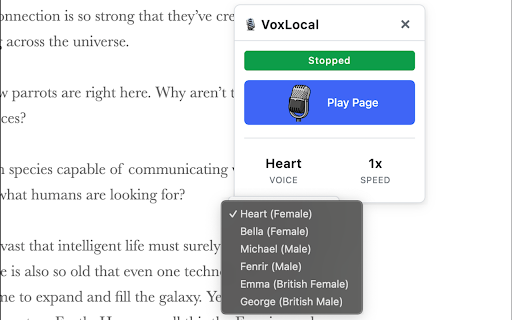
- Multiple voice options
- Zero data sent to external servers (privacy is a premium these days)
- Completely free (no catches, no subscription, no premium tiers)
- Works on any webpage with readable text

How to add and use the extension:
- Install the extension from the Chrome Web Store (click "Add to Chrome")
- Pin the extension to your toolbar:
    Click the puzzle piece icon (Extensions) in the top-right corner of Chrome
    Find your extension in the list
    Click the pin icon next to it
- Use the extension on any webpage:
    Click the old-school microphone icon in your toolbar
    A panel will open on the side of the page. Click play to play the entire page, or select text then click play to play just the selection
- You can also select text on a webpage, right click, then select "Speak ..." to read that selection.

Keep in mind:
- You do need a browser and computer capable of running WebGPU. Visit https://webgpureport.org/ to see if yours does.
- Lower-end GPUs might result in stutter or interrupted speech.
- Currently, only English is supported

Known issues:
- Occasional stutter while text-to-speech is being processed in the background.
- Occasional trouble identifying the end of sentences correctly when unusual punctuations are encountered.
Technical
- Version
- 1.0.1
- Manifest
- V3
- Size
- 9.28MiB
- Min Chrome
- 92
- Languages
- 1
- Featured
- No
Metadata
- ID
- hjjgjkjohnhknjfggobiigfinagpaffh
- Developer ID
- u45ef17eed72dab5b1feb2575f3b9787a
- Developer Email
- [email protected]
- Created
- Nov 29, 2025
- Last Updated (Store)
- Dec 5, 2025
- Last Scraped
- Jun 3, 2026
- Website
- —
- Support URL
- https://github.com/Manto/vox-local/issues
Similar extensions
Alternatives to VoxLocal, ranked by description similarity.

VoxType - Voice & AI Writing Assistant
Click, Speak, Get Polished Text - ANYWHERE. Voice dictation with AI enhancement powered by VoxGenie.
10

Text-to-Speech Extension
Automatically reads text on hover or selection with improved language detection
24
★ 4.0

VOXC: Instant AI Accesss
Voxc is a voice controlled extension that allows you to control your browser with your voice for intant AI conversation.
19
★ 5.0

TLDRL | Lightning TTS Powered by Supertonic
TLDRL: Too Long; Didn't Read? Listen. *On-device AI TTS — 31 languages & locales.
1.0K
★ 4.6

Drag Listening
This is a tool that instantly reads aloud any text you highlight.
9
★ 5.0

Local Reader: AI On Device Text-to-Speech
Read websites aloud with an AI model running in your browser
80
★ 4.0

AI Voice Reader: Read Aloud for ChatGPT, Claude, DeepSeek & Qwen
Read AI responses aloud in real-time. Works with Claude, ChatGPT, DeepSeek and Qwen. Free.
266
★ 5.0

LuvVoice - Text to Speech
Convert any text to natural speech with 300+ AI voices. Free online text-to-speech tool powered by AI.
64
Data sourced from the Chrome Web Store · last verified Jun 3, 2026.