
Gmail Tabs by cloudHQ
Set Gmail labels or Gmail filters as tabs
As of June 2026, Gmail Tabs by cloudHQ has 30,000 users and a 4.06/5 rating from 154 reviews in the Communication category.
Usersno change0%
30.0K
30,000
Ratingup 0.2 percent+0.2%
4.06
154 reviews
Reviewsup 0.7 percent+0.7%
154
Version
1.0.2.3
Manifest V3
History
1 snapshotsTracking since Apr 18, 2026.
View as table
| Date | Users | Rating | Reviews | Version |
|---|---|---|---|---|
| Apr 18, 2026 | 30.0K | 4.05 | 153 | 1.0.2.3 |
| Now | 30.0K | 4.06 | 154 | 1.0.2.3 |
Permissions & access
- Permissions
- scriptingstoragebackground
- Host access
- https://mail.google.com/, https://www.cloudhq.net/
Screenshots


About
Google automatically organizes Gmail labels alphabetically...

Which can be time-consuming when scrolling through your labels in order to find the one you want.

Cut the time you spend sorting through Gmail labels with our newest (and free!) email productivity tool, Gmail Tabs!

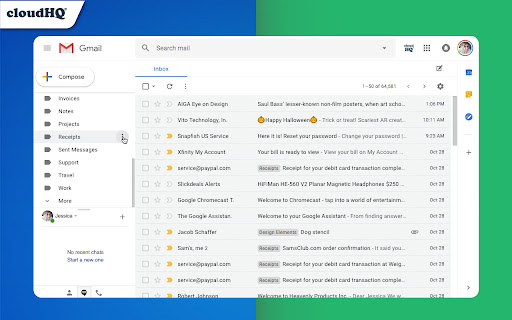
Gmail Tabs lets you customize Gmail to give you clear visibility (and easy access) to:
- Your favorite Gmail Labels
- Common Gmail search queries, like:  receipts with attachments, or emails from your customers or boss

Key features:
✅ Add any query as a tab in Gmail
✅ Add tab with all emails in a label
✅ Add tab with all emails in a label and sublabels
✅ Change font color of your tabs
✅ Change background color of your tabs
✅ Modify tabs descriptions and queries

Try it today, and start working smarter to save more time.

How it works:

1) Install the extension.
2) Select a label or enter a search query
3) If you selected the label, in label menu select "Add to tabs" or "Add to tabs (including sublabels)"
4) If you entered the query, click on the "Add to tabs" button

cloudHQ. Helping your productivity, 1 click at a time.

Website: https://www.gmailtabs.com/
Pricing: https://www.gmailtabs.com/pricing
Support page: https://support.cloudhq.net/category/browser-extensions/gmail-tabs/
Blog: https://blog.cloudhq.net

cloudHQ is trademark of CloudHQ LLC. https://www.cloudhq.net/trademark
Technical
- Version
- 1.0.2.3
- Manifest
- V3
- Size
- 611KiB
- Min Chrome
- 88
- Languages
- 11
- Featured
- Yes
Metadata
- ID
- ckoglchhifaedlfjhnoaebnloipiepjg
- Developer ID
- uc6e885dff6cd0631d1ffe667c63fd7a7
- Developer Email
- [email protected]
- Created
- Oct 25, 2018
- Last Updated (Store)
- Nov 28, 2025
- Last Scraped
- Jun 3, 2026
- Website
- https://www.gmailtabs.com/
- Privacy Policy
- https://www.cloudhq.net/privacy
Similar extensions
Alternatives to Gmail Tabs by cloudHQ, ranked by description similarity.

Sort Gmail Inbox by cloudHQ
Find an email in seconds with free preset filters
10.0K
★ 4.1

Gmail Labels and Search Queries as Tabs
Injects a user-configurable tabs bar into Gmail linked to labels.
184
★ 5.0

Auto Label for Google Gmail™ by cloudHQ
Automatically create filters and labels for clients, customers, prospects, etc.
3.0K
★ 4.7

Inbox Zero Tabs for Gmail
Add custom tabs to Gmail for better email organization
2.0K
★ 5.0

Gmail Snippets by cloudHQ
Save your time: Compose an entire email while only using 3 words!
10.0K
★ 4.0

Tables for Gmail™ by cloudHQ
Add tables to your emails
20.0K
★ 4.5
Gmail Inbox Zero by cloudHQ
Focus mode for Gmail - solution for Inbox Zero
1.0K
★ 5.0

Share and attach files in Gmail™ by cloudHQ
Attach and share files effortlessly from OneDrive, Dropbox, Box, Google Drive, Evernote and many more.
6.0K
★ 4.8
Data sourced from the Chrome Web Store · last verified Jun 3, 2026.