
Inbox Zero Tabs for Gmail
Add custom tabs to Gmail for better email organization
As of June 2026, Inbox Zero Tabs for Gmail has 2,000 users and a 5.00/5 rating from 5 reviews in the Communication category.
Usersup 100.0 percent+100.0%
2.0K
2,000
Ratingno change0%
5.00
5 reviews
Reviewsup 25.0 percent+25.0%
5
Version
1.2.5
Manifest V3
90-day change · In the last 90 days this extension gained 1.0K users, 1 version update.
History
4 snapshotsTracking since Apr 17, 2026.
View as table
| Date | Users | Rating | Reviews | Version |
|---|---|---|---|---|
| Apr 17, 2026 | 1.0K | 5.00 | 4 | 1.2.3 |
| May 25, 2026 | 1.0K | 5.00 | 4 | 1.2.5 |
| Jun 4, 2026 | 3.0K | 5.00 | 4 | 1.2.5 |
| Jun 14, 2026 | 3.0K | 5.00 | 5 | 1.2.5 |
| Now | 2.0K | 5.00 | 5 | 1.2.5 |
Permissions & access
- Permissions
- storagetabscontextMenus
- Host access
- https://mail.google.com/*
Screenshots


About
Transform your Gmail experience with customizable tabs that help you achieve inbox zero faster. 100% private.

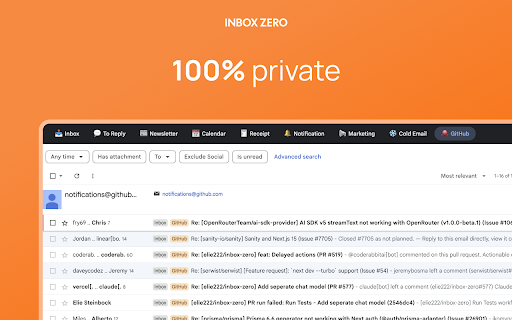
Inbox Zero Tabs integrates into Gmail's interface, adding a powerful tab system that lets you organize emails exactly how you want. Whether you're managing multiple projects, filtering newsletters, or tracking important conversations, our extension makes email management effortless.

Set Gmail labels or Gmail filters as tabs. Bringing Superhuman split inbox to Gmail.

Auto-label using Inbox Zero AI Assistant at https://getinboxzero.com

✨ KEY FEATURES:

📁 SMART ORGANIZATION
• Add custom tabs with any Gmail search query
• Pre-configured tabs for common workflows (To Reply, Newsletters, Receipts, and more)
• Works with all Gmail features and labels

⌨️ Keyboard Shortcuts (Command-K)

• Navigate your inbox without touching the mouse
• Power-user speed for email management
• Archive, mark read, and other actions via the keyboard

🎨 BEAUTIFUL DESIGN
• Perfectly matches Gmail's interface
• Dark/light theming
• Clean, distraction-free design

👥 MULTI-ACCOUNT SUPPORT
• Separate settings for each Gmail account
• Automatically detects active account
• Seamless switching between accounts

🔍 POWERFUL SEARCH INTEGRATION
• Use any Gmail search syntax
• Filter by labels, sender, subject, or attachments
• Combine multiple search criteria
• Optional unread-only filter for all tabs

⚡ EASY TO USE
• Simple one-click setup
• Intuitive settings popup
• Add, edit, or remove tabs anytime
• No account creation required

📊 EXAMPLE USE CASES:
• "To Reply" - Emails you haven't responded to yet
• "Newsletters" - All your subscriptions in one place
• "Receipts" - All your receipts
• "Team" - Emails from specific domains or teams
• "Important & Unread" - Priority emails needing attention
• "Large Attachments" - Files over 10MB

🔒 PRIVACY FIRST
• 100% private
• No data collection or tracking
• No external servers
• All settings stored locally
• Works entirely within your browser

Perfect for professionals, students, and anyone looking to tame their inbox. Install now and experience a cleaner, more organized Gmail!

Extend the functionality even more by using the Inbox Zero email assistant at https://getinboxzero.com!
Technical
- Version
- 1.2.5
- Manifest
- V3
- Size
- 874KiB
- Min Chrome
- 88
- Languages
- 1
- Featured
- No
Metadata
- ID
- iencpoofingkkakccoknbleilcliokfk
- Developer ID
- uc94ec5c4d42cd399d687e7922160806c
- Developer Email
- [email protected]
- Created
- Jul 8, 2025
- Last Updated (Store)
- Apr 6, 2026
- Last Scraped
- Jun 14, 2026
- Website
- getinboxzero.com
- Support URL
- https://www.getinboxzero.com/
- Privacy Policy
- https://getinboxzero.com/privacy
Similar extensions
Alternatives to Inbox Zero Tabs for Gmail, ranked by description similarity.

Gmail Labels and Search Queries as Tabs
Injects a user-configurable tabs bar into Gmail linked to labels.
184
★ 5.0
Gmail Inbox Zero by cloudHQ
Focus mode for Gmail - solution for Inbox Zero
1.0K
★ 5.0

Karma Inbox
Gmail karma scoring to help prioritize your inbox
—
★ 5.0

Gmail Tabs by cloudHQ
Set Gmail labels or Gmail filters as tabs
30.0K
★ 4.1

Gmail GPTier - AI Email Assistant
AI-powered extension to analyze emails and generate intelligent replies
9
★ 5.0

Ext. for Gmail
Ext. for Gmail
102
★ 4.2

Joy for Gmail
Makes Gmail calmer, clearer, and easier to use.
118
★ 5.0

Gmail Checker with Swipe
Gmail client with Swipe Mode for rapid triage. Includes real-time notifications, custom reading panes, and high-speed sync.
14
Data sourced from the Chrome Web Store · last verified Jun 14, 2026.