Gmail Inbox Zero by cloudHQ
Focus mode for Gmail - solution for Inbox Zero
As of June 2026, Gmail Inbox Zero by cloudHQ has 1,000 users and a 5.00/5 rating from 9 reviews in the Communication category.
Usersno change0%
1.0K
1,000
Ratingno change0%
5.00
9 reviews
Reviewsno change0%
9
Version
1.0.1.6
Manifest V3
History
1 snapshotsTracking since Apr 18, 2026.
View as table
| Date | Users | Rating | Reviews | Version |
|---|---|---|---|---|
| Apr 18, 2026 | 1.0K | 5.00 | 9 | 1.0.1.6 |
| Now | 1.0K | 5.00 | 9 | 1.0.1.6 |
Permissions & access
- Permissions
- scriptingstoragebackground
- Host access
- https://mail.google.com/, https://mail-attachment.googleusercontent.com/, https://www.cloudhq.net/
Screenshots




About
Dealing with the high volume of emails that many of us receive on a daily basis can be a challenging task.

This extension helps you manage the overwhelming amount of emails in your Gmail inbox by simplifying the interface and allowing you to focus on the task at hand.

With just a few clicks, you can remove distractions and quickly clean up your inbox to achieve the coveted goal of "inbox zero."
~~~~~~~~~~~
How to use this extension:
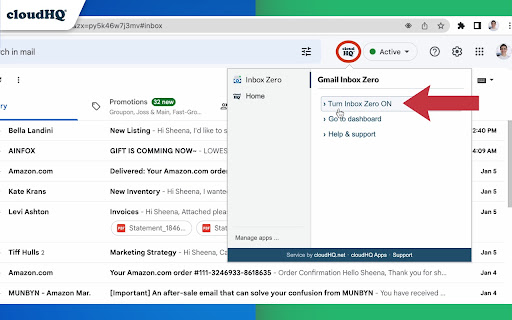
To use the extension, simply click the cloudHQ icon in the upper right corner of your Gmail and select "Turn Simple View ON."
When you're finished organizing your inbox, click "Close Simple View."
~~~~~~~~~~~
Here are some tips for achieving inbox zero:
✅ If an email can be answered in a few minutes or less, do it right away.
✅ If the email contains information you'll need to refer to later or doesn't require a response, archive it.
✅ If the email would be better handled by someone else, forward it and then archive it.
✅ If a response will take longer or require more work, use the snooze feature to defer it until a more convenient time, add it to your TODO label, or add it to Google Tasks.
✅ Once you've processed your inbox, you can then tackle emails in your TODO label or snoozed emails.
~~~~~~~~~~~
cloudHQ. Helping your productivity, 1 click at a time.

cloudHQ website: https://www.cloudhq.net/
App website: https://www.gmail-inbox-zero.com/
Pricing: https://www.gmail-inbox-zero.com/pricing
Support page: https://support.cloudhq.net/category/browser-extensions/gmail-inbox-zero/
Blog: https://blog.cloudhq.net

cloudHQ is trademark of cloudHQ LLC. https://www.cloudhq.net/trademark
Technical
- Version
- 1.0.1.6
- Manifest
- V3
- Size
- 1.12MiB
- Min Chrome
- 88
- Languages
- 11
- Featured
- Yes
Metadata
- ID
- oadlfcoffgcjbckkkgjgcffpknhhodoa
- Developer ID
- u9999076a1cee8608be24fd86bc3000b6
- Developer Email
- [email protected]
- Created
- Dec 20, 2022
- Last Updated (Store)
- Nov 30, 2025
- Last Scraped
- Jun 3, 2026
- Privacy Policy
- https://www.cloudhq.net/privacy
Similar extensions
Alternatives to Gmail Inbox Zero by cloudHQ, ranked by description similarity.

Inbox Zero Tabs for Gmail
Add custom tabs to Gmail for better email organization
2.0K
★ 5.0

Pause Gmail by cloudHQ
Take control over when emails appear in your Gmail. Eliminate interruptions, increase productivity, and reduce stress.
4.0K
★ 4.3

Sort Gmail Inbox by cloudHQ
Find an email in seconds with free preset filters
10.0K
★ 4.1
Auto Follow Up for Gmail™ by cloudHQ
Automated follow up emails and mail merge
9.0K
★ 4.9
Mailto: Set Default Email to Gmail by cloudHQ
Set Gmail as default email application when clicking on an email address on the internet
7.0K
★ 4.0

Gmail Checker with Swipe
Gmail client with Swipe Mode for rapid triage. Includes real-time notifications, custom reading panes, and high-speed sync.
14

Gmail Tabs by cloudHQ
Set Gmail labels or Gmail filters as tabs
30.0K
★ 4.1

TopIt for Gmail: Send Emails to Top
Send emails to the top of your inbox by snoozing them for 1 minute.
19
★ 5.0
Data sourced from the Chrome Web Store · last verified Jun 3, 2026.