
Auto Label for Google Gmail™ by cloudHQ
Automatically create filters and labels for clients, customers, prospects, etc.
As of June 2026, Auto Label for Google Gmail™ by cloudHQ has 3,000 users and a 4.69/5 rating from 16 reviews in the Communication category.
Usersno change0%
3.0K
3,000
Ratingno change0%
4.69
16 reviews
Reviewsno change0%
16
Version
1.0.1.2
Manifest V3
History
1 snapshotsTracking since Apr 19, 2026.
View as table
| Date | Users | Rating | Reviews | Version |
|---|---|---|---|---|
| Apr 19, 2026 | 3.0K | 4.69 | 16 | 1.0.1.2 |
| Now | 3.0K | 4.69 | 16 | 1.0.1.2 |
Permissions & access
- Permissions
- scriptingstoragebackground
- Host access
- https://mail.google.com/, https://www.cloudhq.net/
Screenshots


About
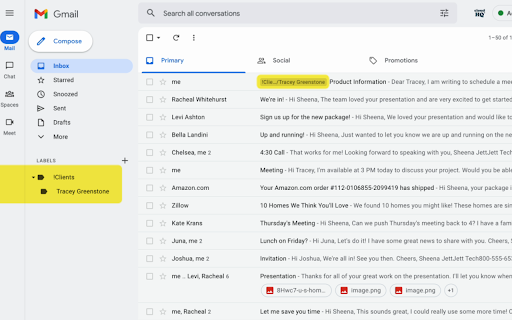
Auto Label for Gmail by cloudHQ categorizes email messages by client email address and/or domain name, and automatically creates filters and catalogs them inside one of 6 Gmail Labels.

This extension is a unique app because it not only filters and labels new emails, but also automatically organizes all your old email exchanges with that email address and/or domain name.

These are the 6 Gmail Labels that this app organizes for your inbox:
1. Clients
2. Leads
3. Prospects
4. Opportunities
5. Team
6. Suppliers

~~~~~~WHY 6 GMAIL LABELS?~~~~~~

Here's why we think you need these 6 Gmail Label categories:

1. Clients:  are your current clients.
2. Leads: are possible prospects who are not yet qualified.
3. Prospects: are qualified leads where your contact person makes buying decisions.
4. Opportunities: are when your contact considers your product/service.
5. Team: are your internal team that you work with.
6. Suppliers: are your external team that you hired.

With these 6 Gmail Labels, you're ready to catalog and organize your inbox to be the most productive self you can be while working in Gmail.

~~~~~~HOW TO USE IT~~~~~~

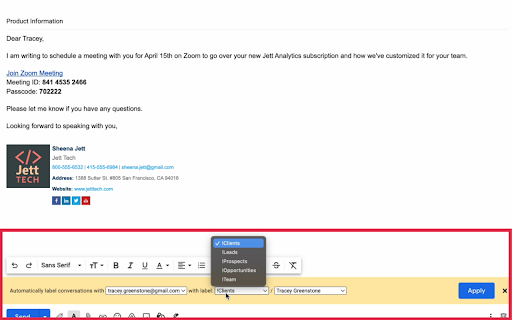
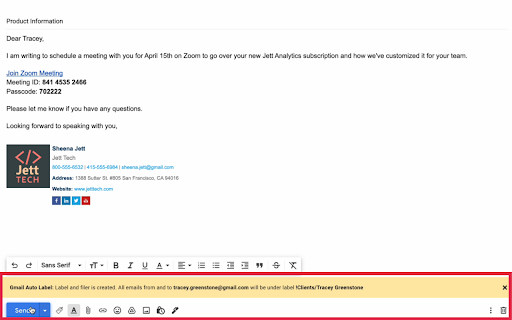
This extension allows you to create filters and labels for any recipient or domain with one click.

Here is how to use it:
1. Compose your email
2. Enter your recipient's email address
3. Click on the "Gmail Auto Label" button and select the label name for this email recipient or recipients' domain

Website: https://www.gmail-auto-label.com
Pricing: FREE
Support page: https://support.cloudhq.net/category/browser-extensions/gmail-auto-label/
Blog: https://blog.cloudhq.net

Google Gmail is a trademark of Google LLC. Use of this trademark is subject to Google Permissions.

cloudHQ is trademark of CloudHQ LLC. https://www.cloudhq.net/trademark
Technical
- Version
- 1.0.1.2
- Manifest
- V3
- Size
- 580KiB
- Min Chrome
- 88
- Languages
- 1
- Featured
- Yes
Metadata
- ID
- gdadckddcgbbopndmccfoibflnoeinca
- Developer ID
- u9999076a1cee8608be24fd86bc3000b6
- Developer Email
- [email protected]
- Created
- Jan 15, 2022
- Last Updated (Store)
- Nov 29, 2025
- Last Scraped
- Jun 4, 2026
- Support URL
- https://support.cloudhq.net
- Privacy Policy
- https://www.cloudhq.net/privacy
Similar extensions
Alternatives to Auto Label for Google Gmail™ by cloudHQ, ranked by description similarity.
Auto Follow Up for Gmail™ by cloudHQ
Automated follow up emails and mail merge
9.0K
★ 4.9

Gmail Tabs by cloudHQ
Set Gmail labels or Gmail filters as tabs
30.0K
★ 4.1

Smart Gmail Data Classifier
This Extension helps classify your emails by adding the required tags: Internal, External, Confidential etc while sending the emails
3

Sort Gmail Inbox by cloudHQ
Find an email in seconds with free preset filters
10.0K
★ 4.1
Rename Email Subject by cloudHQ
Rename email subjects for Gmail.
10.0K
★ 4.2

Email Signature Generator by cloudHQ
Email signature generator and signature templates
20.0K
★ 4.5
Mailto: Set Default Email to Gmail by cloudHQ
Set Gmail as default email application when clicking on an email address on the internet
7.0K
★ 4.0

Gmail™ Email Templates by cloudHQ
Beautiful email templates for Gmail. Design your templates or import templates from Mailchimp. With team sharing!
100.0K
★ 4.2
Data sourced from the Chrome Web Store · last verified Jun 4, 2026.