Gmail Keyboard Navigation
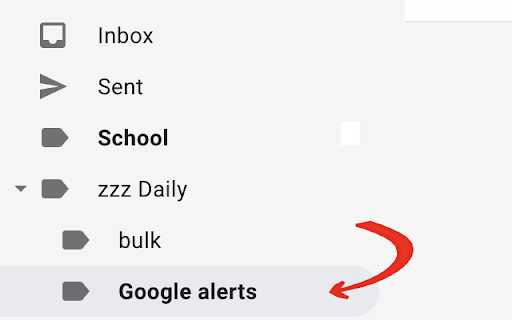
Allows navigating through Gmail labels using the keyboard
As of May 2026, Gmail Keyboard Navigation has 8 users in the Workflow & Planning category.
Usersup 100.0 percent+100.0%
8
8
Ratingno change0%
—
— reviews
Reviewsno change0%
—
Version
1.0.1.0
Manifest V3
History
2 snapshotsTracking since May 1, 2026.
View as table
| Date | Users | Rating | Reviews | Version |
|---|---|---|---|---|
| May 1, 2026 | 4 | — | — | 1.0.1.0 |
| May 30, 2026 | 7 | — | — | 1.0.1.0 |
| Now | 8 | — | — | 1.0.1.0 |
Permissions & access
- Permissions
- None declared
- Host access
- None declared
Screenshots
About
Allows navigating through Gmail labels using the keyboard, using the backquote (`) key, and toggling (expanding/collapsing) folders with the backslash (\) key.
Technical
- Version
- 1.0.1.0
- Manifest
- V3
- Size
- 15.5KiB
- Min Chrome
- 88
- Languages
- 1
- Featured
- Yes
Metadata
- ID
- cholaidlheiahadphiimfgcdinfpkmfg
- Developer ID
- u534bd2c12d7ad4747c3c4e99f3dbe55b
- Developer Email
- [email protected]
- Created
- Jul 8, 2021
- Last Updated (Store)
- Dec 5, 2023
- Last Scraped
- May 30, 2026
- Website
- —
- Support URL
- —
- Privacy Policy
- —
Similar extensions
Alternatives to Gmail Keyboard Navigation, ranked by description similarity.

GMail Label Switch Shortcuts
Adds keyboard shortcuts to GMail that select next and previous labels.
22

Gmail Navbar Shortcuts
Adds shortcuts to gmail's left navbar.
11
★ 5.0

Gmail Shortcut Nudges
Learn to use Gmail shortcuts to blaze through emails
63
★ 3.2

Better Gmail Sidebar
Adds an 'Unread' button and shortcut to different 'Starred' colors in Gmail's left sidebar.
5
★ 5.0

Lemverse - Arrange your Gmail inbox
Reverse your Gmail Conversations, add labels in a better way, Organise mails under labels, sort your inbox.
18

Switch between Multiple Google Accounts
Keyboard shorcuts to Switch between Multiple Google Accounts
235
★ 3.7

Google Navigation
Navigate through Google Search with a set of hotkeys.
37

browserkeynav
Fast browser navigation/interaction with keyboard only
Click using keyboard
- press 'f' to display key overlay (this will display…
—
Data sourced from the Chrome Web Store · last verified May 30, 2026.