
browserkeynav
Fast browser navigation/interaction with keyboard only Click using keyboard - press 'f' to display key overlay (this will display…
As of June 2026, browserkeynav has — users in the Workflow & Planning category.
Usersno change0%
—
—
Ratingno change0%
—
— reviews
Reviewsno change0%
—
Version
1.1.0
Manifest V3
History
2 snapshotsTracking since Apr 20, 2026.
Not enough history yet for this metric — the chart fills in as we collect more snapshots.
View as table
| Date | Users | Rating | Reviews | Version |
|---|---|---|---|---|
| Apr 20, 2026 | — | — | — | 1.1.0 |
| May 5, 2026 | — | — | — | 1.1.0 |
| Now | — | — | — | 1.1.0 |
Permissions & access
- Permissions
- activeTabtabsstorage
- Host access
- *://*/*
Screenshots
About
Fast browser navigation/interaction with keyboard only

Click using keyboard
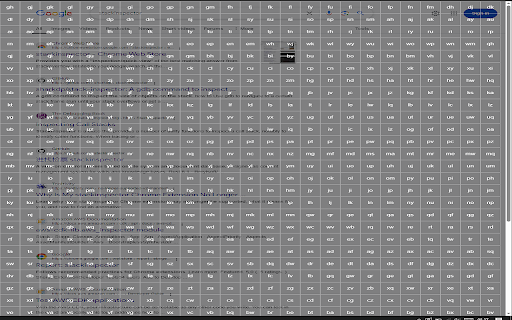
- press 'f' to display key overlay (this will display the grid overlay)
- press the corresponding key combination in the square of which you want to click
  - this presses exactly the middle of the square
- if you want to click more precisely within that square type the first key of the two character combination twice - so if square 'fj' then type 'ffj'
- this then opens a grid within the choosen square which lets you select with more precision using another single keypress
- press escape to disable overlay when active

Closing current tab
- press 'x'

Scroll down/up
- press 'j' to go down and 'k' to go up

Go to bottom/top
- press 'shift + g' to go to bottom and 'gg' to go to top

Going back/forward in current tab
- press 'shift + h' to go back and 'shift + l' to go forward
Technical
- Version
- 1.1.0
- Manifest
- V3
- Size
- 10.94KiB
- Min Chrome
- 88
- Languages
- 1
- Featured
- No
Metadata
- ID
- hbblkjkbkkocginbjopohgbmbaknmhna
- Developer ID
- u9855940793e67393591d0a31c36f9558
- Developer Email
- [email protected]
- Created
- Apr 13, 2025
- Last Updated (Store)
- Jun 6, 2025
- Last Scraped
- Jun 8, 2026
- Website
- —
- Support URL
- —
- Privacy Policy
- —
Similar extensions
Alternatives to browserkeynav, ranked by description similarity.

ChromeKeys
Extra keyboard shortcuts from Chrome
26
★ 5.0

Keyboard Navigator
Your virtual assistant on the web
2

Chrome Tab Switching Shortcut
Implementing a shortcut to switch between tabs in Chrome
3

Keyboard Navigation
Allows you to brows only with your keyboard. Press '.' and required chars to jump to link. Press 'n' or 'p' to scroll down or up.
133
★ 5.0

BackTick
BackTick: Custom Alt+Tab for Chrome
17
★ 4.8

Smart Back
Use the back button twice on a tab with no history to close it and return to the previous tab.
6
★ 5.0

Radial Mouse Gestures
Open the radial menu and execute actions quickly with simple, intuitive gestures.
7

Moly Keys
Optimum key bindings.
135
★ 2.6
Data sourced from the Chrome Web Store · last verified Jun 8, 2026.