
Immersive Web Emulator
WebXR Emulator for Meta Quest devices
As of May 2026, Immersive Web Emulator has 20,000 users and a 4.65/5 rating from 23 reviews in the Developer Tools category.
Usersup 100.0 percent+100.0%
20.0K
20,000
Ratingdown 0.4 percent−0.4%
4.65
23 reviews
Reviewsdown 4.2 percent−4.2%
23
Version
1.5.0
Manifest V3
90-day change · In the last 90 days this extension gained 10.0K users.
History
2 snapshotsTracking since Apr 1, 2026.
View as table
| Date | Users | Rating | Reviews | Version |
|---|---|---|---|---|
| Apr 1, 2026 | 10.0K | 4.67 | 24 | 1.5.0 |
| May 1, 2026 | 10.0K | 4.65 | 23 | 1.5.0 |
| Now | 20.0K | 4.65 | 23 | 1.5.0 |
Permissions & access
- Permissions
- storagescripting
- Host access
- http://*/*, https://*/*
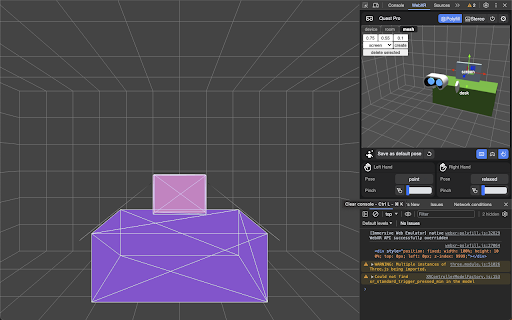
Screenshots


About
Develop WebXR experiences efficiently and effectively on Meta Quest with Immersive Web Emulator.

This browser extension provides a user-friendly interface and is capable of simulating all Meta Quest headsets, enabling developers to easily test and iterate their WebXR experiences without a physical XR device.

Key Features
- Interactive 3D viewport to easily transform manipulation of the VR headset and the controllers
- Simulate controller input, binary input (buttons), and analog input (trigger, grip, joysticks)
- Simulate hand input, including built-in hand poses and pinch gesture control
- Keyboard action mapping for added efficiency
- Keyboard input relay

The extension is built on top of the WebExtensions API, and implements the newly introduced Chrome Extension Manifest V3, which means that it will operate with enhanced security and performance on most Chromium-based desktop browsers.

How to Use It

- Download the extension from this page.
- Navigate to a WebXR app, such as this Three.js example: https://threejs.org/examples/webxr_xr_dragging The app will detect WebXR support as if you are visiting from the specified Meta Quest device, and let you enter immersive (AR/VR) mode.
- Launch the desktop browser’s developer tool panel, and navigate to the “WebXR” tab to control the emulated device.

Developer Resources
- Learn more about Immersive Web Emulator:
https://developer.oculus.com/blog/webxr-development-immersive-web-emulator/
- Find detailed instructions on using Immersive Web Emulator:
https://github.com/meta-quest/immersive-web-emulator#immersive-web-emulator-usage
Technical
- Version
- 1.5.0
- Manifest
- V3
- Size
- 700KiB
- Min Chrome
- 88
- Languages
- 1
- Featured
- Yes
Metadata
- ID
- cgffilbpcibhmcfbgggfhfolhkfbhmik
- Developer ID
- u9e86c5e44afcf61b3ff037fb76134768
- Developer Email
- [email protected]
- Created
- Jan 25, 2023
- Last Updated (Store)
- Dec 21, 2023
- Last Scraped
- May 30, 2026
- Website
- —
- Privacy Policy
- —
Similar extensions
Alternatives to Immersive Web Emulator, ranked by description similarity.

DownQ
Your unofficial companion for managing Meta Quest game versions. Download specific releases, downgrade, and access DLCs with ease.
10.0K
★ 3.7

Device Simulator
Device Simulator
423
★ 5.0

Web3 Decode Extension
Decode web3 transactions with ease
37
★ 5.0

Interactive Demo Builder
Create step-by-step onboarding flows visually on your live product. No SDK headaches. One code snippet to deploy anywhere.
—

WebAI Extension
Unlock Chrome’s Built-In AI. Monitor local model readiness, inspect APIs, and debug your on-device AI natively in DevTools.
133

U-Eyes: Mobile Simulator
Test any website on iPhone & Android mobile devices. A powerful mobile simulator with screenshots & beautiful device mockups.
10.0K
★ 4.5

CrabApple Apple Pay Test Extension
CrabApple is an Apple Pay Button Tester for Windows—reliable, powered by advanced spoofing technology.
113

Mobile Simulator Extension: Responsive Viewer
Professional mobile device simulator with multiple views, extensive device library, and sync scrolling
1.0K
★ 5.0
Data sourced from the Chrome Web Store · last verified May 30, 2026.