
Interactive Demo Builder
Create step-by-step onboarding flows visually on your live product. No SDK headaches. One code snippet to deploy anywhere.
As of June 2026, Interactive Demo Builder has — users in the Developer Tools category.
Usersno change0%
—
—
Ratingno change0%
—
— reviews
Reviewsno change0%
—
Version
1.0.0
Manifest V3
History
2 snapshotsTracking since Apr 20, 2026.
Not enough history yet for this metric — the chart fills in as we collect more snapshots.
View as table
| Date | Users | Rating | Reviews | Version |
|---|---|---|---|---|
| Apr 20, 2026 | — | — | — | 1.0.0 |
| Apr 25, 2026 | — | — | — | 1.0.0 |
| Now | — | — | — | 1.0.0 |
Permissions & access
- Permissions
- activeTabstoragescriptingtabscontextMenus
- Host access
- <all_urls>
Screenshots


About
This extension is an interactive demo builder that lets you create controlled onboarding experiences directly on top of your existing web app.

You don’t recreate screens or manage demos in a separate dashboard. You open your product, click real elements, and define the flow step by step. What users see is your actual UI, not a mock or recording.

It’s interactive demo software built for teams that want demos and onboarding to stay accurate as the product evolves.

What this interactive demo builder does

✅ Builds step-by-step onboarding flows on a live web app

✅ Lets you visually select real UI elements in the browser

✅ Defines tooltips, actions, and progression without writing UI code

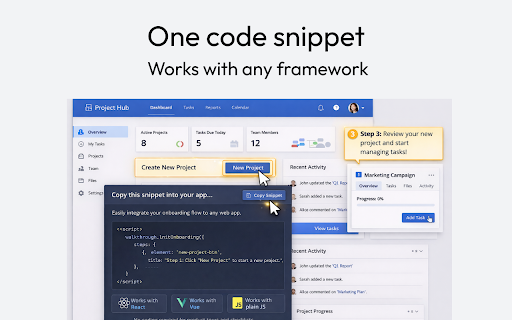
✅ Generates a single code snippet that works with any framework

✅ Runs on local, staging, or production environments

You create the entire interactive demo inside the browser. When it’s ready, you ship it with one snippet.

How it works

👉 Install the Chrome extension

👉 Open your web app

👉 Open the extension and click Add step

👉 Click any element on the page to select it

👉 Define the action or instruction for that step

👉 Save and repeat until the flow is complete

👉 Copy the generated code snippet and add it to your app

No rebuilds. No screenshots. No guessing.

Who it’s for

✅ Product teams building user onboarding and feature walkthroughs

✅ Growth teams creating interactive demos for activation

✅ Developers who want framework-agnostic onboarding tools

✅ SaaS teams that need demos tied to the real product UI

If your product runs in a browser, this interactive demo builder fits.

What it does not do

❌ It does not create mockups or fake demo environments

❌ It does not record videos or generate static tours

❌ It does not wrap your app in an iframe

❌ It does not auto-write onboarding content for you

❌ This tool gives you control over the experience, not automated guesswork.

Why teams use it

Most interactive demo software lives outside the product. This one lives inside it.

You work on real UI, with real elements, and ship onboarding flows that stay in sync with how your app actually works.
Technical
- Version
- 1.0.0
- Manifest
- V3
- Size
- 41.06KiB
- Min Chrome
- 88
- Languages
- 1
- Featured
- No
Metadata
- ID
- dllbealncngpfcaicpchehfoaokhleem
- Developer ID
- u72a816265ab3eeaa818a4136d4f4e410
- Developer Email
- [email protected]
- Created
- Feb 8, 2026
- Last Updated (Store)
- Feb 8, 2026
- Last Scraped
- Jun 10, 2026
- Website
- —
- Support URL
- —
- Privacy Policy
- https://watext.me/privacy-policy.html
Similar extensions
Alternatives to Interactive Demo Builder, ranked by description similarity.

LiveDemo - AI Product demos in seconds
Create AI interactive product demos and guides. Record, edit, and share clickable demos that convert prospects into customers.
147
★ 5.0

Demoboost Capture 2.0
Demo experience that sells. Easily create, share and track your demos.
Demoboost enables your team to easily create, share and…
392

Demolaunch Recorder
Capture click interactions and record browser sessions to build product demos.
6

Guideful Recorder
Create interactive product tours in minutes and show users exactly where to click.
5

PageBolt Recorder
Record browser interactions and build PageBolt sequences visually. Record once, replay forever.
1

Guidey.dev – Plug & Play Onboarding
Interactive onboarding made easy.
26

Gen4MeAI
Save time for QA Automations.
4

DirectCodeUI Capture
Select any area on any webpage to capture a screenshot
16
★ 4.0
Data sourced from the Chrome Web Store · last verified Jun 10, 2026.