
Media player classic
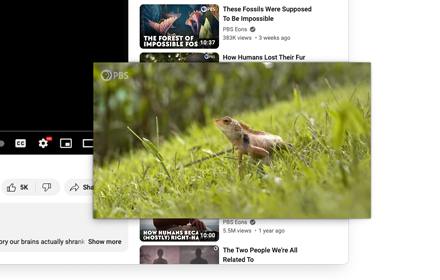
Watch videos using Picture-in-Picture mode (Floating Video Player).
As of May 2026, Media player classic has 1,000 users and a 4.58/5 rating from 12 reviews in the Functionality & UI category.
Usersno change0%
1.0K
1,000
Ratingdown 6.3 percent−6.3%
4.58
12 reviews
Reviewsup 33.3 percent+33.3%
12
Version
3.0.3
Manifest V3
History
1 snapshotsTracking since May 29, 2026.
View as table
| Date | Users | Rating | Reviews | Version |
|---|---|---|---|---|
| May 29, 2026 | 1.0K | 4.89 | 9 | 3.0.3 |
| Now | 1.0K | 4.58 | 12 | 3.0.3 |
Permissions & access
- Permissions
- activeTabcontextMenusscripting
- Host access
- None declared
Screenshots

About
Watch videos using Picture-in-Picture mode (Floating Video Player).
Watch videos using Picture-in-Picture mode (Floating Video Player). Our software supports all kinds of video websites.
Picture-in-Picture lets you to watch videos in a popup window (always on top of other windows) so you can keep an eye on what you’re watching while surfing the Internet.


Features:
- Adds a Picture in Picture button to the video player of supported sites
- Users can choose to click on the Picture in Picture button on the video player or on the extension icon on the Google Chrome toolbar
- Save time and continue browsing the Internet and watching your videos at the same time


YouTube is a trademark of Google Inc. Use of this trademark is subject to Google Permissions. The floating image mode in Picture mode (PIP) for Chrome is not created, is not associated with Google Inc. or not supported.
Technical
- Version
- 3.0.3
- Manifest
- V3
- Size
- 124KiB
- Min Chrome
- 88
- Languages
- 40
- Featured
- No
Metadata
- ID
- cehgeknjajllchaaccghmooofahhngjj
- Developer ID
- ua108e7b06fa6508dbf4846fdab890ff2
- Developer Email
- [email protected]
- Created
- Oct 24, 2022
- Last Updated (Store)
- Nov 12, 2022
- Last Scraped
- May 29, 2026
- Website
- —
- Support URL
- —
- Privacy Policy
- https://www.freebusinessapps.net/privacy
Similar extensions
Alternatives to Media player classic, ranked by description similarity.

Picture in Picture
Picture in Picture for video on any site.
23

PiP: Seamless Picture-in-Picture
Transform your video watching experience with PiP! The effortless way to enable Picture-in-Picture mode on any website. A one-click…
13

YouTube Picture in Picture
Watch videos using the YouTube Picture in Picture feature. It allows to use picture-in-picture mode on YouTube or other websites.
10.0K
★ 4.2
Picture-in-Picture Shortcut
Switch videos to Picture-in-Picture mode with a keyboard shortcut or toolbar button.
10.0K
★ 4.7

PiPlet
Toggle Picture-in-Picture on YouTube with a toolbar button or in-page pill.
4
★ 5.0

PiP Anywhere
Picture-in-Picture mode for any website with full interactivity — scroll, click, type, and navigate in an always-on-top window.
52
★ 1.0

BetterPiP (Picture-in-Picture)
Unlock PiP on any site, enabling floating video windows, even on restricted elements.
231
★ 5.0

One Click PiP
Click once to Picture-in-Picture and enjoy tracker-free, ad-free viewing with no data collected.
6
Data sourced from the Chrome Web Store · last verified May 29, 2026.