
Symbol Typer - Write Math and Symbols Easily
Write special symbols in plain text and paste them anywhere!
As of June 2026, Symbol Typer - Write Math and Symbols Easily has 2,000 users and a 5.00/5 rating from 2 reviews in the Productivity category.
Usersdown 33.3 percent−33.3%
2.0K
2,000
Ratingno change0%
5.00
2 reviews
Reviewsno change0%
2
Version
0.71
Manifest V3
90-day change · In the last 90 days this extension lost 1.0K users.
History
2 snapshotsTracking since Apr 22, 2026.
View as table
| Date | Users | Rating | Reviews | Version |
|---|---|---|---|---|
| Apr 22, 2026 | 3.0K | 5.00 | 2 | 0.71 |
| Jun 7, 2026 | 3.0K | 5.00 | 2 | 0.71 |
| Now | 2.0K | 5.00 | 2 | 0.71 |
Permissions & access
- Permissions
- None declared
- Host access
- None declared
Screenshots

About
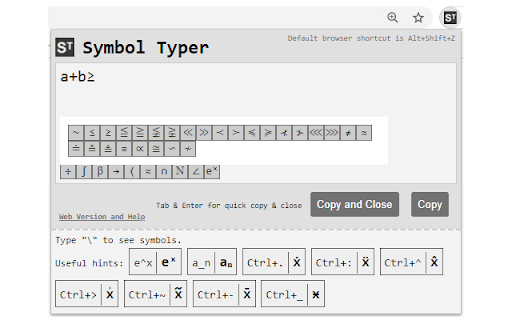
Using Symbol Typer, you can easily type mathematical symbols in plain text.

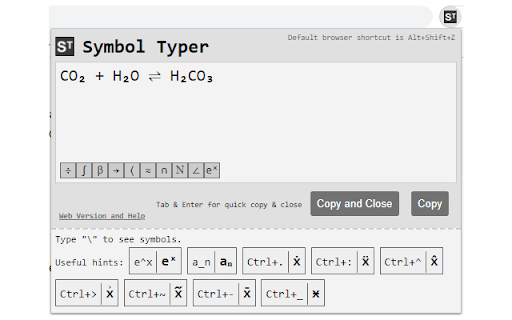
Simply open the extension and start typing: e^x will turn into eˣ,\alpha will become α, and many other symbols are available.

- Math? Easy! A\cup B = C → A∪B=C
- Chemistry? No problem! H_2 O → H₂O
- Physics? We got your back! H(t)|\Psi(t)\ket → H(t)|Ψ(t)〉

To activate the extension press Alt+Shift+Z in your browser or set a shortcut of your own in Chrome->Settings->Extensions->Menu->Keyboard Shortcuts.

No permissions are required for Symbol Typer to work! This extension is lightweight, quick and easy.

New in version 0.71:
-- New symbol buttons

New in version 0.70:
-- New symbols including \llbracket, \rrbracket (⟦,⟧)
Technical
- Version
- 0.71
- Manifest
- V3
- Size
- 18.19KiB
- Min Chrome
- 88
- Languages
- 1
- Featured
- Yes
Metadata
- ID
- bmkeakikhanegdbepkdemnpdapfemjln
- Developer ID
- ubeed2dc7ea273d9769c195328dbc1825
- Developer Email
- [email protected]
- Created
- Mar 22, 2021
- Last Updated (Store)
- Oct 3, 2023
- Last Scraped
- Jun 7, 2026
- Website
- symboltyper.com
- Privacy Policy
- —
Similar extensions
Alternatives to Symbol Typer - Write Math and Symbols Easily, ranked by description similarity.

AutoMath Symbols
Type shortcuts and press Tab to get math symbols instantly. Simple, fast, and works on most websites.
21

Symbol & Emoji Picker
Copy and paste unique symbols and categorized emojis with an enhanced selection.
28
★ 5.0

Quick Symbols
Blazing fast, keyboard-first symbol finder. Copy symbols instantly.
7

TypeRight
Insert typographically correct symbols via the right-click context menu.
27

SymbolHub - Copy & Paste Symbols
Quick access to 3900+ Unicode symbols, arrows, emojis & special characters. Search, copy, and insert directly into any text field.
12

ChromeDash
Enter dashes, accents, Greek letters, and custom aliases—instantly!
412
★ 4.1

SmartType — Instant Smart Quotes, Brackets & Text Wrapping
Select text, press a key — wrapped! Smart typography auto-replaces quotes, dashes & symbols as you type. Works everywhere.
167
★ 4.3

Symbol Collector - Easily Save and Manage Symbols
With the Symbol Collector Chrome extension, effortlessly collect and manage a wide range of symbols
9
Data sourced from the Chrome Web Store · last verified Jun 7, 2026.