
Symbol & Emoji Picker
Copy and paste unique symbols and categorized emojis with an enhanced selection.
As of May 2026, Symbol & Emoji Picker has 28 users and a 5.00/5 rating from 5 reviews in the Productivity category.
Usersno change0%
28
28
Ratingno change0%
5.00
5 reviews
Reviewsno change0%
5
Version
1.3
Manifest V3
History
4 snapshotsTracking since Apr 1, 2026.
View as table
| Date | Users | Rating | Reviews | Version |
|---|---|---|---|---|
| Apr 1, 2026 | 28 | 5.00 | 5 | 1.3 |
| Apr 21, 2026 | 32 | 5.00 | 5 | 1.3 |
| May 6, 2026 | 26 | 5.00 | 5 | 1.3 |
| May 18, 2026 | 25 | 5.00 | 5 | 1.3 |
| Now | 28 | 5.00 | 5 | 1.3 |
Permissions & access
- Permissions
- clipboardWrite
- Host access
- None declared
Screenshots


About
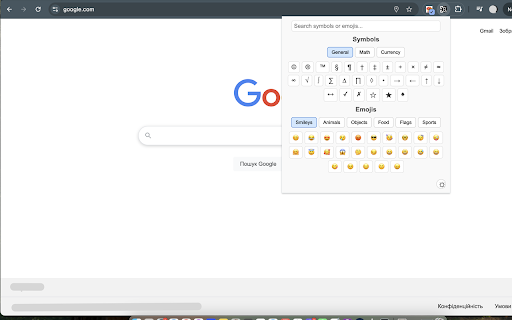
Enhance your typing with Symbol & Emoji Picker—a lightweight Chrome Extension that makes it simple to insert unique symbols and emojis anywhere you type. Whether you need currency symbols like $, €, or ₴, mathematical notations like π and ∑, or fun emojis like 😊 and 🍕, this tool has you covered.

Key Features:

Wide Selection: Access a curated collection of symbols (general, math, currency) and emojis (smileys, animals, objects, food, flags, sports).
Smart Search: Find what you need fast—type keywords like 'euro,' 'smile,' or 'pizza' to instantly filter results across all categories.
Theme Toggle: Switch between light (☼) and dark (☾) modes to match your style, with preferences saved automatically.
One-Click Copy: Click any symbol or emoji to copy it to your clipboard, with a subtle 'Copied' confirmation.
User-Friendly Design: Enjoy a clean, organized interface with tabbed categories for quick navigation.
Perfect for writers, developers, designers, or anyone who loves adding flair to their text. Install Symbol & Emoji Picker today and express yourself effortlessly!
Technical
- Version
- 1.3
- Manifest
- V3
- Size
- 57.34KiB
- Min Chrome
- 88
- Languages
- 1
- Featured
- No
Metadata
- ID
- janabgnbgjajbcplklpcckjnmfmjbpom
- Developer ID
- u4ae064b75f626a20f54a34240c7e409f
- Developer Email
- [email protected]
- Created
- Mar 19, 2025
- Last Updated (Store)
- May 9, 2025
- Last Scraped
- May 18, 2026
- Website
- —
- Support URL
- —
- Privacy Policy
- —
Similar extensions
Alternatives to Symbol & Emoji Picker, ranked by description similarity.

Symbol Finder - Copy & Paste Symbols
Search and copy any symbol instantly – math, arrows, currency, bullet points and more.
37
★ 5.0

SymbolHub - Copy & Paste Symbols
Quick access to 3900+ Unicode symbols, arrows, emojis & special characters. Search, copy, and insert directly into any text field.
12

Text Symbols
Use Text Symbols: Easily copy and paste text symbols & Unicode characters! Perfect for cool text, emojis and unique designs
106
★ 5.0

Emoji & Symbols Copy and Paste + Lenny Face
Copy and paste 9500+ emojis, symbols & lenny faces ( ͡° ͜ʖ ͡°) in 1 click. The only extension with all 3 types!
22
★ 5.0

Special Character Picker: Symbols & Emojis
Instantly find and insert special characters, symbols, and emojis. Click-to-copy or direct insert into any webpage.
88

Symbol Collector - Easily Save and Manage Symbols
With the Symbol Collector Chrome extension, effortlessly collect and manage a wide range of symbols
9

EmojiClick - Emoji Keyboard
A simple emoji keyboard for Chrome.
82
★ 5.0

Symbly
One-click copy of commonly used symbols (—, →, ✓) for documents, chats, and code.
4
Data sourced from the Chrome Web Store · last verified May 18, 2026.