
Surf Learning - Open Beta
Select your native language from extension configuration and start to learn language with the content you surf on youtube
As of May 2026, Surf Learning - Open Beta has 40 users and a 5.00/5 rating from 1 reviews in the Workflow & Planning category.
Usersup 2.6 percent+2.6%
40
40
Ratingno change0%
5.00
1 reviews
Reviewsdown 50.0 percent−50.0%
1
Version
0.0.2
Manifest V3
History
2 snapshotsTracking since Apr 1, 2026.
View as table
| Date | Users | Rating | Reviews | Version |
|---|---|---|---|---|
| Apr 1, 2026 | 39 | 5.00 | 2 | 0.0.2 |
| May 27, 2026 | 42 | 5.00 | 2 | 0.0.2 |
| Now | 40 | 5.00 | 1 | 0.0.2 |
Permissions & access
- Permissions
- storagetabsscriptingwebRequest
- Host access
- https://www.youtube.com/api/, https://clients5.google.com/
Screenshots


About
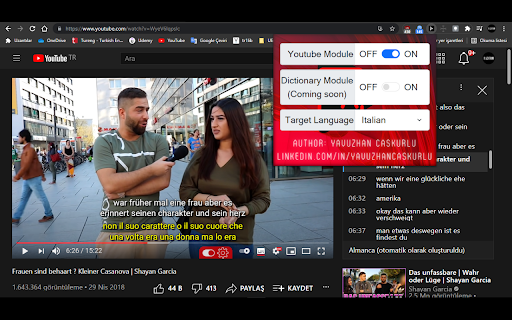
For now, this application only aims to instantly translate the words in the video subtitles being watched on YouTube, and to display a translated subtitle as a secondary subtitle depending on user preference. Some parts of the extension (DICTIONARY module and LOGIN module) do NOT work yet. They will be added soon. However, the FOLLOWING FEATURES are AVAILABLE in the application.

--------------------------------------------------------------------------------------------------------------------
TRANSLATION TO ALL LANGUAGES
-Regardless of your native language, you can choose the language you want from the extension configurations and translate to that language.

INDEPENDENT OF VIDEO LANGUAGE
-Whatever the language of the video, the language of the video is automatically detected and translated from that language.

NO NEED FOR SPECIALLY CRAFTED SUBTITLES
-The extension doesn't need custom subtitles made by other people to work. It can work with both subtitle and closed captions(auto generated by youtube).
   *Important*
   The video being watched must have at least one subtitle or closed caption for this extension to work properly.

INSTANT TRANSLATION
-You can translate instantly by moving your mouse over the word you want in the subtitles displayed by the extension on YouTube.

DUAL SUBTITLES
-On YouTube with double subtitles, you can see both the translation and the original dialogue at the same time and compare them. If you want to don not see secondary subtitle, you can turn off this feature from extension configurations.

CONFIGURABLE FONT SIZE
-You can resize font sizes of primary and secondary subtitles from extension configurations.

CONFIGURABLE FONT COLOR
-You can recolor fonts of primary and secondary subtitles from extension configurations.

AUTO-RESIZE FOR SUBTITLES
-Dynamically updating font-size according to your interface size and fullscreen changes.

AUTO-PAUSE
-We prevented you from missing a scene by automatically pausing when a word is translated in the subtitles displayed by the extension on YouTube.

SUBTITLES IN THE SIDEBAR
-You can view the entire dialogue on YouTube and quickly jump to the sentence you want.

USER-FRIENDLY
-Customizable.
-Easy to use.
-Ad-free.
-Completely-free.

------------------------------------------------------------------------------------------------------------
Coming Soon (The features listed here are currently NOT working)
-Dictionary Module
-Login system (for dictionary module synchronization via google)
Technical
- Version
- 0.0.2
- Manifest
- V3
- Size
- 2.4MiB
- Min Chrome
- 88
- Languages
- 1
- Featured
- No
Metadata
- ID
- bgoiennlbkgepofbpmfhijjaiimipckd
- Developer ID
- u0ed0effed7c937c3679cf181125bb6d4
- Developer Email
- [email protected]
- Created
- Feb 18, 2022
- Last Updated (Store)
- Feb 18, 2022
- Last Scraped
- May 27, 2026
- Website
- —
- Support URL
- —
- Privacy Policy
- —
Similar extensions
Alternatives to Surf Learning - Open Beta, ranked by description similarity.
SubTrans - General Subtitle Translator Suite
General Subtitle Translator for Multiple Sites. Displays bilingual subtitles. Supported sites are actively increasing.
30.0K
★ 3.9

SubtitleKit
A must-have tool for all YouTube lovers!
27

Listen and Repeat - Language Learning
Learn a new language on Youtube
342
★ 5.0

Speak YouTube Subtitles
Reads YouTube subtitles aloud with multi-language support
1.0K
★ 4.1

DuoSub
Watch streaming video with fully customizable dual subtitles — supports 100+ languages on Netflix, streamimdb.ru and more.
20
★ 5.0
Painless CC
Make a good use of Youtube's Auto-generated Captions
1.0K
★ 5.0

SimIntpr - Translate & Speak YouTube Subtitle
Translate YouTube video subtitles and speak out. Just like a YouTube virtual simultaneous interpreter.
10.0K
★ 3.3

Universal Subtitle Downloader: YouTube Netflix Disney+ Max Apple TV & More
Download whole seasons of subtitles in one click! Dual-language display, auto-translation, and editing for streaming sites.
3.0K
★ 4.4
Data sourced from the Chrome Web Store · last verified May 27, 2026.