
Listen and Repeat - Language Learning
Learn a new language on Youtube
As of May 2026, Listen and Repeat - Language Learning has 342 users and a 5.00/5 rating from 3 reviews in the Workflow & Planning category.
Usersno change0%
342
342
Ratingno change0%
5.00
3 reviews
Reviewsdown 25.0 percent−25.0%
3
Version
0.4
Manifest V3
History
3 snapshotsTracking since Apr 1, 2026.
View as table
| Date | Users | Rating | Reviews | Version |
|---|---|---|---|---|
| Apr 1, 2026 | 342 | 5.00 | 4 | 0.4 |
| Apr 30, 2026 | 349 | 5.00 | 4 | 0.4 |
| May 28, 2026 | 350 | 5.00 | 4 | 0.4 |
| Now | 342 | 5.00 | 3 | 0.4 |
Permissions & access
- Permissions
- tabsstoragescriptingunlimitedStorage
- Host access
- https://*.youtube.com/*, http://localhost:5000/*
Screenshots


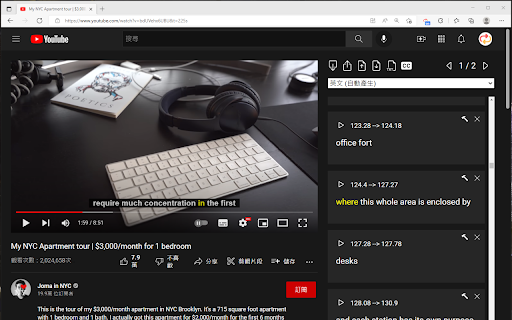
About
This extension helps you learn listening and speaking more efficiently on Youtube

How to use:

1. Install the extension
2. Go to the Youtube watch page (URL format: https://www.youtube.com/watch?v=)
3. Make sure subtitles are available and ready to use (Important!)
4. If the extension panel is not displayed, please refresh the page (F5)

Why develop this extension?

You may know that Youtube automatically generates subtitles for their videos, the problems with using these subtitles are:

1. Sentences always stick together, which makes it awkward to listen repeatedly
2. When you encounter translation errors, there is no relevant features to correct them
3. Sometimes the sentences are too long, which is not good for beginner

How does this extension solve the above problem?
1. Provide drag and drop feature to separate sentences
2. "Double click" subtitles to edit them or delete them
3. Use the drag and drop feature to compose your own listening combination
4. Click on a word to hear the pronunciation from the video, not from the dictionary

More features:
★ Save / Load editing progress
★ Download / Upload subtitles
★ This extension is optimized for subtitles generated by Youtube, but also supports subtitles uploaded by the creator

- If you want to speed up / slow down the playback speed, you can use the shortcuts provided by Youtube (Shift + </ / Shift + >)
Technical
- Version
- 0.4
- Manifest
- V3
- Size
- 181KiB
- Min Chrome
- 88
- Languages
- 3
- Featured
- No
Metadata
- ID
- dlbbmmeaglbjmlddnpdbfhcpepnkfofk
- Developer ID
- u2d79c01a05be05844b34fc154057be92
- Developer Email
- [email protected]
- Created
- May 9, 2022
- Last Updated (Store)
- Sep 11, 2024
- Last Scraped
- May 28, 2026
- Website
- —
- Support URL
- —
- Privacy Policy
- —
Similar extensions
Alternatives to Listen and Repeat - Language Learning, ranked by description similarity.

Painless CC
Make a good use of Youtube's Auto-generated Captions
1.0K
★ 5.0

Speak YouTube Subtitles
Reads YouTube subtitles aloud with multi-language support
1.0K
★ 4.1

SubtitleKit
A must-have tool for all YouTube lovers!
27

Transcript YouTube
Use Transcript YouTube to transcribe video to text and download youtube subtitles! The transcript generator helps you get subtitles
6.0K
★ 4.6

Surf Learning - Open Beta
Select your native language from extension configuration and start to learn language with the content you surf on youtube
40
★ 5.0

YouTube Subtitle Downloader
Youtube Subtitle Downloader: download subtitles from YouTube easily. Extract, copy or download with the youtube subtitle downloader
30.0K
★ 4.8

Transcript YouTube
Use Transcript YouTube to download YouTube captions. Get YT transcript to transcribe youtube effortlessly
10.0K
★ 3.5

Channel groups and rating for YouTube™ subs
Equalizer, blocking, grouping and filtering of YouTube channels, analytics, exporting information to Excel and more.
1.0K
★ 3.0
Data sourced from the Chrome Web Store · last verified May 28, 2026.