
SimIntpr - Translate & Speak YouTube Subtitle
Translate YouTube video subtitles and speak out. Just like a YouTube virtual simultaneous interpreter.
As of June 2026, SimIntpr - Translate & Speak YouTube Subtitle has 10,000 users and a 3.29/5 rating from 69 reviews in the Workflow & Planning category.
Usersno change0%
10.0K
10,000
Ratingup 0.3 percent+0.3%
3.29
69 reviews
Reviewsup 1.5 percent+1.5%
69
Version
4.0.0
Manifest V3
90-day change · In the last 90 days this extension 1 version update.
History
3 snapshotsTracking since Apr 1, 2026.
View as table
| Date | Users | Rating | Reviews | Version |
|---|---|---|---|---|
| Apr 1, 2026 | 10.0K | 3.28 | 68 | 3.8.0 |
| Apr 5, 2026 | 10.0K | 3.28 | 68 | 4.0.0 |
| Apr 16, 2026 | 10.0K | 3.29 | 69 | 4.0.0 |
| Now | 10.0K | 3.29 | 69 | 4.0.0 |
Permissions & access
- Permissions
- storagetts
- Host access
- https://*.simintpr.com/
Screenshots

About
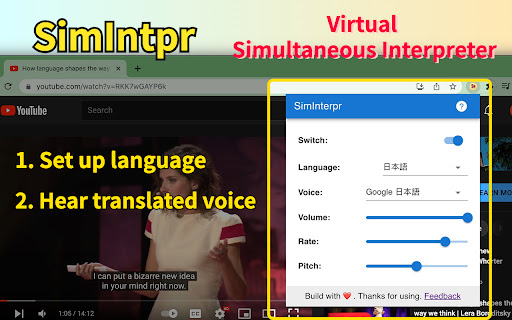
SimIntpr is a virtual Simultaneous Interpreter for YouTube videos. It translates YouTube video subtitles and speaks them out. If you want to watch any YouTube video and hear the voice of your own language, SimIntpr is your thumb of choice. It can translate the YouTube subtitles / captions into almost all widely used languages and read them out. SimIntpr uses state-of-art Text-To-Speech(TTS) Engine to generate synthesized voice. It supports as many as 67 voices covering almost 30 different languages. Currently, to make the extension work, the YouTube video should have at least 1 official subtitle. You need to choose a YouTube official subtitle as the translation source, then select your preferred voice language, tune, speed, etc. We're working on supporting uploading your local subtitles, or links to external subtitles. Once you set up, SimIntpr speaks out your preferred language and voice, just as a virtual simultaneous interpreter. The translated voice does not conflict with the YouTube original one. So you can keep them both and adjust the volume separately as you wish. SimIntpr remembers your settings locally. Hence the translated voice comes up every time when you open a new YouTube video, needless to set up repeatedly. Features: ✅ Translated YouTube subtitle and speak out ✅ Multiple speech voice related settings Upcoming features: 🏃♂️ Support upload your local YouTube subtitle 🏃♂️ Support embed YouTube videos anywhere on the web Supported languages include: Almost all widely used languages are supported. (Listing languages here is forbidden by Chrome Web Store to avoid keyword abuse.) Tips: 🔹 Pin the extension and left-click the icon to set up language, voice and other settings. Attention: ⚠️ This extension only works when the YouTube video has AT LEAST one official subtitle / caption Contact: 😜 Also feel free to contact us if you have any questions or suggestions on this extension. 📧 Email: [email protected]
Technical
- Version
- 4.0.0
- Manifest
- V3
- Size
- 512KiB
- Min Chrome
- 88
- Languages
- 10
- Featured
- Yes
Metadata
- ID
- kjheadnejomnapknbjdficacmoppeege
- Developer ID
- u9657602021e12469aa0f5a74fd056f9f
- Developer Email
- [email protected]
- Created
- Jan 7, 2022
- Last Updated (Store)
- Mar 29, 2026
- Last Scraped
- Jun 21, 2026
- Website
- simintpr.com
- Support URL
- —
Similar extensions
Alternatives to SimIntpr - Translate & Speak YouTube Subtitle, ranked by description similarity.

Speak YouTube Subtitles
Reads YouTube subtitles aloud with multi-language support
1.0K
★ 4.1

Translate and Speak Subtitles for YouTube
Extension convert text subtitles for YouTube into natural-sounding speech using AI technologies.
40.0K
★ 3.0

Speak Subtitles for YouTube
Extension convert text subtitles for YouTube into natural-sounding speech using AI technologies.
500.0K
★ 3.4

Surf Learning - Open Beta
Select your native language from extension configuration and start to learn language with the content you surf on youtube
40
★ 5.0
SubTrans - General Subtitle Translator Suite
General Subtitle Translator for Multiple Sites. Displays bilingual subtitles. Supported sites are actively increasing.
30.0K
★ 3.9

YouTube Text Tools - Video Transcript and Summary
YouTube to text: transcribe YouTube video to text, get accurate YouTube transcript with AI summary. Convert YouTube video to text…
10.0K
★ 4.5

Transcript YouTube
Use Transcript YouTube to transcribe video to text and download youtube subtitles! The transcript generator helps you get subtitles
6.0K
★ 4.6

Listen and Repeat - Language Learning
Learn a new language on Youtube
342
★ 5.0
Data sourced from the Chrome Web Store · last verified Jun 21, 2026.