
Vertical Tabs in Side Panel
Display and manage tabs vertically in the browser sidebar.
As of June 2026, Vertical Tabs in Side Panel has 100,000 users and a 4.39/5 rating from 273 reviews in the Functionality & UI category.
Usersno change0%
100.0K
100,000
Ratingdown 0.2 percent−0.2%
4.39
273 reviews
Reviewsup 2.2 percent+2.2%
273
Version
1.0.8
Manifest V3
90-day change · In the last 90 days this extension 1 version update.
History
7 snapshotsTracking since Apr 6, 2026.
View as table
| Date | Users | Rating | Reviews | Version |
|---|---|---|---|---|
| Apr 6, 2026 | 100.0K | 4.40 | 267 | 1.0.7 |
| Apr 17, 2026 | 100.0K | 4.39 | 268 | 1.0.7 |
| Apr 22, 2026 | 100.0K | 4.39 | 268 | 1.0.7 |
| May 3, 2026 | 100.0K | 4.39 | 270 | 1.0.7 |
| May 6, 2026 | 100.0K | 4.39 | 270 | 1.0.8 |
| Jun 9, 2026 | 100.0K | 4.39 | 271 | 1.0.8 |
| Jun 18, 2026 | 100.0K | 4.39 | 272 | 1.0.8 |
| Now | 100.0K | 4.39 | 273 | 1.0.8 |
Changelog
- May 3, 2026description
📢 February 2026: Chrome 145 has a bug that causes problems with tab group operations (collapse and modify title). This bug will be fixed in Chrome 146. This is a Chrome bug, not an extension bug. All browser extensions with similar functionality are affected.

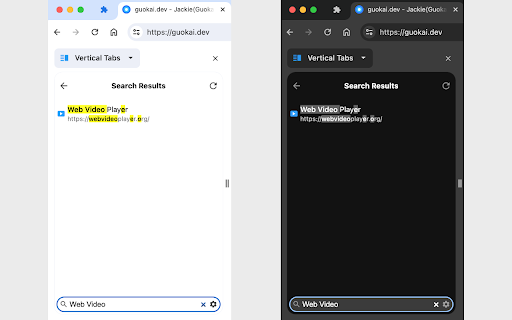
This extension lets you display and manage tabs vertically in the browser sidebar, supports light and dark themes and search functionality.

2023/12/21 Update: Support Tab Groups, including collapse/expand a group, drag and drop a group and context menu (i.e. right-click) on a group.

Two Ways to Open the Extension Sidebar:
1. Click the Extension icon. You need to "Pin" the extension to the browser toolbar.
2. Use shortcut keys. Please set it at "chrome://extensions/shortcuts" by yourself, the default is Alt+V .

How to use the extension:
1. Single Click: switch to the tab.
2. Double Click: close the tab.
3. Middle Click: close the tab.
4. Right Click: functions such as closing, pinning, and duplicating the tab.
5. Drag and Drop: move the position of the tab.
6. Bottom Toolbar: search tabs.

Set the position of the sidebar: left or right:
Browser Settings → Appearance → Side panel

Note: This extension only supports Chrome 114 and above, and may not support other browsers.
This extension lets you display and manage tabs vertically in the browser sidebar, supports light and dark themes and search functionality.

2023/12/21 Update: Support Tab Groups, including collapse/expand a group, drag and drop a group and context menu (i.e. right-click) on a group.

Two Ways to Open the Extension Sidebar:
1. Click the Extension icon. You need to "Pin" the extension to the browser toolbar.
2. Use shortcut keys. Please set it at "chrome://extensions/shortcuts" by yourself, the default is Alt+V .

How to use the extension:
1. Single Click: switch to the tab.
2. Double Click: close the tab.
3. Middle Click: close the tab.
4. Right Click: functions such as closing, pinning, and duplicating the tab.
5. Drag and Drop: move the position of the tab.
6. Bottom Toolbar: search tabs.

Set the position of the sidebar: left or right:
Browser Settings → Appearance → Side panel

Note: This extension only supports Chrome 114 and above, and may not support other browsers.
Permissions & access
- Permissions
- tabstabGroupsfaviconstoragesidePanel
- Host access
- None declared
Screenshots


About
This extension lets you display and manage tabs vertically in the browser sidebar, supports light and dark themes and search functionality.

2023/12/21 Update: Support Tab Groups, including collapse/expand a group, drag and drop a group and context menu (i.e. right-click) on a group.

Two Ways to Open the Extension Sidebar:
1. Click the Extension icon. You need to "Pin" the extension to the browser toolbar.
2. Use shortcut keys. Please set it at "chrome://extensions/shortcuts" by yourself, the default is Alt+V .

How to use the extension:
1. Single Click: switch to the tab.
2. Double Click: close the tab.
3. Middle Click: close the tab.
4. Right Click: functions such as closing, pinning, and duplicating the tab.
5. Drag and Drop: move the position of the tab.
6. Bottom Toolbar: search tabs.

Set the position of the sidebar: left or right:
Browser Settings → Appearance → Side panel

Note: This extension only supports Chrome 114 and above, and may not support other browsers.
Technical
- Version
- 1.0.8
- Manifest
- V3
- Size
- 35.37KiB
- Min Chrome
- 114
- Languages
- 9
- Featured
- Yes
Metadata
- ID
- akahnknmcbmgodngfjcflnaljdbhnlfo
- Developer ID
- ub9d0093c83f93801cb34eac94c7e5701
- Developer Email
- [email protected]
- Created
- Jun 9, 2023
- Last Updated (Store)
- Apr 30, 2026
- Last Scraped
- Jun 18, 2026
- Website
- guokai.dev
- Support URL
- —
- Privacy Policy
- https://guokai.dev/privacy/
Similar extensions
Alternatives to Vertical Tabs in Side Panel, ranked by description similarity.

Tabs in Vertical
Displays all open tabs in a vertical sidebar for better readability
96
★ 5.0

Pure Side Tabs
Safely view and manage your open tabs and tab groups in a sidebar. Fully open-source, with zero dependencies and no data collection.
6
Vertical Tabs
Vertical tab manager in side panel
70.0K
★ 4.1

Tab Manager in Side Panel
Compatible with built-in and adds more easy-to-use features, lives in side panel
1.0K
★ 4.5

Thready - Vertical Tabs
Vertical tabs, bookmarks, history and readling list in side panel.
1.0K
★ 4.1

Vertical Tabs - Tab Manager
Best vertical tabs extension. Sidebar, Vertical Tabs, Tab Manager, Tab groups
1.0K
★ 4.5

vertab
Display open tabs in a vertical sidebar
9
Tab Groups List
Lists all tab groups across all browser windows. On a click navigates to the selected group.
912
★ 3.8
Data sourced from the Chrome Web Store · last verified Jun 18, 2026.