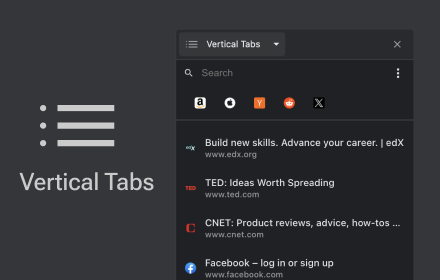
Vertical Tabs
Vertical tab manager in side panel
As of June 2026, Vertical Tabs has 70,000 users and a 4.12/5 rating from 231 reviews in the Functionality & UI category.
Usersno change0%
70.0K
70,000
Ratingno change0%
4.12
231 reviews
Reviewsup 1.3 percent+1.3%
231
Version
2.2.13
Manifest V3
90-day change · In the last 90 days this extension 1 version update.
History
5 snapshotsTracking since Apr 1, 2026.
View as table
| Date | Users | Rating | Reviews | Version |
|---|---|---|---|---|
| Apr 1, 2026 | 70.0K | 4.12 | 228 | 2.2.12 |
| Apr 5, 2026 | 70.0K | 4.13 | 229 | 2.2.12 |
| Apr 16, 2026 | 70.0K | 4.12 | 231 | 2.2.12 |
| May 7, 2026 | 80.0K | 4.12 | 231 | 2.2.12 |
| May 24, 2026 | 80.0K | 4.12 | 231 | 2.2.13 |
| Now | 70.0K | 4.12 | 231 | 2.2.13 |
Permissions & access
- Permissions
- sidePaneltabstabGroupsstoragefaviconcontextMenus
- Host access
- None declared
Screenshots


About
💡 How to Get Started:
Activate Vertical Tabs with just a click on the extension icon. Pin it for quick access and utilize the shortcut Alt+B (modify from chrome://extensions/shortcuts).

🚀 Discover a new dimension of tab management with Vertical Tabs, a Chrome extension aiming to enhance your browsing experience.

🎯 Effortless Tab Management:
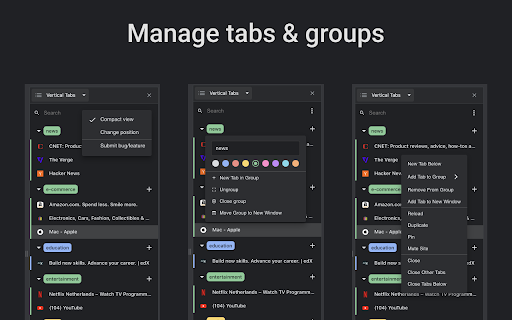
Vertical Tabs elegantly organizes your tabs and groups them seamlessly within Chrome's side panel, simplifying your browsing experience.

🌟 Seamless Integration:
Crafted specifically for Chrome, Vertical Tabs seamlessly integrates, becoming an intuitive extension of your browsing experience.

🔍 Swift Tab Access and Search:
Navigate your tabs effortlessly and find what you need quickly with the intuitive search functionality. Say goodbye to tab-hunting chaos!

🔄 Intuitive Tab Reordering:
Drag and drop tabs with ease, effortlessly rearranging them to match your workflow and priorities. Take control of your browsing experience like never before.

🌘 Dark Mode:
Dark Mode intelligently aligns with your system theme, ensuring a comfortable browsing experience without any manual adjustments.

📍 Change Position:
Personalize your browsing setup by choosing to position Vertical Tabs on either the left or right side of your screen. Simply head to Chrome Settings > Appearance > Side Panel and make it your own.

🛡️ Privacy-First Approach:
Your tab information stays private, no tab data is sent to any servers. Enjoy organized tabs while keeping your data secure.

Get ready to streamline your browsing, boost productivity, and enjoy a visually stunning interface with Vertical Tabs. Download now and discover the future of tab management!
Technical
- Version
- 2.2.13
- Manifest
- V3
- Size
- 285KiB
- Min Chrome
- 88
- Languages
- 55
- Featured
- Yes
Metadata
- ID
- efobhjmgoddhfdhaflheioeagkcknoji
- Developer ID
- u9cb0011c0fae6cbda75e69e7dd1ffcba
- Developer Email
- [email protected]
- Created
- Jul 12, 2020
- Last Updated (Store)
- May 3, 2026
- Last Scraped
- Jun 15, 2026
- Website
- samihaddad.dev
- Privacy Policy
- —
Similar extensions
Alternatives to Vertical Tabs, ranked by description similarity.

Tabs in Vertical
Displays all open tabs in a vertical sidebar for better readability
96
★ 5.0

vertab
Display open tabs in a vertical sidebar
9

Vertical Tabs by Sensasi Delight — Sidebar & Fullscreen Navigation
Press ALT + X to toggle the side panel 🧭 A clean vertical tab sidebar for Chrome — fast, minimal, and fully usable in fullscreen 🧭
9

Vertical Tab Manager
A lightweight vertical tab manager for Chrome.
9
★ 3.0

Vertical Tabs - Tab Manager
Best vertical tabs extension. Sidebar, Vertical Tabs, Tab Manager, Tab groups
1.0K
★ 4.5

Vertical Tabs
Organize your browser tabs vertically for a more efficient browsing experience
848
★ 4.7

Zenith Vertical Tabs
A premium Zen-inspired vertical sidebar that appears on hover or with Alt+V
—
★ 3.9

Thready - Vertical Tabs
Vertical tabs, bookmarks, history and readling list in side panel.
1.0K
★ 4.1
Data sourced from the Chrome Web Store · last verified Jun 15, 2026.