
Secure Password Generator
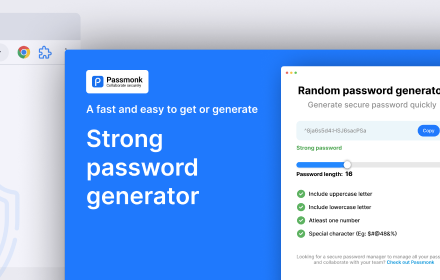
Generate strong passwords and secure QR codes for Google Authenticator. Customize your passwords for ultimate protection.
As of May 2026, Secure Password Generator has 85 users and a 4.00/5 rating from 1 reviews in the Productivity category.
Usersno change0%
85
85
Ratingno change0%
4.00
1 reviews
Reviewsno change0%
1
Version
1.2.0
Manifest V3
History
2 snapshotsTracking since Apr 25, 2026.
View as table
| Date | Users | Rating | Reviews | Version |
|---|---|---|---|---|
| Apr 25, 2026 | 85 | 4.00 | 1 | 1.2.0 |
| May 22, 2026 | 81 | 4.00 | 1 | 1.2.0 |
| Now | 85 | 4.00 | 1 | 1.2.0 |
Permissions & access
- Permissions
- None declared
- Host access
- None declared
Screenshots

About
Update Alert: Introducing QR Code Functionality & Enhanced Password Options!

We're excited to announce a major update to your favorite Random Password Generator Chrome extension! This upgrade is all about making password management easier and more secure.

What’s New?
✨ QR Code Integration
Now, you can generate secure QR codes for your passwords, ready to be used with Google Authenticator and similar apps. Protect your accounts effortlessly!

Enhanced Password Generation Options:
Numeric Passcodes: Generate simple numeric passwords for basic security needs.
Character & Numeric Combinations: Choose passwords with both letters and numbers for added strength.
Alphanumeric & Special Characters: Create complex passwords that combine letters, numbers, and special characters for maximum security.
📏 Maximum Length Limitation
We’ve fine-tuned the maximum password length to 50 characters, ensuring strong yet manageable passwords for everyday use.

🎨 Visual Enhancements
Enjoy a sleeker, more intuitive user experience with refined visuals and seamless navigation.

Why Update?
Enhanced Security: Tailor your password complexity for improved security across all your accounts.
Flexibility & Convenience: Generate everything from simple numeric codes to complex alphanumeric passwords with ease.
Peace of Mind: Stronger passwords mean better protection against unauthorized access.
🚀 Ready to Boost Your Security?
Update your Random Password Generator extension today to enjoy the latest features, including QR code functionality, enhanced password options, and a refreshed user interface. Strengthen your defenses and navigate the digital landscape with confidence!
Technical
- Version
- 1.2.0
- Manifest
- V3
- Size
- 226KiB
- Min Chrome
- 88
- Languages
- 1
- Featured
- No
Metadata
- ID
- ahofnmjkiahlfndgfhoehcdjciedbipp
- Developer ID
- u433230e7e4694d233aca50f218349680
- Developer Email
- [email protected]
- Created
- Dec 26, 2023
- Last Updated (Store)
- Oct 26, 2024
- Last Scraped
- May 22, 2026
- Support URL
- —
- Privacy Policy
- —
Similar extensions
Alternatives to Secure Password Generator, ranked by description similarity.

Random Password Generator
Generate Random Password Generator with customizable options
5

Generate Password
Secure your digital life with Chrome extension Generate Password. Use random password generator for instant, strong combinations.
6.0K
★ 4.9

Password Generator
Secure password generator browser extension
—

Password Generator
Create strong and random passwords. Customize options and copy to clipboard with one click.
7
★ 5.0

Quick Password Gen
Generates a secure password and copies it to the clipboard.
15
★ 5.0
Random password generator
Generate random password of various length and complexity.
32
★ 5.0

Secure Password Generator
Generate strong, secure passwords instantly with customizable options. Create unique passwords for every account!
9

Password Generator
A simple, strightforward tool to quickly generate passwords.
9
Data sourced from the Chrome Web Store · last verified May 22, 2026.