
Random Password Generator
Generate Random Password Generator with customizable options
As of June 2026, Random Password Generator has 5 users in the Productivity category.
Usersno change0%
5
5
Ratingno change0%
—
— reviews
Reviewsno change0%
—
Version
1.0
Manifest V3
History
4 snapshotsTracking since Apr 19, 2026.
View as table
| Date | Users | Rating | Reviews | Version |
|---|---|---|---|---|
| Apr 19, 2026 | 5 | — | — | 1.0 |
| May 14, 2026 | 4 | — | — | 1.0 |
| May 26, 2026 | 5 | — | — | 1.0 |
| Jun 8, 2026 | 3 | — | — | 1.0 |
| Now | 5 | — | — | 1.0 |
Permissions & access
- Permissions
- None declared
- Host access
- None declared
Screenshots


About
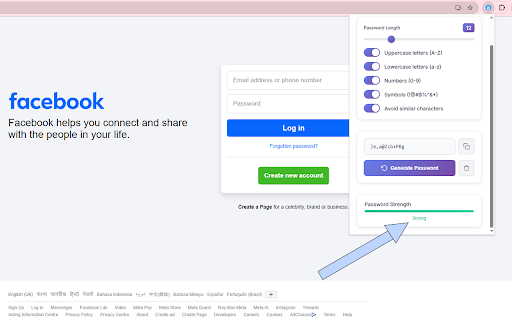
🔐 Random Password Generator - Secure & Customizable Password Creator 🚀 Generate Ultra-Secure Passwords Instantly! Transform your online security with the Random Password Generator - the most intuitive and powerful password creation tool for Chrome! Say goodbye to weak, predictable passwords and hello to military-grade security that takes just one click to achieve. ✨ Key Features 🎯 Smart Password Generation Instant Creation: Generate secure passwords with a single click Real-time Updates: Passwords automatically regenerate when you change settings Cryptographically Secure: Uses advanced randomization algorithms for maximum security ⚙️ Fully Customizable Options 🔢 Flexible Length: Choose password length from 6 to 32 characters 🔤 Uppercase Letters (A-Z): Include capital letters for enhanced security 🔡 Lowercase Letters (a-z): Add lowercase characters for complexity 🔢 Numbers (0-9): Incorporate digits for stronger passwords 🔣 Special Symbols: Add symbols (!@#$%^&*) for maximum protection 👁️ Avoid Similar Characters: Eliminate confusing characters like i, l, 1, O, 0 📊 Intelligent Password Strength Meter Visual Strength Indicator: Color-coded strength meter (Weak/Moderate/Strong) Real-time Analysis: Instant feedback on password security level Smart Scoring: Advanced algorithm considers length, complexity, and character variety 💾 Seamless User Experience One-Click Copy: Instantly copy passwords to clipboard Clean Interface: Beautiful, modern design that's easy to use Quick Reset: Clear all options and start fresh with one click Success Notifications: Visual feedback for all actions 🛡️ Security & Privacy 100% Offline: No data sent to external servers No Storage: Passwords aren't saved or logged anywhere Instant Generation: Create passwords locally in your browser Zero Tracking: Complete privacy protection 🎨 Beautiful Design Modern UI: Sleek, professional interface with smooth animations Responsive Layout: Perfect display on all screen sizes Intuitive Controls: Toggle switches and sliders for easy customization Visual Feedback: Hover effects and micro-interactions for better UX 🔧 Perfect For 🏢 Business Professionals: Secure company accounts and sensitive data 👨💻 Developers: Generate API keys and secure tokens 🛒 Online Shoppers: Protect e-commerce and banking accounts 🎓 Students: Secure educational platforms and personal accounts 👥 Everyone: Anyone who values online security and privacy 🚀 Why Choose Random Password Generator? ⚡ Lightning Fast No waiting, no loading screens - instant password generation every time! 🎯 Highly Customizable Tailor every aspect of your password to meet specific requirements 🔒 Bank-Level Security Military-grade randomization ensures maximum protection 🎨 User-Friendly Beautiful interface that makes security simple and enjoyable 📱 Always Available One click away in your Chrome toolbar - available whenever you need it 💡 How It Works 🖱️ Click the extension icon in your Chrome toolbar ⚙️ Customize your password preferences (length, character types) 🔄 Generate your secure password instantly 📋 Copy to clipboard with one click ✅ Use your new secure password anywhere! 🌟 Pro Tips 📏 Longer is Stronger: Use 12+ characters for maximum security 🔀 Mix Character Types: Combine uppercase, lowercase, numbers, and symbols 🔄 Regular Updates: Generate new passwords regularly for existing accounts 📝 Unique Passwords: Use different passwords for each account 🔐 Security Best Practices Never reuse passwords across multiple sites Update passwords regularly (every 3-6 months) Use unique passwords for important accounts Store passwords in a secure password manager 🎉 Get Started Today! Join thousands of users who have already upgraded their online security! Install Random Password Generator now and experience the peace of mind that comes with truly secure passwords. 🔒 Your Security. Your Control. Your Peace of Mind. Download now and take the first step towards bulletproof online security! 🛡️
Technical
- Version
- 1.0
- Manifest
- V3
- Size
- 21.33KiB
- Min Chrome
- 88
- Languages
- 1
- Featured
- No
Metadata
- ID
- phocoaffebnkhkpnkcgabeadniickljc
- Developer ID
- ueb71a4935d596a4271f61f9f8bc7d4c7
- Developer Email
- [email protected]
- Created
- Jul 19, 2025
- Last Updated (Store)
- Jul 19, 2025
- Last Scraped
- Jun 8, 2026
- Website
- —
- Support URL
- —
Similar extensions
Alternatives to Random Password Generator, ranked by description similarity.

SecurePass Generator Pro
Create unbreakable passwords instantly with customizable security options. The ultimate password generator tool.
3

Secure Password Generator
Generate strong, secure passwords instantly with customizable options. Create unique passwords for every account!
9

Password Generator
Generate strong, customizable passwords locally in your browser. Choose length 8-64 characters, and copy securely.
—

Password Generator
A simple, strightforward tool to quickly generate passwords.
9
Random password generator
Generate random password of various length and complexity.
32
★ 5.0

Your Password Generator
Generate secure passwords with custom options.
4
★ 5.0

Random Password Generator
A powerful random password generator with customizable options
1

Random Password Generator
Generates random passwords with customizable length.
2
Data sourced from the Chrome Web Store · last verified Jun 8, 2026.